Known Participant
July 18, 2023
Answered

HOW TO change/replace my picturefile?

  • July 18, 2023
  • 1 reply
  • 892 views

hello :),

i bought a template and it says here CHANGE YOUR LOGO but i just cannot find any option to replace this picture file 😞

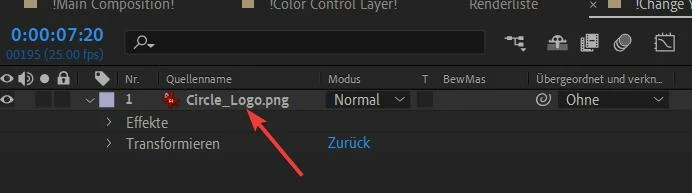
only workaround i  found is to rename my picture to the one in the pic Circle_Logo.png but there should be a REPLACE function? thanks 🙂

This topic has been closed for replies.
Correct answer Andrew Yoole

There's a number of ways to deal with this.  


Normally in template projects the logo will be precomposed so that all animation happens in different comps.  As a result, you can simply drag your new logo into the timeline, then turn off or delete the original logo layer.  Scale your new logo layer so that it's around the same size as the original.


Alternately, select the original logo layer in the timline.  Then import your new logo into the project window, hold down the Alt/Option key and drag the new logo from the project window onto the selected layer in the timeline to replace it.


To completely replace the logo, right click on it in the timeline and choose "Reveal in Project".  This will highlight the logo source file in the project pane.  Right click on this and choose "Replace footage item".

1 reply

Andrew Yoole
Community Expert
Andrew YooleCommunity ExpertCorrect answer
Community Expert
July 18, 2023

There's a number of ways to deal with this.  


Normally in template projects the logo will be precomposed so that all animation happens in different comps.  As a result, you can simply drag your new logo into the timeline, then turn off or delete the original logo layer.  Scale your new logo layer so that it's around the same size as the original.


Alternately, select the original logo layer in the timline.  Then import your new logo into the project window, hold down the Alt/Option key and drag the new logo from the project window onto the selected layer in the timeline to replace it.


To completely replace the logo, right click on it in the timeline and choose "Reveal in Project".  This will highlight the logo source file in the project pane.  Right click on this and choose "Replace footage item".

Robb3243Author
Known Participant
July 18, 2023

thx a lot! the first method dint work specifically, cause there the EFFECTS were different, not the same.


BUT with the REVEAL SOURCE function i found left in the tree structure the PNG file and then i could RIGHT CLICK and REPLACE FOOTAGE 🙂