You could take a straight ruler and apply Polar Coordinates to it:
You could layout the artwork in Illustrator using a custom brush that looked like the divisions on a ruler.
You could draw a single vertical line in a shape layer or use a skinny rounded rectangle, then add a repeater, set the anchor point way below the line, position to zero and set up the angle and repeat, then duplicate with smaller hash marks.
This is really more of an illustration problem than a plug-in. Personally, I'd just use shape layers and repeaters like this:
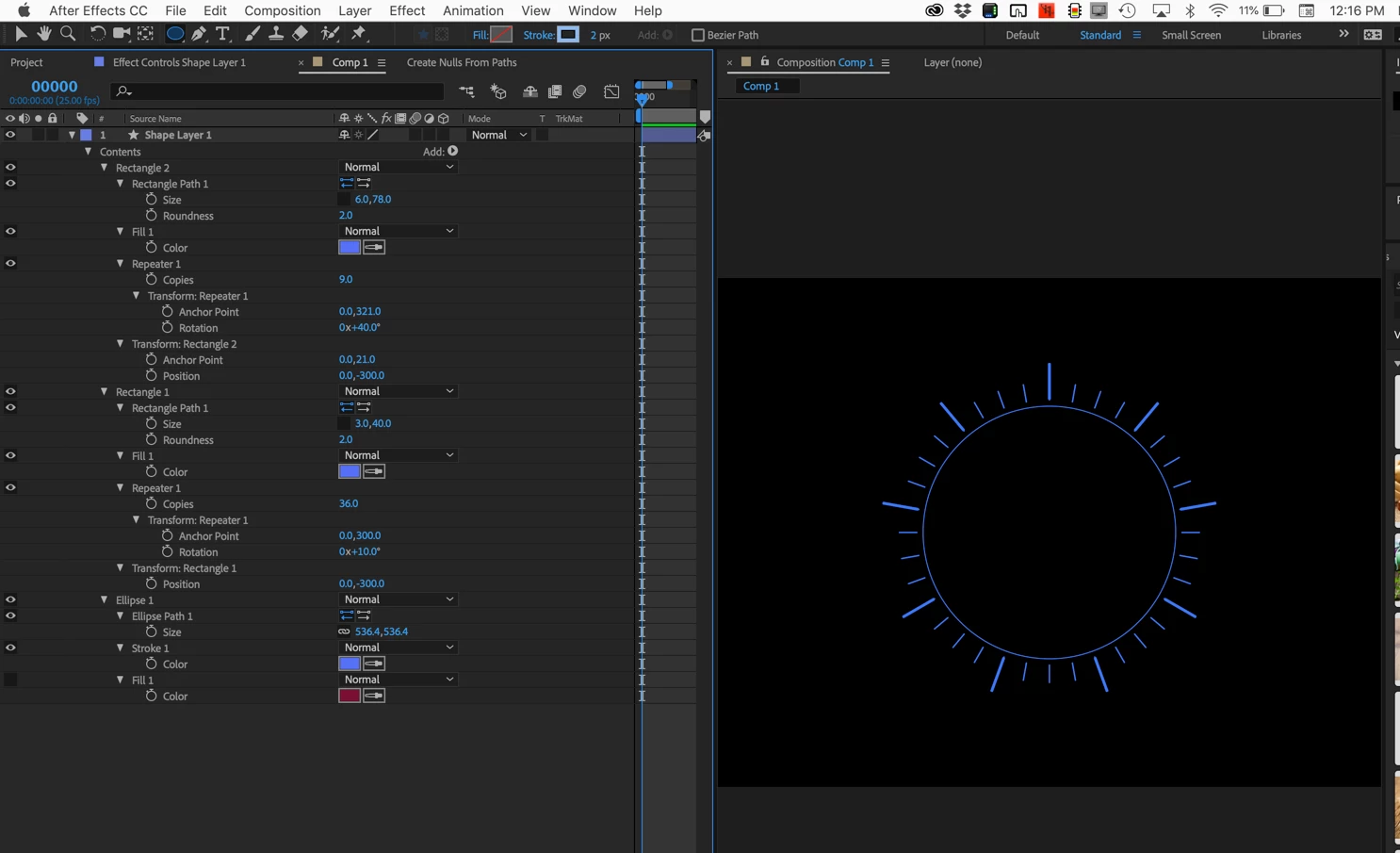
I moved the timeline to the left and revealed all modified properties of the shape layer by pressing the U key twice so you could duplicate it. Started with an ellipse, added a rounded rectangle and a repeater, adjusted the Rectangle 1 position and the Repeater 1 number of copies, anchor point, and rotation, duplicated Rectangle 1 and changed a couple of the numbers. It took about two minutes. and all of the values are nothing more than simple math. The really cool thing is that you can animate those properties and make the graphic do all kinds of great things with just a couple of keyframes.

Do that a couple of times, use a text layer with text on a path, add a background and you are going to be pretty close to duplicating that artwork from scratch.



 AdChoices