


Known Participant
January 31, 2025
Answered

How to create Create dropdown list with icons in ExtendScript

  • January 31, 2025
  • 1 reply
  • 615 views

Hi! Does anyone know how to create a dropdown with an icon in ExtendScript?
I saw this in a regular script (not an extension) and I really want to know how!

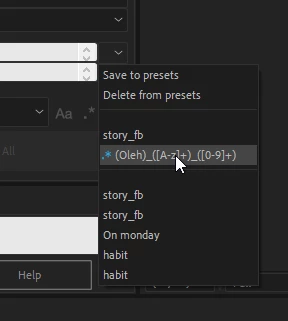
Here is the example of what i saw, as you can see, there is an blue image icon in the list itself
Correct answer Aaron Cobb

Each ListItem has a .icon property. Load a PNG using File(<URI>) and assign that file to the .icon property, and when you show your dropdown list the icon should be there.

1 reply

Kevin-Monahan
Community Manager
Community Manager
February 1, 2025

Hi @,

See if this tutorial might give you the info for this: https://adobe.ly/4hFJW1w

I hope it helps. Please let us know if it does.


Thanks,
Kevin


Kevin Monahan - Sr. Community &amp; Engagement Strategist – Pro Video and Audio
Known Participant
February 1, 2025

Unfortunately, I have already seen this video, it talks about icons in regular buttons, but there is no information about the list menu items

Aaron CobbCorrect answer
Inspiring
February 2, 2025

Each ListItem has a .icon property. Load a PNG using File(<URI>) and assign that file to the .icon property, and when you show your dropdown list the icon should be there.