


New Participant
July 13, 2017
Answered

Line break if text is bigger then fixed width

  • July 13, 2017
  • 1 reply
  • 7659 views

Hey,

I'm currently trying to make a text box element that can be used with live text in premiere.

I tried tweaking the code that makes a line break after a fixed number of characters. ( https://forums.creativecow.net/thread/227/34484 )

txt = value;

s = thisLayer;

n = 455;

outStr = "";

newLine = ""

splt = txt.split(" ")

for (i = 0; i < splt.length; i++){

  if ((s.sourceRectAtTime(time-s.inPoint,true).width / i ) > n){

    if (outStr != "") outStr += "\r";

    outStr += newLine;

    newLine = splt;

  }else{

    if (newLine != "") newLine += " ";

    newLine += splt;

  }

}

if (newLine != ""){

  if (outStr != "") outStr += "\r";

  outStr += newLine;

}

outStr;

But the problem I get is that after it reaches the max width, it makes a line break after one word.

Is there a way that it always breaks the sentence after it reaches the max width, so that you can have for lines breaks in total?
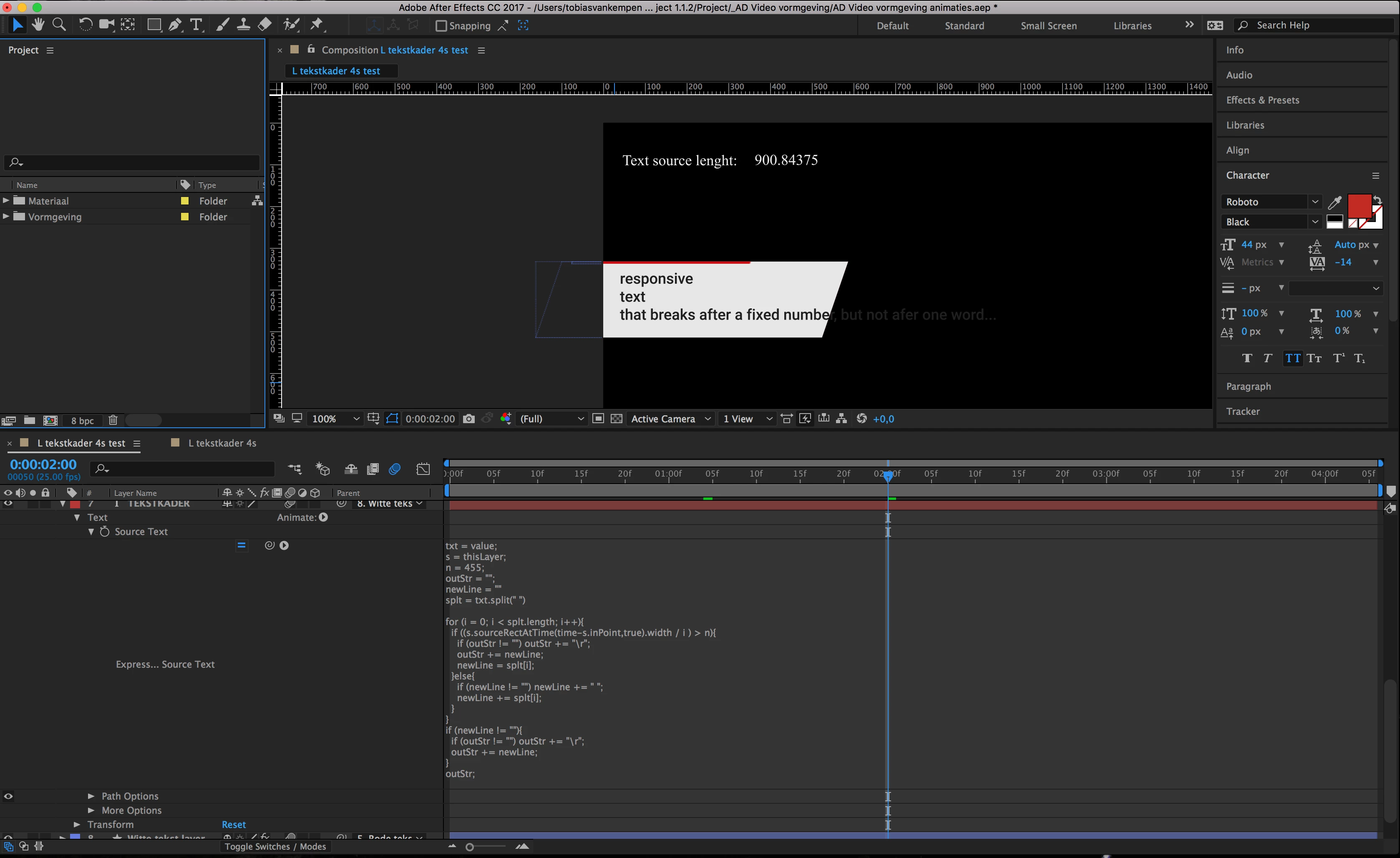
I hope you guys can help.

Kind regards,

Tobiasvk

This topic has been closed for replies.
Correct answer Mike_Abbott

Hi Kevin,

I'm still facing the same problem, so any help would be much appreciated.

Kind regards,

Tobiasvk


Tobiasvk,

Maybe I'm misunderstanding the issue, but...

Can't you just drag out a text box (not just 'click and type') to be just slightly smaller than the size of your background shape?

Any text entered in Premiere via the Essentials Graphic panel would then word-wrap into that text box.
Or are you trying to do something else?

1 reply

Mylenium
Brainiac
July 13, 2017

Well, the code obviously looks for the first space to determine the split. You would have to modify it considerably to make it work with real sentences, meaning you need some regular expression or nested string processing that ignores any spaces within the given range and still makes sure full words remain tied together. It's not as simple as you may have thought. I don't have time at the moment, but if you're not in a rush and I don't forget perhaps I can have a look at it over the weekend.

Mylenium

tobiasvkAuthor
New Participant
July 17, 2017

That would be very nice, I wasn't able to make a code that works.

I'm pretty new to complex expressions in After Effects, so any help would be more then appreciated!

tobiasvkAuthor
New Participant
August 3, 2017

Tobiasvk,

Maybe I'm misunderstanding the issue, but...

Can't you just drag out a text box (not just 'click and type') to be just slightly smaller than the size of your background shape?

Any text entered in Premiere via the Essentials Graphic panel would then word-wrap into that text box.
Or are you trying to do something else?


Who, I'm feeling stupid.

Sometimes the simplest solution are the beste.

Thanks!