

New Participant
May 25, 2022
Answered

Line to Bouncy wave: Animation

  • May 25, 2022
  • 1 reply
  • 1656 views

How do you animate a straight line bouncing into a waveform? More like a line squeeze into ripple turning to a waveform. I don't want the path to travel, but transform rather. Attached a Reference below

This topic has been closed for replies.
Correct answer Kyle Hamrick

Cool - I may have an answer for you, then! 

If desired, you can have total control over every one of the peaks and valleys, if that's what you're looking for. Using multiple shapes within a single shape layer, and making use of Merge Paths, you can create some pretty complex shapes while still being able to keyframe the position, size, etc. of each component. 
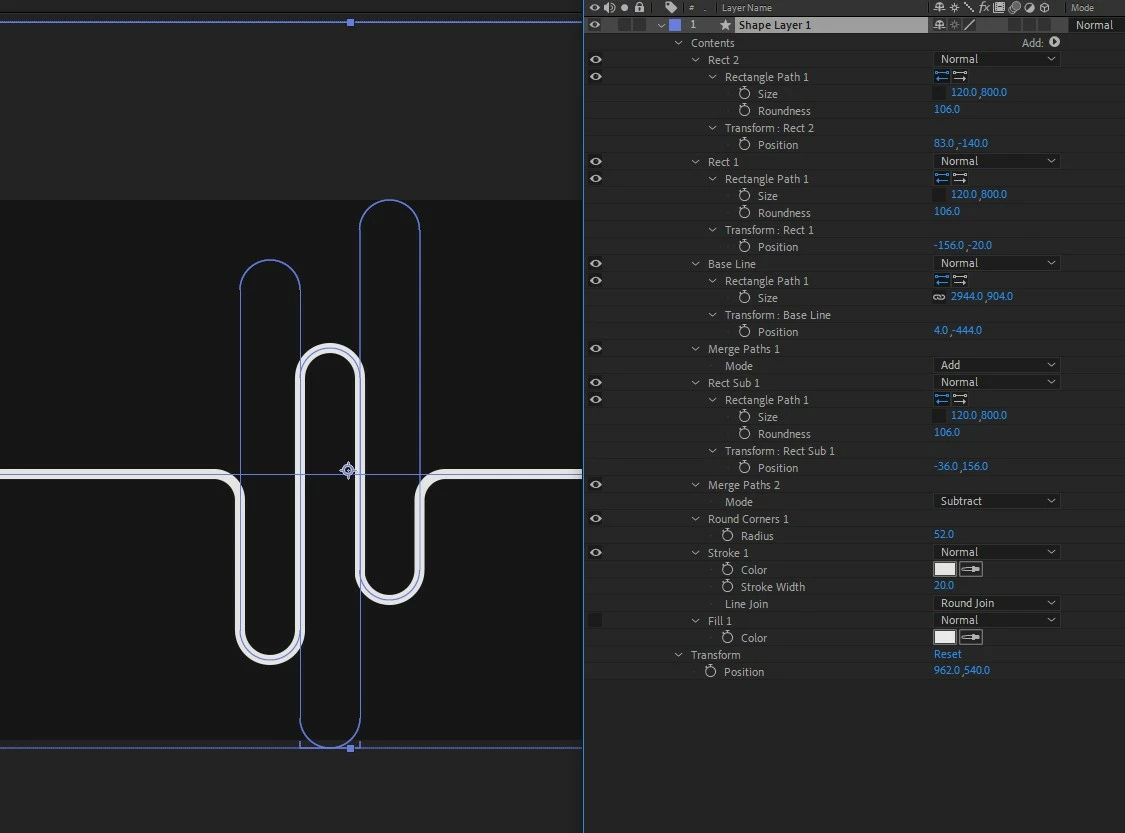
Of course, these shapes' positions could all be driven by expressions (even simple ones like wiggle), if you're just looking for MOVEMENT, but don't want to keyframe everything yourself. I've attached my simple example here, in case you want to poke around and get an idea how to approach this. 


This tutorial doesn't address this exact use case, but is good for getting an understanding on how shape layers work, and how you can combine (and subtract) shapes to create more complex setups like this. 

https://youtu.be/heYi6xLWvB0 

1 reply

Kyle Hamrick
Community Expert
Community Expert
May 25, 2022

Are you specifically needing this to be audio-driven, or more of an abstraction of that kind of look? 
Since you're saying "transform, not travel," I take it to mean you're NOT looking for left-right movement, but just having these extensions "bouncing" up/down off the flat line - is that a semi-accurate description? 

New Participant
May 25, 2022

Hi Kyle, thanks for prompt reply. What im wanting to have is a definite shape and not a random wave structure. And I don't think audio driven expression will give me a definite form of wave. So, like you said, more of an abstraction. Your description above is pretty much accurate. 

Kyle Hamrick
Community Expert
Kyle HamrickCommunity ExpertCorrect answer
Community Expert
May 25, 2022

Cool - I may have an answer for you, then! 

If desired, you can have total control over every one of the peaks and valleys, if that's what you're looking for. Using multiple shapes within a single shape layer, and making use of Merge Paths, you can create some pretty complex shapes while still being able to keyframe the position, size, etc. of each component. 

Of course, these shapes' positions could all be driven by expressions (even simple ones like wiggle), if you're just looking for MOVEMENT, but don't want to keyframe everything yourself. I've attached my simple example here, in case you want to poke around and get an idea how to approach this. 


This tutorial doesn't address this exact use case, but is good for getting an understanding on how shape layers work, and how you can combine (and subtract) shapes to create more complex setups like this. 

https://youtu.be/heYi6xLWvB0
