Answered
Line to move like sine wave
Hello, What is the best way to animate these lines in After Effects, to move like a sine wave, all at once. 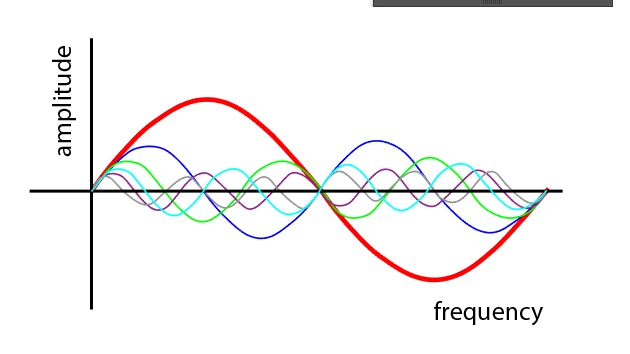

Hello, What is the best way to animate these lines in After Effects, to move like a sine wave, all at once.
The math gets a little complicated if you want to animate a Shape Layer Path. The first thing you need to do is start a new shape layer with the Pen tool and set the path to Rotobezier. Just add one point anywhere.
The second step is to add an Expression Control Slider to the shape layer, duplicate it 3 times and then name the sliders Speed, Amp, Freq, and Width.
Now add the following expressions to the Shape Layer
// to Contents/Shape 1/Path 1
S = - effect("Speed")("Slider") * (Math.PI * .2);
A = effect("Amp")("Slider");
F = 2 * (effect("Freq")("Slider") * Math.PI);
pts = F * 5;
if (pts <= 0)
	R = 1
else
	R = pts
W = effect("Width")("Slider")

P = [];

for (i=0;i<R;i++){
P.push([W/R*i,Math.sin(time*S+i/(R/F))*A]);}

createPath(P,[],[], false)

//to Transform/Anchor Point
x = effect("Width")("Slider")/2;
[x, 0]
Set the Stroke options to Round Cap and Round Join.
If your slider values are 5, 100, 10, 1000 you will end up with a sine wave path that is moving to the right 1/2 cycle per second, with a height of 100 pixels, and a frequency of 10 full waves over a distance of 1000 pixels.
It would be a good exercise to save that as an animation preset. If you press UU to reveal all modified properties in the shape layer and Ctrl/Cmnd + Click Shape 1, Effects, and Anchor point you can create an animation preset the will deliver a path with the stroke width you have set in your layer, the stroke color, and the Speed, Amp, Freq, and Width values you had selected when you save the animation preset. They are great time savers.
Already have an account? Login
No account yet? Create an account
Enter your E-mail address. We'll send you an e-mail with instructions to reset your password.


 AdChoices