Brainiac
September 16, 2013
Answered

Migration from base SDK to VS2012 does not build.

  • September 16, 2013
  • 1 reply
  • 3206 views

So after some battling with Visual Studio 2012 trying to build my custom plugin, I decided to do a fresh download of the SDK and try to build the example projects with VS2012.  None of them build after VS does a "Migration" to 2012.  All of the projects in the solution file fail to build with the same error.  Here is the output from the build process for Paramarama:

  Compiling the PiPL

  Microsoft (R) C/C++ Optimizing Compiler Version 17.00.60610.1 for x64

  Copyright (C) Microsoft Corporation.  All rights reserved.

  ParamaramaPiPL.r

  Microsoft (R) C/C++ Optimizing Compiler Version 17.00.60610.1 for x64

  Copyright (C) Microsoft Corporation.  All rights reserved.

  ParamaramaPiPL.rrc

  AEGP_SuiteHandler.cpp

  Paramarama.cpp

  Paramarama_Strings.cpp

  Generating Code...

  MissingSuiteError.cpp

C:\Program Files (x86)\MSBuild\Microsoft.Cpp\v4.0\V110\Microsoft.CppBuild.targets(1137,5): warning MSB8012: TargetPath(C:\Dev\Adobe After Effects CS6 Win SDK\Examples\Effect\Paramarama\Win\x64\Debug\Paramarama.dll) does not match the Linker's OutputFile property value (C:\Paramarama.aex). This may cause your project to build incorrectly. To correct this, please make sure that $(OutDir), $(TargetName) and $(TargetExt) property values match the value specified in %(Link.OutputFile).

C:\Program Files (x86)\MSBuild\Microsoft.Cpp\v4.0\V110\Microsoft.CppBuild.targets(1138,5): warning MSB8012: TargetExt(.dll) does not match the Linker's OutputFile property value (.aex). This may cause your project to build incorrectly. To correct this, please make sure that $(OutDir), $(TargetName) and $(TargetExt) property values match the value specified in %(Link.OutputFile).

LINK : fatal error LNK1104: cannot open file '\Paramarama.aex'

So, I checked some of the property pages for the project.  Here are some screenshots:
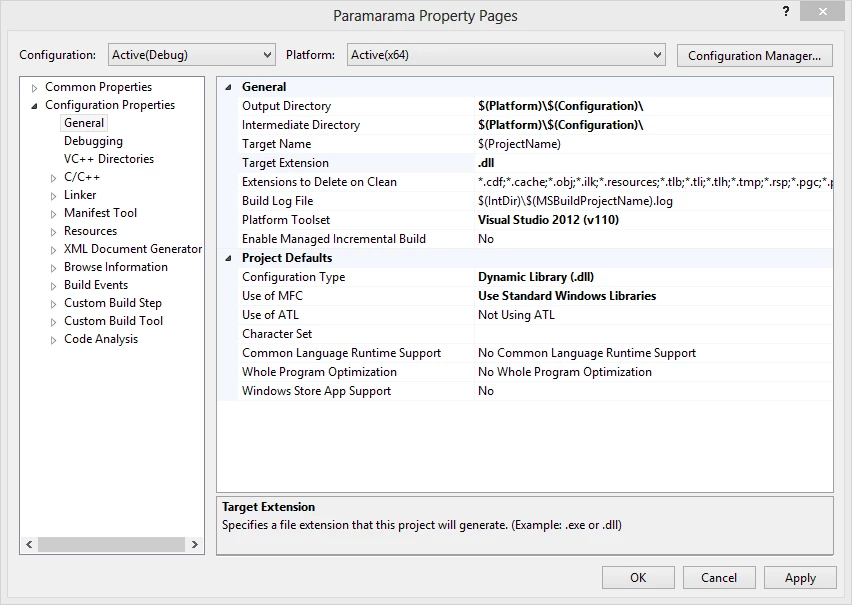
I'm curious as to why the target extension is set to `.dll`, but the Output File is .aex.  Shouldn't the target extension be .aex?  Also, what should the `Configuration Type` be set to since a .aex file is not necessarily a .dll (although maybe I'm wrong here)?  Is an .aex a .dll? 

And one final question:  What does the %(Link.OutputFile) refer to in the error I get upon building.

Thanks,
Arie
This topic has been closed for replies.
Correct answer Arie Stavchansky

Okay, I finally got the example projects building in VS2012 and the .aex file is generated and working great once copied into the AE folder.  This thread on MSDN helped.  Anyways, it was relatively simple after careful observation.  It's worth noting that the project file configurations contain the environment variable $(AE_PLUGIN_BUILD_DIR), and you have to set that up in your Advanced System Settings dialog as a new System Variable to point it to where you want.  It's also worth noting that because of the Windows UAC (User Account Control), you can't really build into AE's Plugins folder.  I ran into permissions issues doing that, and the .aex was simply not getting created.

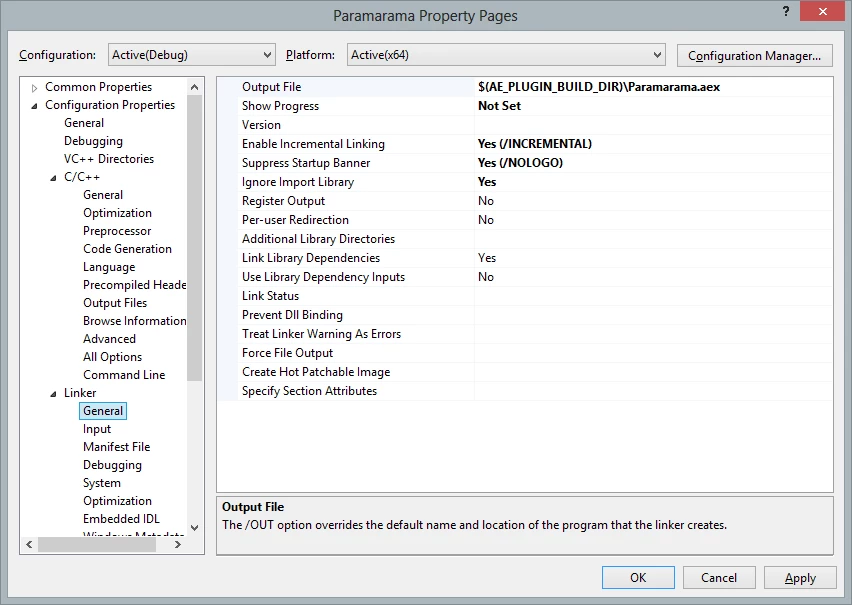
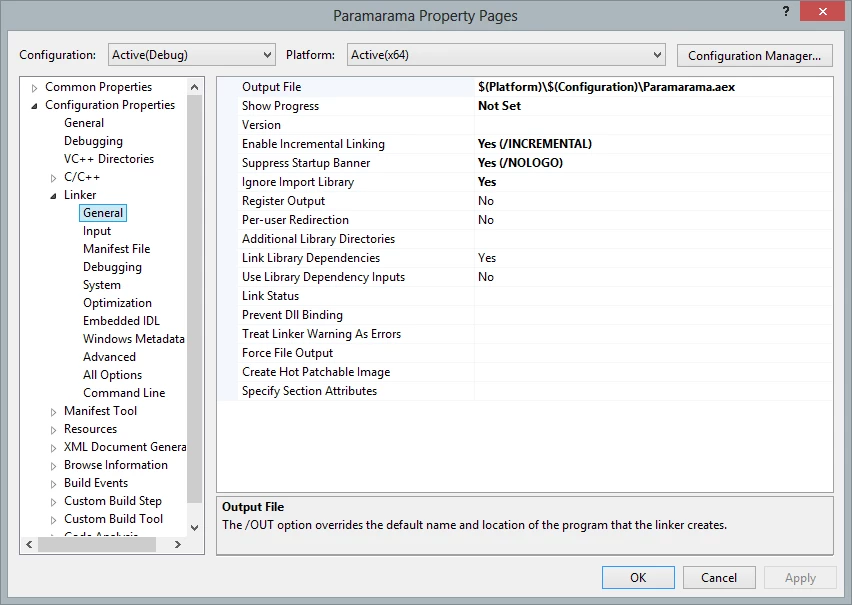
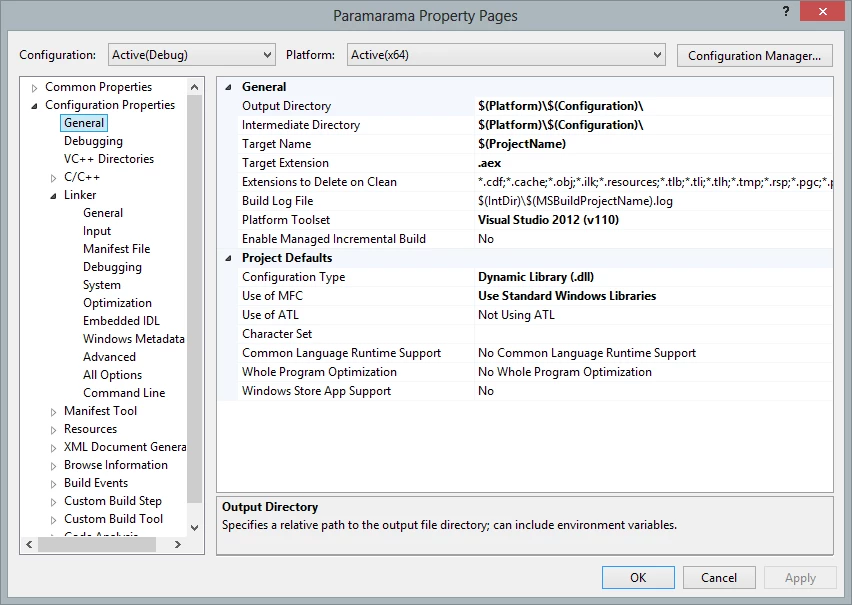
The value for `Output Directory` under the `Configuration Properties -> General` tab should match the `Output File` under the `General` tab under `Linker`.  Also, the migration to VS2012 makes the `Target Extension` value `.dll`, but you need to change it to `.aex`

More precisely here are the screenshots from my VS IDE.  Hopefully this might help somebody down the line who is using VS2012.  Finally, I can get started building for the Windows platform.

Hope it helps!

--Arie

1 reply

Arie StavchanskyAuthorCorrect answer
Brainiac
September 16, 2013

Okay, I finally got the example projects building in VS2012 and the .aex file is generated and working great once copied into the AE folder.  This thread on MSDN helped.  Anyways, it was relatively simple after careful observation.  It's worth noting that the project file configurations contain the environment variable $(AE_PLUGIN_BUILD_DIR), and you have to set that up in your Advanced System Settings dialog as a new System Variable to point it to where you want.  It's also worth noting that because of the Windows UAC (User Account Control), you can't really build into AE's Plugins folder.  I ran into permissions issues doing that, and the .aex was simply not getting created.

The value for `Output Directory` under the `Configuration Properties -> General` tab should match the `Output File` under the `General` tab under `Linker`.  Also, the migration to VS2012 makes the `Target Extension` value `.dll`, but you need to change it to `.aex`

More precisely here are the screenshots from my VS IDE.  Hopefully this might help somebody down the line who is using VS2012.  Finally, I can get started building for the Windows platform.

Hope it helps!

--Arie

Known Participant
October 13, 2013

Hey Arie,

thanks for the info. I'm trying to get the example plugins working, I finally got them to compile but now I keep getting a " invalid filter 25::3" error message when try to use them in After Effects.  Any ideas ?

Thanks !

Wout

Brainiac
October 13, 2013

I have not seens that error for any of the sample plugins that ship with the SDK.  Which effect are you getting that error on?  It may have to do with the fact that the PiPL resource file was not compiled correctly.  I remember that even though I was able to build, I still had to ensure that the PiPL resource file was created by VS.