


Mocha AE - no QT platform plugin could be initialized
Help, I cannot start Mocha Ae all of a sudden, and every time I try, I get this message. Immediately after hitting OK, Ae crashes.
Error message:
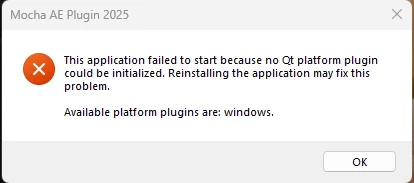
I have reinstalled, after effects and removed plugins. I did the same for premiere pro for good measure. I tried switching to open cl from cuda, I tried not using hardware at all. I tried installing a trial of MochaPro and that works. I did run in command prompt: sf/scan now. That didn't resolve the issue. I have no way of only reinstalling MochaAE as it is bundled with Ae. I cannot even open Mocha Ae to clear the cache, I cannot find instructions as to where the cache is online to manually clear it.
SYSTEM:
MSI Raider GE78 HX 13V
Processor 13th Gen Intel(R) Core(TM) i9-13950HX (2.20 GHz)
Installed RAM 64.0 GB (63.7 GB usable)
NVIDIA GeForce RTX 4080 Laptop GPU
System type 64-bit operating system, x64-based processor
 AdChoices