


December 19, 2019
Answered

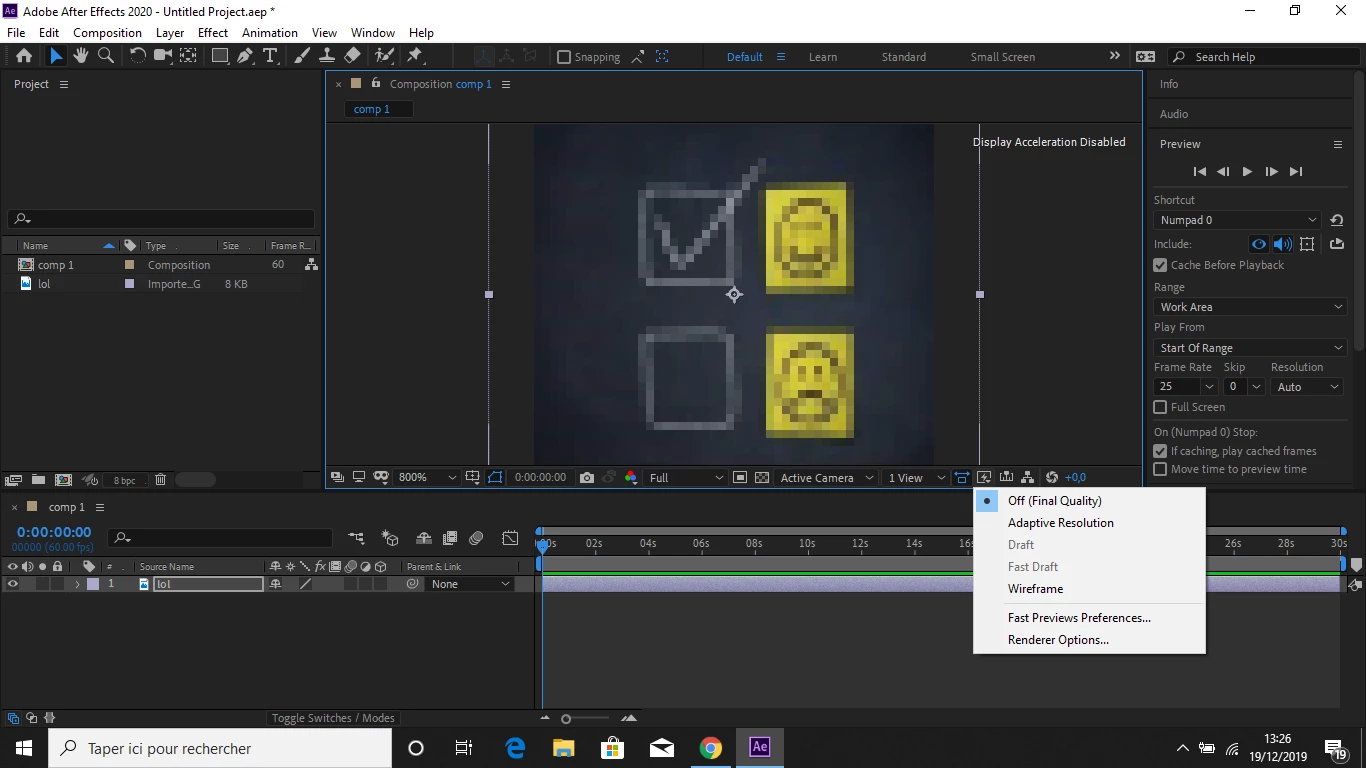
My AE 2020 preview is pixelated.
  • December 19, 2019
  • 2 replies
  • 1357 views

Ok so, I literaly did everything I can do for fix it but nothing works.

- My adaptive resolution is on off and my preview on full

- I tried ram preview

- I tried edit < preferences < preview < and change adaptive resolution limits

or - Edit < purge < all memory

- And my GPU is not available ( so do I have to make it enable ? )

I don't know what to do next or if it's possible to fix it.

Please guys, help me !

This topic has been closed for replies.
Correct answer Mylenium

Your zoom is set to 800%, which means that your actual source is thumbnail-size. This will of course never look any better, especially since your footage is pixel based data. You have wrong expectations and seriously do not understand something here. Only re-creating the graphic at a much higher resolution will give better quality.


Mylenium

2 replies

Shivangi_Gupta
Community Manager
Community Manager
December 21, 2019

Hi there,


I second @Mylenium here. When we zoom in to the image, it is normal for the file to get pixelated. Even when we try to export a video file in a HD or 4K resolution which is originally shot in lower resolution, it is expected to give pixelated preview.


Let us know if you have any other questions.


Thanks,

Shivangi

Mylenium
MyleniumCorrect answer
Legend
December 19, 2019

Your zoom is set to 800%, which means that your actual source is thumbnail-size. This will of course never look any better, especially since your footage is pixel based data. You have wrong expectations and seriously do not understand something here. Only re-creating the graphic at a much higher resolution will give better quality.


Mylenium