


New Participant
September 19, 2014
Answered

Number Counting Expression with $ - Understanding how to set stop points

  • September 19, 2014
  • 1 reply
  • 6574 views

Hello, I'm using an expression I found on: Dan Ebberts's Expressioneering Design Guide which has saved me quiet a bit of frustration since I needed to have a comma and a custom character at the end of my counting numbers. But I have a simple question that I can't quite get out of the page's instructions and I'm hoping someone here could direct me.


Issue: The numbers are counting for the first 4 seconds - or whatever I change it too, but I don't understand how to set my number stop points. ie, I want to go from 0 to 1,800 pause at a specific point for several seconds and then count up to 6,500 pause again and count up and so on. So the part I'm not understanding is, how to start the count and stop on a number and then start the count again. I've set key frames for where I want those numbers to be on the timeline in the 'Source Text' which Dan's page references but this isn't working. Thoughts? Direction??? Expression is below and I've attached a reference image of my timeline. Many thanks for any direction you can provide!


Expression:

numDecimals = 0;

commas = true;

dollarSign = true;

beginCount = 0;

endCount = 17000;

dur = 4;

t = time - inPoint;

s = linear (t, 0, dur, beginCount, endCount).toFixed(numDecimals);

prefix = "";

if (s[0] == "-"){

  prefix = "-";

  s = s.substr(1);

}

if(dollarSign) prefix += "±";

if (commas){

  decimals = "";

  if (numDecimals > 0){

    decimals = s.substr(-(numDecimals + 1));

    s = s.substr(0,s.length - (numDecimals + 1));

  }

  outStr = s.substr(-s.length, (s.length-1)%3 +1);

  for (i = Math.floor((s.length-1)/3); i > 0; i--){

    outStr += "," + s.substr(-i*3,3);

  }

  outStr + decimals + prefix;

}else{

  prefix + s;

}
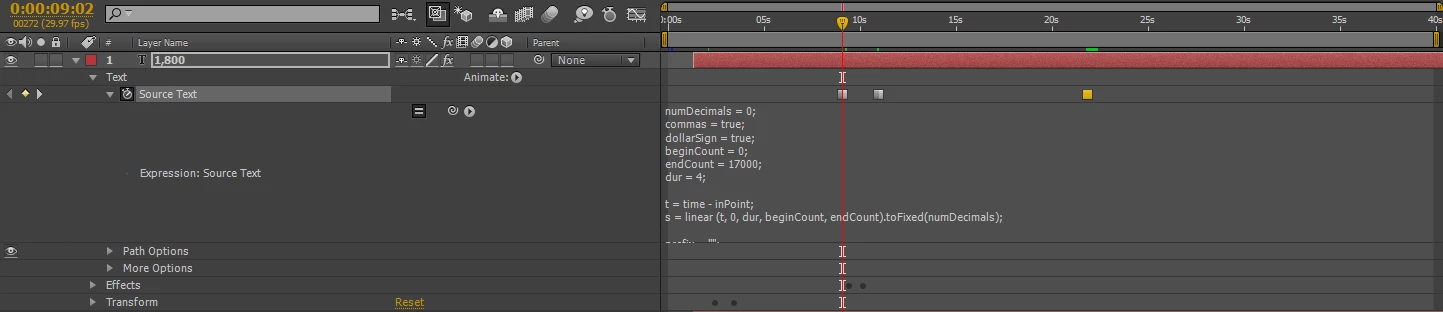
This topic has been closed for replies.
Correct answer Dan Ebberts

I think I would just keyframe a slider with the values and times where you want to stop, and use a simpler source text expression like this to do the formatting:

s = Math.round(effect("Slider Control")("Slider")).toString();

outStr = s.substr(-s.length, (s.length-1)%3 +1);

for (i = Math.floor((s.length-1)/3); i > 0; i--){

  outStr += "," + s.substr(-i*3,3);

}

outStr + "±";

Dan

1 reply

Dan Ebberts
Dan EbbertsCorrect answer
Community Expert
September 20, 2014

I think I would just keyframe a slider with the values and times where you want to stop, and use a simpler source text expression like this to do the formatting:

s = Math.round(effect("Slider Control")("Slider")).toString();

outStr = s.substr(-s.length, (s.length-1)%3 +1);

for (i = Math.floor((s.length-1)/3); i > 0; i--){

  outStr += "," + s.substr(-i*3,3);

}

outStr + "±";

Dan

c-fqgyAuthor
New Participant
September 23, 2014

Hi Dan,

Thank you for your help, unfortunately I don't quite understand your direction. I've got my text layer with my text changes keyframed and added a slider controller effect with the expression you suggest but I'm getting an error. When you say 'keyframe a slider with the values and times where you want to stop' is the 'slider' a text layer or something else? I've interpreted the slider as the slider controller effect and added the expression to the slider, picture attached for hopefully more clarity.

Dan Ebberts
Community Expert
September 23, 2014

You would keyframe the slider with the values you want to count to and hold, you would apply the expression to the source text (with no keyframes there).

Dan