August 23, 2010
Answered

Possible to bend a text line?

  • August 23, 2010
  • 2 replies
  • 38287 views

Hi! Is there a way to animate a bend of a text line? I have tried a bunch of distortion tools in AE but non work like I want to. I suspect that this could be done with some sort of type on path and the animate the path. Any example would be great pointing me in the right direction.

Regards / Jimmy
    This topic has been closed for replies.
    Correct answer Rick Gerard

    Remember my first post. Make your text layer, draw a mask, set some keyframes, attach the text to the path.

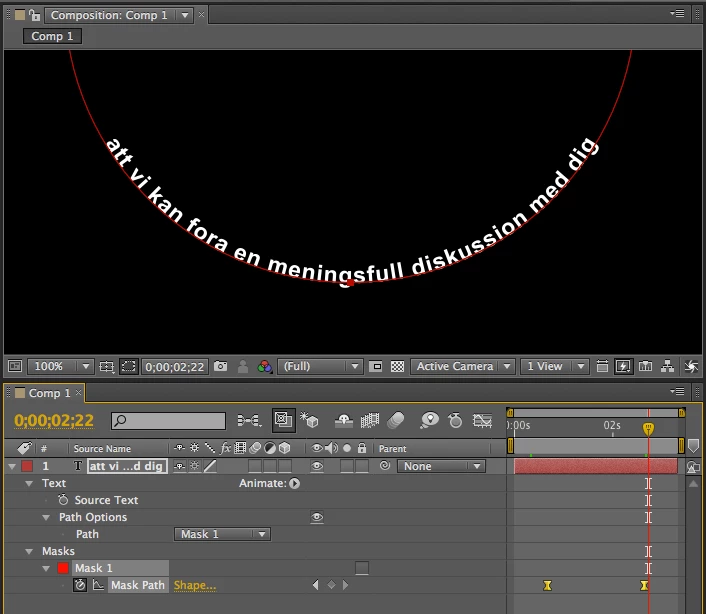
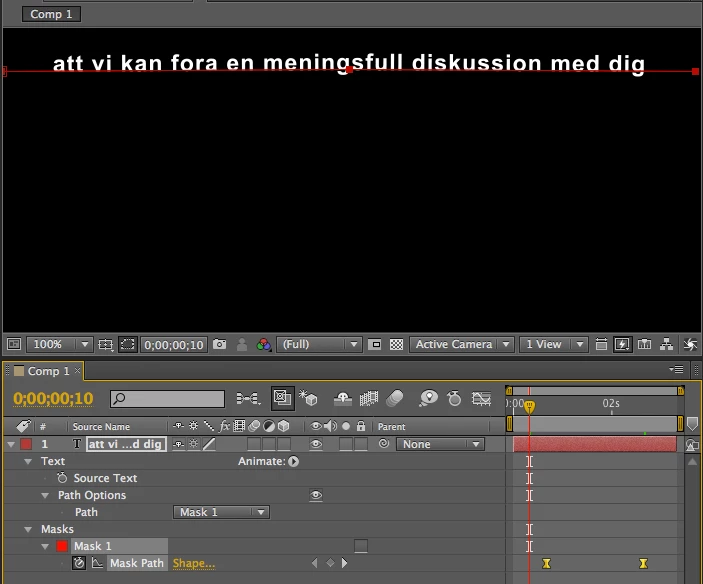
    Here's two screenshots. Took longer to figure out how to spell your text than to do the animation.

    You should be able to figure it out. I actually created a circular mask first, selected 2 points, then selected open in the mask options (right click the mask in the timeline) then deleted one other point to give me a perfect semi circle. I then set a keyframe, moved to a spot earlier in the timeline and edited the curve to form a straight line with 3 points.

    Hope this helps.

    2 replies

    Mylenium
    Brainiac
    August 24, 2010

    But how exactly do you want it to work? While masks may be an option, there may be several other, simpler or at least more structured techniques then animating a path from hand...

    Mylenium

    August 24, 2010

    I have made the animation in 3ds Max 2011, and it looks like this:

    http://www.alenius.nu/ae/ae_bend_text/

    The bend tool in 3ds Max is really nice. But it would be great to do it inside AE instead.

    Regards / Jimmy

    Rick GerardCorrect answer
    Adobe Expert
    August 25, 2010

    Remember my first post. Make your text layer, draw a mask, set some keyframes, attach the text to the path.

    Here's two screenshots. Took longer to figure out how to spell your text than to do the animation.

    You should be able to figure it out. I actually created a circular mask first, selected 2 points, then selected open in the mask options (right click the mask in the timeline) then deleted one other point to give me a perfect semi circle. I then set a keyframe, moved to a spot earlier in the timeline and edited the curve to form a straight line with 3 points.

    Hope this helps.

    Todd_Kopriva
    Inspiring
    August 23, 2010

    I think that you're right that text on a path might be the best way, depending on what you're doing.

    You might try the Puppet tools, too.

    Adobe Expert
    August 24, 2010

    Okay I am dictating this answer to my iPhone so everything thing might not exactly be right but here's what I would do. I would create a new text layer.  Type in your copy then use the pen tool to draw a curved path. Then I would press the M key to reveal the mask properties. I would set a key frame. Then I would go down the timeline and adjust the mask to animate the curve. Then I would attach text to the mask and that's all there should be to it.