


Known Participant
January 14, 2019
Answered

"Blend if" functionality in After Effects?

  • January 14, 2019
  • 3 replies
  • 18533 views

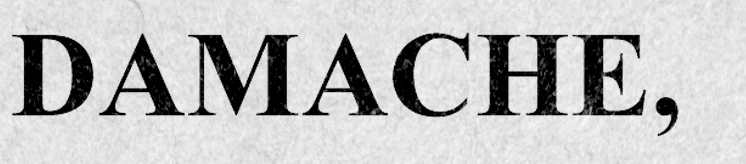
I'm layering text over a background paper texture and am trying to change the blending mode to make the text look like it's printed on the paper. It's very easy to achieve this effect using Photoshop's "Blend If" feature in the blending modes menu:
The effect can be very effectively fine-tuned using these sliders:
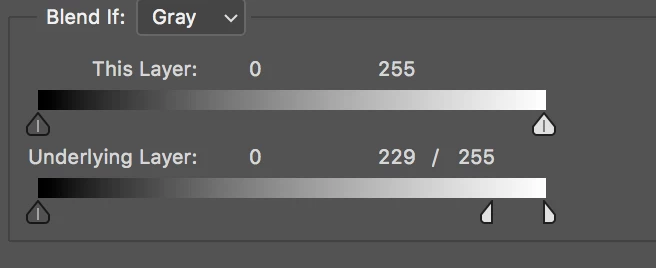
I'm wondering if there's a way to achieve this same effect in After Effects. No combination of After Effects' blending modes that I've tried yields the same result where the texture of the paper really shows through the text like that. This is the closest I can can get:

One workaround I've been using is to create the effect I want in Photoshop, import the PSD layers into After Effects and then turn on advanced blending, but this creates a whole bunch of annoying limitations, and I'd rather not have to go back into the PSDs to make formatting changes, so I'm hoping this effect can be produced completely within After Effects.

Thanks!

    Correct answer Roei Tzoref
    I'm wondering if there's a way to achieve this same effect in After Effects.

    yes, use the gradient wipe effect. it does the same thing "blend if" does and reveals/hides in a mix with a layer of your choosing.

    3 replies

    New Participant
    May 12, 2023

    Hello!


    I'm replying to this since it was quite an issue for me for a long time. I recently discovered that After Effect's 'Extract' effect works similarly to the 'Blend if' function in Photoshop. On the other hand, 'Gradient Wipe' is also a great option as it was mentioned.


    Hope that helps for anyone coming here in the future!

    New Participant
    June 30, 2023

    Thanks you saved my life!

    Roei Tzoref
    Roei TzorefCorrect answer
    Brainiac
    February 15, 2019
    I'm wondering if there's a way to achieve this same effect in After Effects.

    yes, use the gradient wipe effect. it does the same thing "blend if" does and reveals/hides in a mix with a layer of your choosing.

    Participating Frequently
    October 8, 2019
    Actually you can fudge it a bit by setting up photoshop layers. Not a good solution but if you had for example a flame layer on black and used blend if to remove the black background you could create a new layer and do a Command Shift option E to merge it onto its own layer. I thought the painting layer in AE gave blend if functionality?
    Adobe Expert
    January 14, 2019

    Not directly. You could use a copy of the text layer as a track matte for a copy of the paper texture, put that above the text layer, change the blend mode of the matted paper layer to Color Dodge or something similar, then adjust the opacity to get some of the paper texture to come through. Roughen Edges and Bevil Alpha could give the ink a little edge. Something like this:

    If the type isn't completely black you might be able to just get away with Multiply and playing with the color. It all depends on how much of the paper you want to come through.