



travVT
Participating Frequently
September 7, 2021
Answered

Scaling Down Width and Height Results in Poor Visual Quality -- (Ae+AME+Mac)

  • September 7, 2021
  • 3 replies
  • 2050 views

Hello All,


I've recently upgraded to a new Mac and I'm now running into an issue with Media Encoder. When I change the width and height to scale down a video (from 1998x1080 to 640x346) I'm getting a pretty low quality looking video. It's almost like it's not doing a smooth/antialiased scale down.


It looks like this originally (Match Source - High Bitrate):
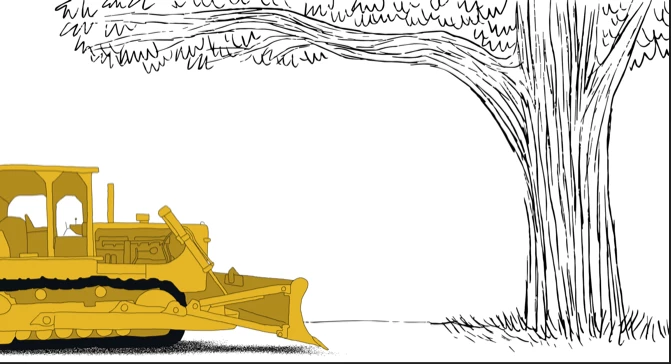


And looks "garbled" like this when scaled down (I only change the width/height):
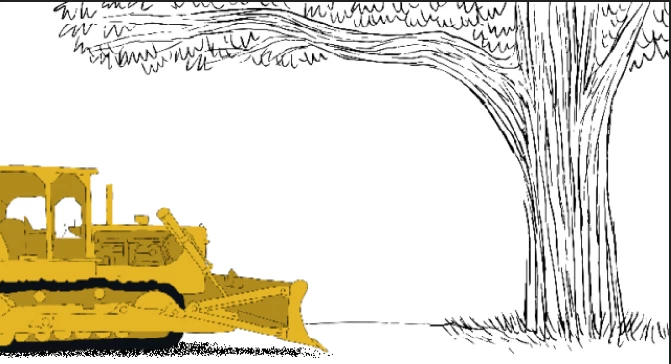


What's weird about this is I wasn't running into this issue on my older machine. I'd do the same exact workflow, but with a much better outcome. Here are my settings:
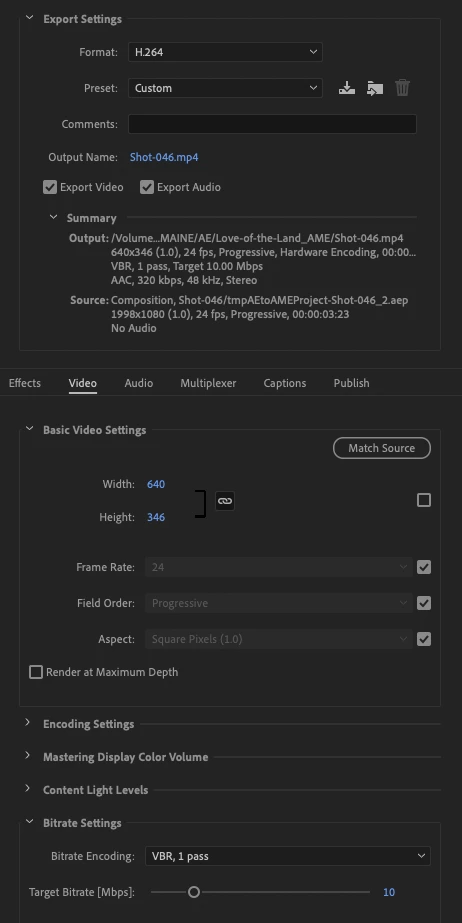


If anyone has any ideas, I'd love to hear them.


Thanks!


This topic has been closed for replies.
Correct answer Rick Gerard

It could be the settings in the Rendere Queue. Make sure they are set to Best by default. The AME uses the current Rencer Queue settings - or at least it used to.

3 replies

New Participant
November 14, 2022

I'm getting this too. I have ~75 little videos to export then convert to gifs, and doing it in the output preset would save a lot of time in my workflow. They resized exports look horrible.

I found that if I create a new resized comp within after effects (my OG files are 2048x2048) then render those they look great, but if I leave it to Media Encoder they're trash.

Community Expert
September 8, 2021

The original artwork looks like the lines are about 1 point (pixel). Scaling down the output using the Render Settings isn't going to give you as good of a result as nesting the original comp in a smaller comp and then scaling the nested comp down and collapsing transformations if there is a vector art. It is never a very good idea to design artwork for a video that has very thin lines. They just don't scale down well and they look terrible if they are moving slowly.

travVT
travVTAuthor
Participating Frequently
September 8, 2021

Hey Rick,


You have eagle eyes, the lines are thin (about 1px wide)! I really appreciate you letting me know about the troubles of very thin lines and video. I'd love to get your thoughts abouth these two points, if possible:


  1. When I export the same video from Premeire, and use Media Encoder to scale the width and height down, I'm not getting any jagged edges or poor scaling quality. I wonder why this is only happening from an export from After Effects?

  2. I've also tested exporting from After Effects to Media Encoder at 100% width and height, then add the resulting MP4 file back to Media Encoder and scale it then. This works perfectly/flawlessly without any of the jagged edges and poor scaling quality. Any ideas why this method would work over scaling the video on the first export?


Thanks for your help!

Rick GerardCorrect answer
Community Expert
September 8, 2021

It could be the settings in the Rendere Queue. Make sure they are set to Best by default. The AME uses the current Rencer Queue settings - or at least it used to.

travVT
travVTAuthor
Participating Frequently
September 7, 2021

I still haven't figured out why this is occuring, but I've narrowed it down to exports to Media Encoder from After Effects. Anyone have any ideas why this is?

Averdahl
Community Expert
September 8, 2021
quote

I still haven't figured out why this is occuring, but I've narrowed it down to exports to Media Encoder from After Effects. Anyone have any ideas why this is?


By @travVT


  • How does it look if you twirl down the Encoding Settings and set it to Software Encoding?
  • Do you have the same issues if you export from Premiere Pro?
  • Since you are scaling the footage, check the Use Maximum Render Quality.
  • Specs on old machine and new machine?


travVT
travVTAuthor
Participating Frequently
September 8, 2021

Hello Averdahl,


First, thank you SO much for suggesting a few possible fixes. Here's what I discovered:


  • How does it look if you twirl down the Encoding Settings and set it to Software Encoding?
    Looks like I'm already using software encoding.
  • Do you have the same issues if you export from Premiere Pro?
    There is no issue when exporting from Premiere to Media Encoder! I'm wondering if this means there's some sort of After Effects setting I'm missing?
  • Since you are scaling the footage, check the Use Maximum Render Quality.
    I selected this setting but still had the same jagged scaling issue.
  • Specs on old machine and new machine?
    I moved from a PC to a new Mac. Looking at Media Encoder it looks like both my PC and Mac are using the same settings in Media Encoder.


I'm a little stumped. If it matters, in After Effects the only layers in my composition are a PNG image sequence and a Photoshop file imported as footage. Do you think Media Encoder isn't the problem and I'm missing some sort of setting in After Effects?


Thanks!