


Participant
June 14, 2025
Answered

Scroll to Zoom not working in After Effects 25.3 on macOS

  • June 14, 2025
  • 10 replies
  • 6439 views

In After Effects 25.3 on macOS, using mouse scroll or Option + mouse scroll no longer zooms in the composition panel. Instead, it pans the view, regardless of modifier key. This function worked fine in version 25.2. Tested on multiple Macs with clean installs and no tablet drivers.
Please restore the ability to zoom with scroll in a future update.
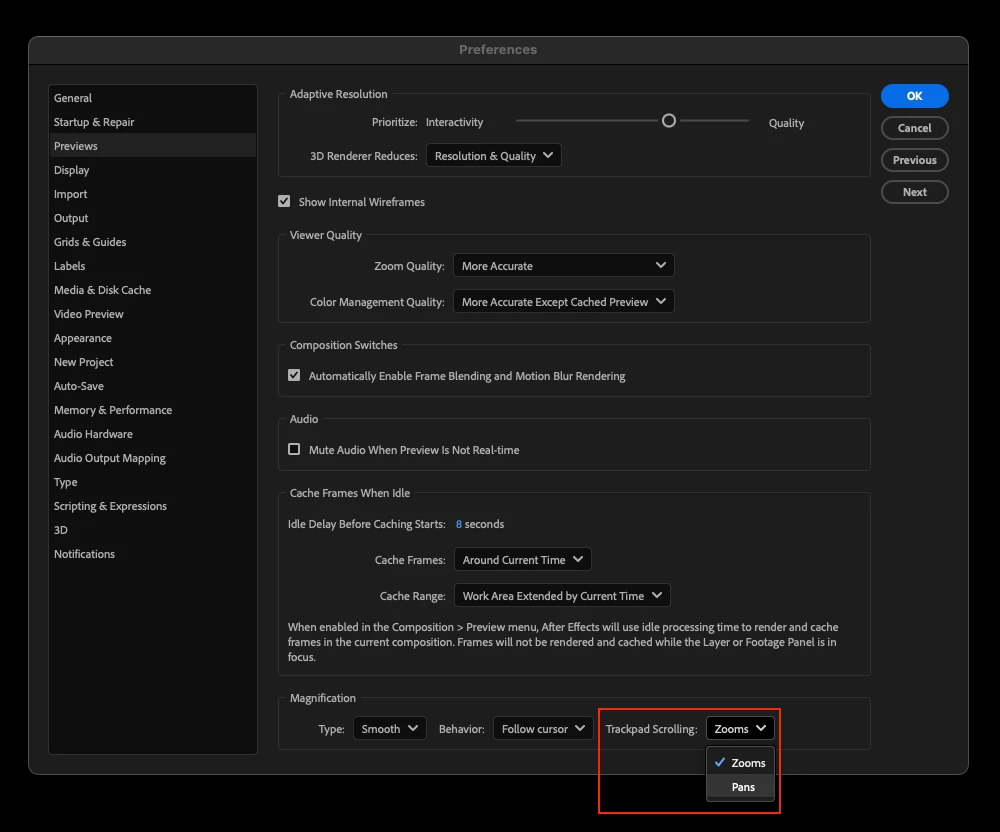
Correct answer loyal_Whirlwind98A4

Thankfully, this solves the issue

10 replies

Participant
September 22, 2025

I reverted back to version 25.2.2. No way I´ll miss out on being able to pan AND zoom with my mouse. Hopefully this issue will be resolved in a later version...otherwise I´m stuck here 🙂

JohnColombo17100380
Community Manager
Community Manager
September 4, 2025

@Bas | Peakfort@Badams7@user3462704, and others,
Thank you for bringing it this up. We are currently investigating what the right behavior might be to restore, but we haven't been able to reproduce the behavior with a Magic Mouse that is being described.

In previous versions of After Effects, scrolling would always zoom and holding Option would toggle between zooming to view center or zoom to the mouse cursor—panning using scrolling gestures was not supported as it is now. Would you be able to share a screen recording of the panning behavior in prior versions of AE and which model of Magic Mouse you are using? That would be a helpful reference to us as try to improve the zoom behavior to a more familiar state.

Thanks again,
- John, After Effects Engineering Team 

Participant
September 4, 2025

Hi John, thanks. 
I'm using MX Master 2s. That did the horizontal scrolling in my case. 

The "old way" is simply more intuitive. Panning is hardly needed as you can quickly option zoom to move around the canvas. After Effects has had the option/alt fuction for years, as Figma and many other design apps. 

I can fully understand that AE needs new/quicker ways of working, but add the option to choose between the "legacy" setting. In the past week i've taken more time using H/hand to move around the artboard than panning/scrolling/zooming. 

Thanks

Participant
August 26, 2025

This still seems like an issue? How has this not be corrected yet?! 

"Correct" answer does not solve the original function of pan and zoom via mouse. 

Participant
August 5, 2025

The "solved" answer does not solve the problem. I want to be able to pan AND zoom, like I did before with using the command key. Macbook User with Magic Mouse here. Please give us that feature back. I can't see the reason why you removed it, you did not replace it with something different, it's just... gone. 😞

Participant
August 19, 2025

100%, this is really not helping... I need access to both pan and zoom quickly to have any kind of efficient workflow on iMac desktop.

Known Participant
July 7, 2025

Hasn't this been made worse now? What was wrong with how it worked before?

Participant
June 23, 2025

I thought either my AE or mouse was broken but turns out its a new "feature". I almost lost trying to figure out whats wrong.

[abuse removed by moderator]

Participant
June 19, 2025

I tried reinstalling the application, cleared the preference but the option + Mouse scroll doesn't zoom in and out in the comp which is very frustrating as it works in Photoshop & Illustrator. but not in After Effects.
I am using the iMac M3 with the latest After Effect version.

nishu_kush
Community Manager
Community Manager
June 19, 2025

Hi there,


Thanks for writing in. Please check out the following community thread and try the steps mentioned in the correct answer: https://adobe.ly/4kOZRNh

Let me know how it goes.


Thanks,
Nishu

Participant
July 3, 2025

Tha answer does not solve the problem, it just creates a new one, now a can´t pan, I´m going back to the previous versión until you solve this problem.

Participant
June 17, 2025

Yes, this solves the issue (the issue being some muppet decided that this update should f@ck around with our work processes). Please STOP damaging this product, Adobe. I have already changed to Resolve for editing and I am at my witts end with you after 26 years!

loyal_Whirlwind98A4Correct answer
Participant
June 17, 2025

Thankfully, this solves the issue

Participant
June 17, 2025

Thank you! I came back to AE after a few months and was freaking out why the scrolling was not working like how it was. Such an unneccessary change! 

Participant
June 26, 2025

I agree with you.

Community Manager
June 14, 2025

Alfredo,


This functionality has not been removed. If you're using a touch pad you can use two finger scroll to pan and pinch to zoom.


Additionally there is a new preference in Preview which allows you to go back to zooming when scrolling with a touchpad if you prefer that.


See more details here:

https://community.adobe.com/t5/after-effects-beta-discussions/new-in-beta-welcome-to-smooth-zoom-in-after-effects/td-p/15162700

Participant
June 30, 2025

This is not a functional solution. I use an Apple Magic Mouse that doesn't support pinch, meaning my entire workflow is broken because there is no longer a modifier key to swap between scroll and zoom. Please bring back the modifier key rather than expecting everyone to change their workflow on hardware that will not support it.

Participant
January 28, 2026

Same issue. If i change the preference to “zoom” instead of “pan”, then i simply cannot pan. In past i used to scroll with option button pressed in order to zoom in or zoom out.