


New Participant
October 31, 2018
Answered

Shadow glitch with CC 2019 update

  • October 31, 2018
  • 3 replies
  • 7692 views

After updating to After Effects CC 2019, I noticed issues with my shadows as well as performance. There seems to be grainy noise when I have more than one layer casting shadows on my floor layer. Moving each layer along the Z plane to offset them seemed to help a little bit but when I checked, this is not an issue in CC 2018 so I'm wondering why now. It also causes my computer to crash periodically when I try to preview the problem areas.

The scene is set up with 5 3d layers (4 text, 1 logo animation precomp), stack up above a white 3d floor layer. The point light is above and slightly behind to cast a shadow forward. There is a 2d background layer at the bottom of the comp.

I am using the classic 3d renderer, so no layers are extruded.
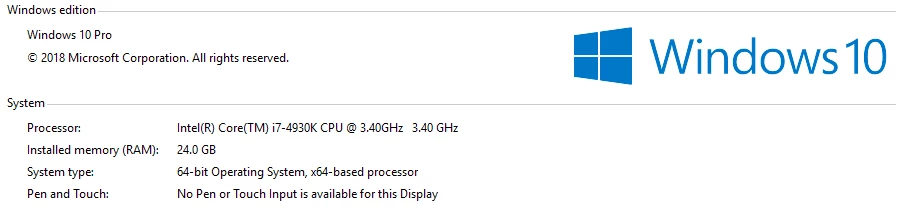
My specs are:

Video card - Geforce GTX 780 with 6GB vram
These are my questions:

  1. Is anyone else experiencing this? (Specifically with a different video card.)
  2. Does anyone know how to fix it? (I am going back to CC 2018 to finish the project but would like to take advantage of updates in the future.)
  3. Adobe, has this been discovered as a know issue and will it be fixed or am I nearing the end of my hardware's life? (I can provide all hardware specs if necessary.)

Message was edited by: Joel York

This topic has been closed for replies.
Correct answer Tim Kurkoski

I have been working with one of their engineers and it looks like they are working on it. Here is what he said...

Thanks for the project file. The problem is with high Shadow Diffusion value using the Classic 3D renderer, on Windows only. I also saw the crash a few times working with it.

I was able to repro the noise yesterday with just one shadow caster. In your project file the problem gets magnified by the 4 casters in the same Z plane. If you separate the text layers in Z, the problem is reduced.

Using the CINEMA 4D can be a workaround, but it doesn’t support Motion Blur and the Shadow Diffusion value needs to be adjusted for your specific setup to match the original.

We will have the problem fixed in an update, in the near future.

@Ziad Saad, can you confirm that you are also using Windows?


This bug was fixed in the December 2018 release of After Effects CC (version 16.0.1). You can install this release via the Creative Cloud desktop application.

A list of bugs fixed in After Effects 16.0.1 can be found here: https://helpx.adobe.com/after-effects/kb/fixed-issues.html

3 replies

New Participant
January 18, 2019

Well, this might be unrelated, but I cannot render with any drop shadow activated. It freezes the render after some time and creates a corrupt file with my rendered video up until the crashing point, then black.

Windows 10:64

Ziad Saad
New Participant
November 15, 2018

Same here. It does come from the 3D Lights Shadows. Glitch disappears when Shadows get disabled.

New Participant
November 15, 2018

Thank you for your reply, I thought I was going crazy. That looks like what I am seeing.

My comp is 8 bits per channel. I noticed that when I changed it to 32 bpc the glitch changed to a white color. What color space is your project in?

It's almost like noise the way it moves when I render a preview.

Tim Kurkoski
Adobe Employee
Tim KurkoskiCorrect answer
Adobe Employee
December 11, 2018

I have been working with one of their engineers and it looks like they are working on it. Here is what he said...

Thanks for the project file. The problem is with high Shadow Diffusion value using the Classic 3D renderer, on Windows only. I also saw the crash a few times working with it.

I was able to repro the noise yesterday with just one shadow caster. In your project file the problem gets magnified by the 4 casters in the same Z plane. If you separate the text layers in Z, the problem is reduced.

Using the CINEMA 4D can be a workaround, but it doesn’t support Motion Blur and the Shadow Diffusion value needs to be adjusted for your specific setup to match the original.

We will have the problem fixed in an update, in the near future.

@Ziad Saad, can you confirm that you are also using Windows?


This bug was fixed in the December 2018 release of After Effects CC (version 16.0.1). You can install this release via the Creative Cloud desktop application.

A list of bugs fixed in After Effects 16.0.1 can be found here: https://helpx.adobe.com/after-effects/kb/fixed-issues.html

New Participant
November 1, 2018

I am having the SAME issue in InDesign CC 2019! Trying to overlay text that has a drop shadow on top of an image, then the image becomes faded/grainy as well.