


Participant
February 14, 2014
Answered

Shapelayer Gradient Fill Colors Value

  • February 14, 2014
  • 1 reply
  • 1284 views

Hi

Is it possible to get the colors data (e.g. color, opacity, location, orientation of gradient) of an gradient-fill in a shapelayer by script?
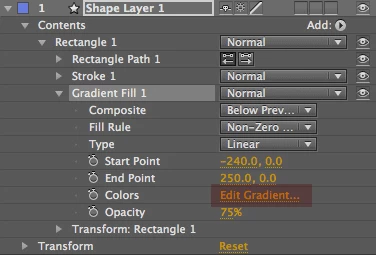
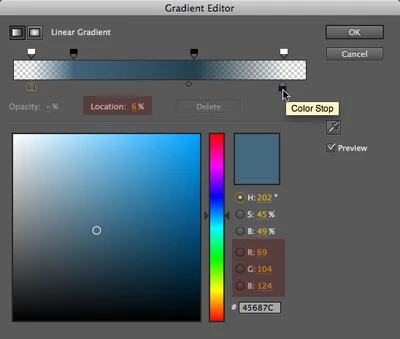
I can get the property with:

myShape.property("ADBE Vector Graphic - G-Fill").property("ADBE Vector Grad Colors");

But its "value" field has no actual value. It holds an error.
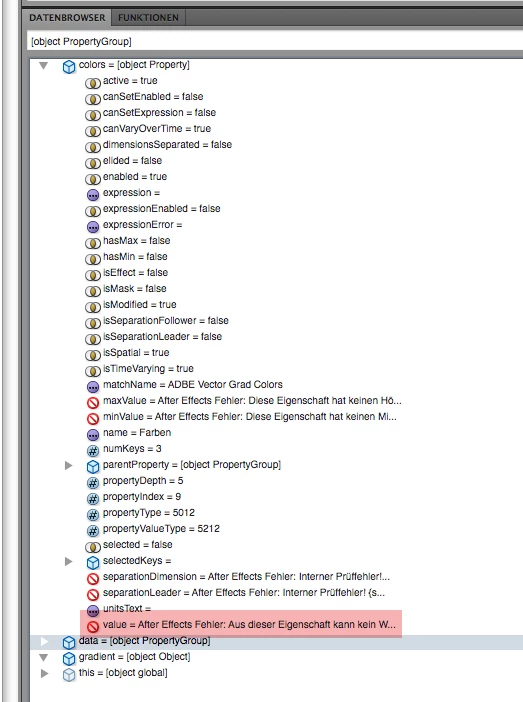
sorry for german screenshot.

Any info would be greatly appreciated.

Thanks!

This topic has been closed for replies.
Correct answer UQg

Hi,

i don't have access to AE right, so can't check, but the gradient value is very propably of "custom value" type, hence cannot be displayed. AE provides no scripting info/framework for this type of data.

From your screenshot the propertyValueType is 5212. To know what this is pointing to you can do:

var type = myShape.property("ADBE Vector Graphic - G-Fill").property("ADBE Vector Grad Colors").propertyValueType, key;

for (key in PropertyValueType) if (PropertyValueType[key]===type) {alert(key); break;};

You 'll probably receive a "CUSTOM" alert, in which case there is nothing you can do.

Xavier.

1 reply

UQg
UQgCorrect answer
Legend
February 15, 2014

Hi,

i don't have access to AE right, so can't check, but the gradient value is very propably of "custom value" type, hence cannot be displayed. AE provides no scripting info/framework for this type of data.

From your screenshot the propertyValueType is 5212. To know what this is pointing to you can do:

var type = myShape.property("ADBE Vector Graphic - G-Fill").property("ADBE Vector Grad Colors").propertyValueType, key;

for (key in PropertyValueType) if (PropertyValueType[key]===type) {alert(key); break;};

You 'll probably receive a "CUSTOM" alert, in which case there is nothing you can do.

Xavier.

Participant
February 18, 2014

Thats too bad.

Thanks a lot for the clarification, Xavier!