



Mike Coopey
New Participant
October 2, 2020
Question

Solution for 'blank frame' during Time Remapping loopOut() looped comp

  • October 2, 2020
  • 9 replies
  • 15563 views

Hi,

I have been going crazy looking for a solution to how to solve the 'blank frame' glitch when creating a looping composition using the loopOut() expression.
I tried the current/previous solutions which involved adding a keyframe on the penultimate frame or manually setting the final keyframe value -1 frame. These worked, but I was still getting a visible animation glitch happening.


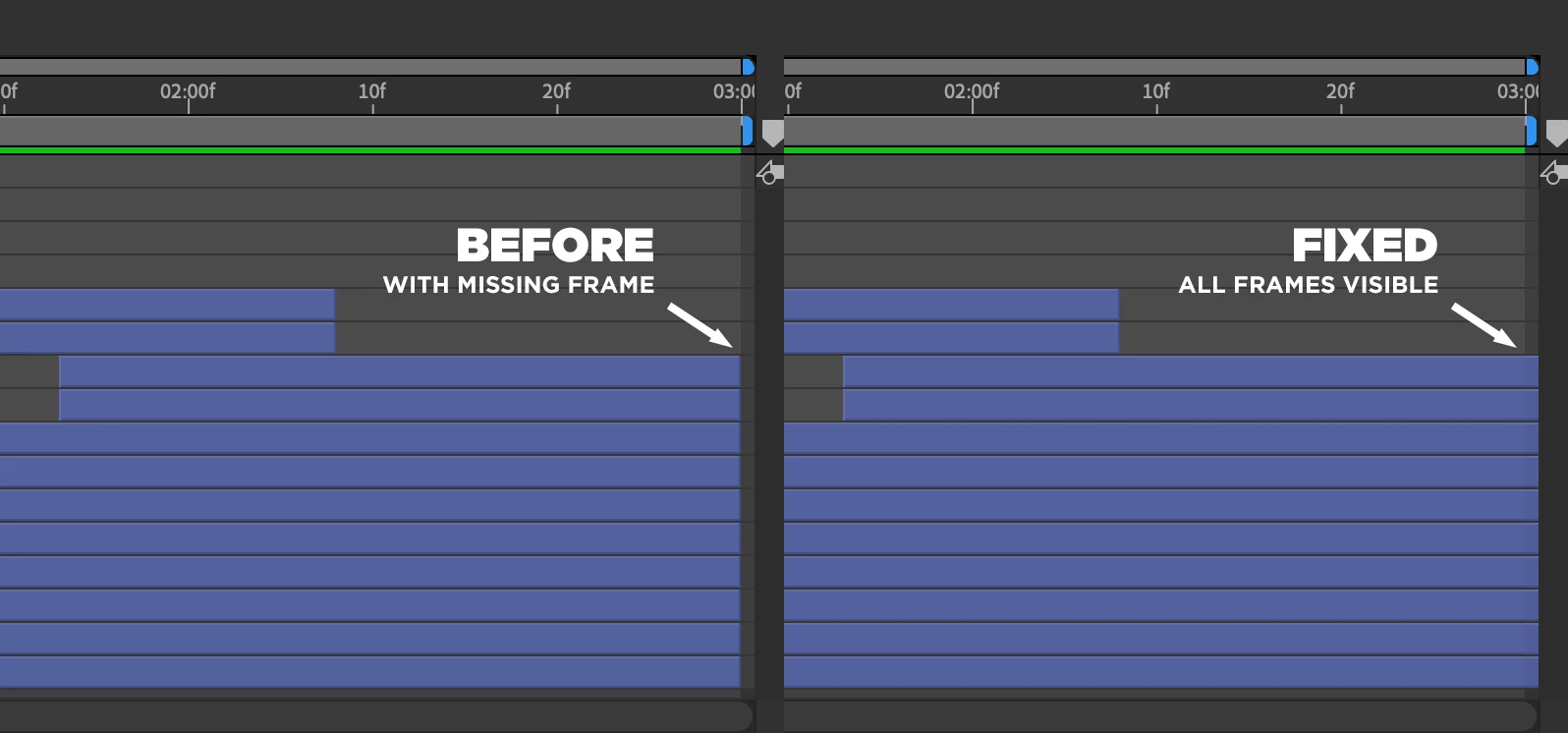
My final solution, for a perfect loop with zero visible glitches or blank frames, was to open the pre-comp layer (the original composition that you're trying to loop) and for every layer that reaches the final frame, drag it beyond the end. These layers may appear to run to the very end of the comp and appear as though they reach the final frame, but manually dragging the end of the layer 'off' to the right of the comp was what was needed for that final 'missing' frame to show in the precomp loop.

So, starting with a Time Wrapping comp that is showing a blank frame:

1. Double-click the comp to show the contents

2. Scroll to the final frame

3. Drag all layers to the right 'beyond' the final frame


Hopefully, that blank frame has now gone.
 

9 replies

New Participant
June 21, 2024

Tried many solutions mentioned here.
The one that worked was checking that all compositions had the same frame rate (eg 24fps).
Sometimes whem pre-composing, the specs would change to "Custom". Adjusting them to be as close as possible (and the fps exactly the same) solved my issues. For now.

Best of luck.

franzen
Participating Frequently
June 23, 2025

Nothing I've read works for me. The only thing that has worked for me is replacing the loopOut expression with 

time%key(numKeys).time


Thanks to the creative COW site for the solution!
Here's the article 

New Participant
July 3, 2025

Thanks for this! This expression does exactly what you would expect loopOut to do.

Would it be asking too much just to have a dedicated Loop tool built into After Effects instead of having to use script...? You have menu functions for stretching, remapping or reversing but not looping. You can loop footage that you import easily, but not comps that you create. Why not? Many artists don't want to have to learn Javascript programming just to access functions that they can reasonably expect to be part of the toolset, and even those who do end up having to use workarounds to make it work properly.
Don't get me wrong, I use scripting a lot and it makes After Effects way more powerful and versatile...but it shouldn't be necessary for something as fundamental as looping.

Participating Frequently
May 27, 2024

After you enable time remap you get 2 keyframes. add your loop expression then go to the last keyframe, go back one keyframe, add one keyframe and delete the last. Hope this makes sense. This should remove the issue. 

New Participant
June 13, 2024

This doesn't work for me. I go back one, add keyframe, delete one at the end, then it just pulls the black frame forward by one frame

New Participant
May 24, 2024

That is a bug , when I am using After effect 7.0 , What are you doing adobe?  10 years , the bug is still here!~ Ya, I am fixing this problem the same way like yours!~ Can't imagine in 2024 , I still fixing this bug everyday. 

troytooner
New Participant
August 3, 2023

Tried that. Did not work.

[TOXGG]BIGBOSS
Participating Frequently
March 30, 2023

Thank you for sharing your solution with others who may be experiencing the same issue. Your advice could be very helpful to someone who is struggling to create a seamless loop in their composition.

Best of luck with your future animation projects!

New Participant
March 30, 2023

So What I've figured out was loopOut() doesn't work in whole number frame rates... for some reason. I was working in 30 fps and my comp would go blank for TWO frames, not just one. When I switched it to 29.97 fps it didn't do any skipping. Fix it adobe.

New Participant
March 30, 2023

Never Mind. Rendered it out and still didn't work. Adobe please fix this problem. 

New Participant
February 20, 2023

I really don't understand how something so simple and fundamental to Animation like Looping just doesn't work in AE. I do a lot of Animation in other Software and it's astonishing how buggy this "Industry Standard" is. And what's even more frustrating, there is no way of expressing this frustration towards Adobe. There is no way to leave a public review or a Rating, so you find yourself ranting in some community thread about how to make the simplest thing just work. And when the community expert thinks a 8 step workflow is simple, for sth that should basically require one click, it's pretty apparent that the software and workflow is fundamentally flawed. No disrespect, just frustration about a corporation that has a lag of competition and therefore no apparent ambition. 

New Participant
February 27, 2023

I am beyond done with After Effects and Adobe. They are a predatory, sketchy company focused on sucking your bank account dry, making it insanely difficult to leave their ecosystem, and providing unstable, unuseable products. What is worse is that everyone has a different solution to this blank frame problem and so far none of them have worked for me. I am in need of better alternatives to AE. Good-bye and good riddance Adobe.

New Participant
January 5, 2022

Didn't work for me but found an easier one, at least in my case:


Duplicate first frame inside comp (one extra frame). Add time-remap but add a keyframe one frame before the end and delete the last one. Add loop, cut first frame of the comp and move left one frame.

Community Expert
October 2, 2020

If you are using time remapping the last keyframe is placed at the end of the last frame or start of no frames. That's why you get a blank frame.


  • The workflow is very simple
    1. Select the footage layer or the nested comp
    2. Press Alt/Option + Ctrl/Cmnd + t or use the Menu to enable Time Remapping
    3. Press k then Ctrl/Cmnd + left arrow to move to the last keyframe then back one frame
    4. Click the diamond icon in between the previous and next keyframe tool in the timeline to set a new keyframe at the start of the last keyframe
    5. Press k to move to the last keyframe and click the diamond icon again to delete the last keyframe
    6. Alt/Option + click the Time Remapping stopwatch to create an expression and type loopOut()
    7. Click anywhere in the comp panel or timeline to complete the expression
    8. If you need to extend the out point of the footage or comp layer do so now


That's all there is to it. To make a seamless loop for any property the first and last frame of the loop must be identical but the last keyframe must be set one frame before the identical last frame. For example if you animated position with 3 keyframes set to these values:

  • 960, 0
  • 960, 540
  • 960, 0

and you wanted to make a perfect loop you would move the CTI (time indicator) to the last keyframe, then back 1 frame and set a new keyframe making 4, then add your loopOut() expression. It works every time, with every property. 

New Participant
April 25, 2022

So this has been posted a while ago, but i just found the EASIEST solution of all ( and possibily the reason for the glitch). I too had my last frame disappear, tried many methods and none seemed to work, until I changed my composition framerate from 23.976 to 24fps. I think the drop-frame is causing the issue with the expression.


So, TLDR, try putting the framerate of the looped composition at a number without decimals, 8, 12 or 24 for example.

New Participant
March 30, 2023

I'm working in 30 fps and it still does it.