


olllieelmes
Inspiring
December 9, 2021
Question

Strange effect when exporting GIF

  • December 9, 2021
  • 2 replies
  • 9952 views

Hello, 


I'm trying to export an animated GIF from AE but I'm getting this strange orange pixel effect shown below in the top left of the still. It seems whenever I use a feathered mask or an opacicty drop, this happens. 
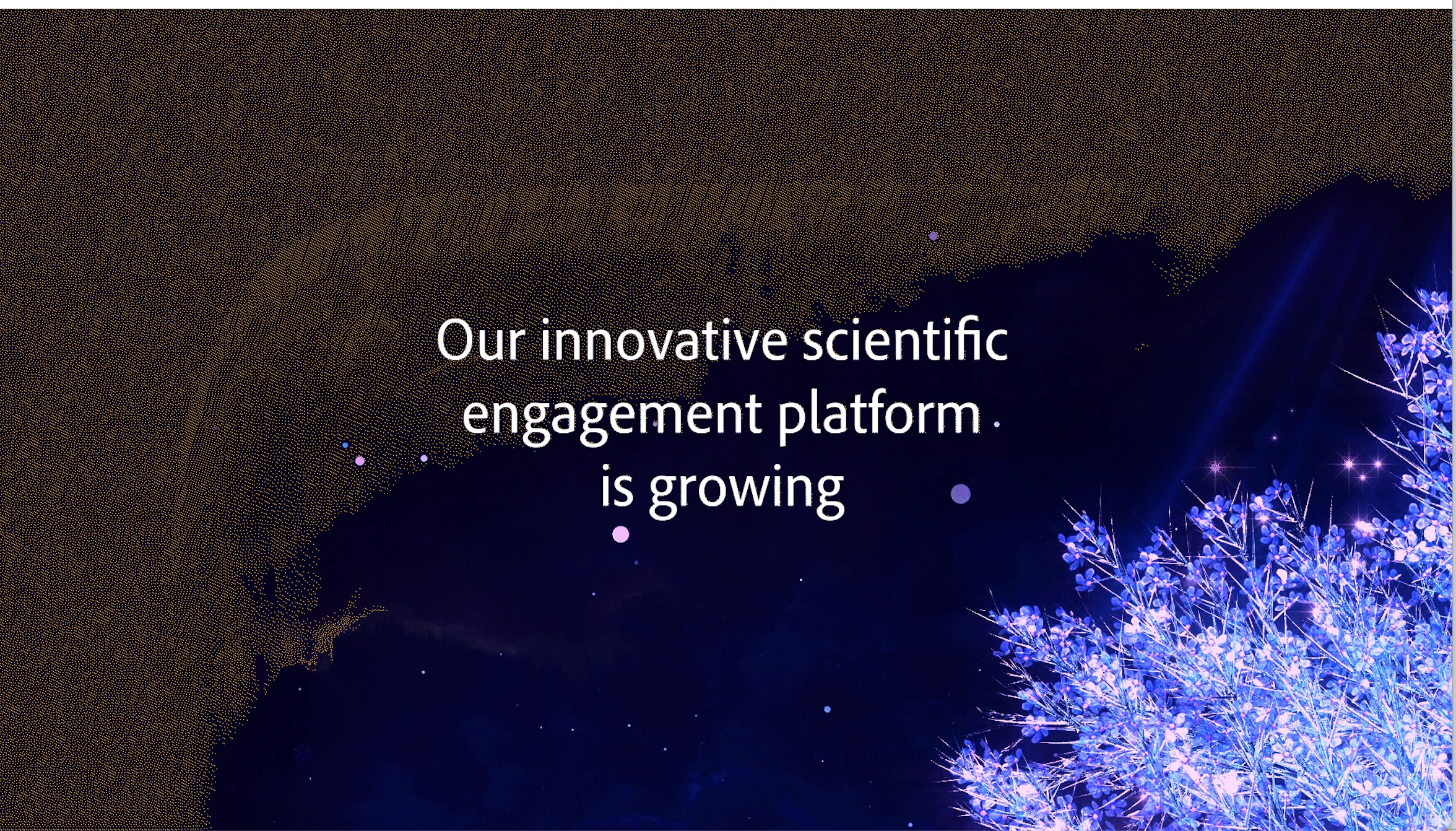


I also tried to export a mov file from AE to import into Photoshop to create the GIF from there, but PS said there was not enough memory.

Any suggestions much appreciated. 

Thanks,


This topic has been closed for replies.

2 replies

Joost van der Hoeven
Community Expert
Community Expert
December 10, 2021

Put a back solid as background layer and see if this helps.

Conrad_C
Community Expert
Community Expert
December 10, 2021

My guess is that it has to do with the creaky old Animated GIF format supporting only 256 colors. When the composition includes a smooth transition, especially across a large area, GIF simply runs out of colors. After Effects tries to simulate more colors through dither patterns, so you see the side effects of trying to dither the few available colors into patterns.


In addition, the animated GIF export in After Effects, Premiere Pro, and Media Encoder is not the best available. You might also try running an exported video through the Gifski app; it does a better job of translating colors to animated GIF.


If Photoshop said there wasn’t enough memory, what is the duration of the composition, and what are the pixel dimensions of the frame? Larger or longer compositions can be too much for the old Save for Web code to handle.


GIF was not designed for high quality, high resolution video. It’s only used a lot because if you can’t use actual video formats, there aren’t many other options. But if it’s possible to use an actual video format with full color support such as H.264, these problems won’t happen.

Participant
October 3, 2024

Gifski's got only 10/20/50 fps which makes it hard to convert a 29,97 composition so that it looks like original. Or is this a problem of the free version?

Conrad_C
Community Expert
Community Expert
October 3, 2024

If you’re using Windows, it might be a limitation of the Windows version. I use the Gifski app on macOS, and for FPS it has a continuous slider that goes from 3 to 50 fps.


An alternative is to download the command line version available on the Gifski website so you can enter whatever FPS you want, as long as it’s supported by both the Gifski code and the GIF89a format.


Because the source code of Gifski is free open source, if you or someone you know is a programmer, it might be possible to build your own version of Gifski that has whatever features you need, subject to the limitations of the source code and GIF89a format.


I could be wrong but I don’t think there are any paid versions of Gifski. But I only know about the open source code and the free apps based on it.