Participating Frequently
August 6, 2016
Answered

Time clock/Countdown effect issue. Ahead of real time

  • August 6, 2016
  • 2 replies
  • 20356 views

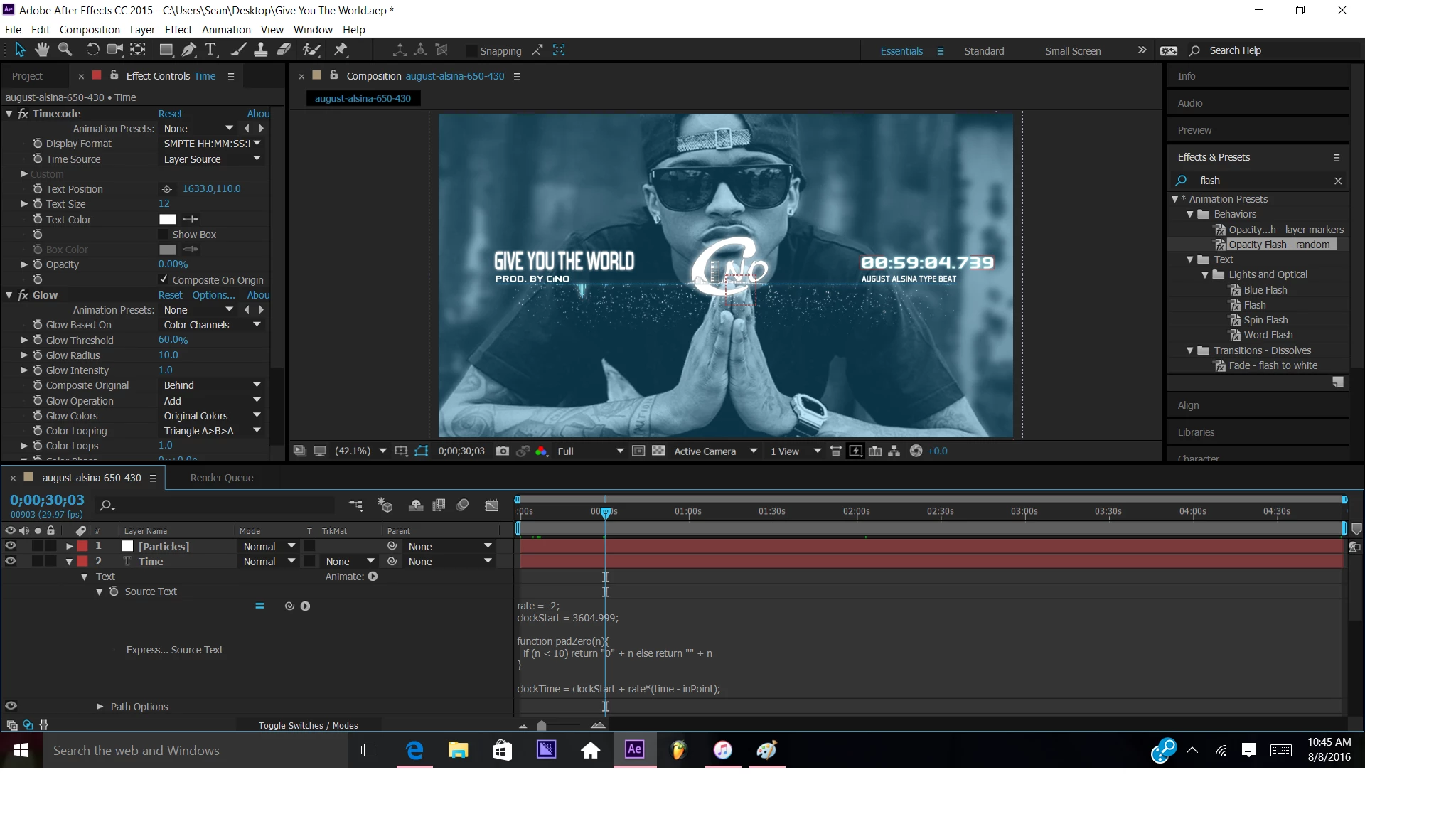
So I put a time icon in my song so it can have a little more visual appearance. Just one issue...It's a few seconds ahead of how long the song actually is. I put in the code

amtOfDigits = 2;

seconds = Math.round( time % 59 );

minutes = Math.floor( time / 59 );

function addLeadingZeroes( v ){

    for( i = 0; i < Math.abs( amtOfDigits - (v + "").length ); i++)

       v = "0" + v;

    return v;

} addLeadingZeroes(minutes) + ":" + addLeadingZeroes(seconds)

Notice the song is on 3 minutes but the time says 3:03

This topic has been closed for replies.
Correct answer Roei Tzoref

Hmm I just tried that and got these results. Any reason why? Roei Tzoref


Yes. you need to set the speed (rate) to 1 and the clockstart to 0. it should be written like this:

rate = 1;

clockStart = 0;

function padZero(n){

  if (n < 10) return "0" + n else return "" + n

}

clockTime = clockStart + rate*(time - inPoint);

if (clockTime < 0){

  sign = "-";

  clockTime = -clockTime;

}else{

  sign = "";

}

t = Math.floor(clockTime);

hr = Math.floor(t/3600);

min = Math.floor((t%3600)/60);

sec = Math.floor(t%60);

ms = clockTime.toFixed(3).substr(-3);

sign + padZero(hr) + ":" + padZero(min) + ":" + padZero(sec)

2 replies

Roei Tzoref
Brainiac
August 6, 2016

I find that the expression you provided not working as it should, no matter what number you put in there. after some research, I found the following expression that does the same thing and is much simpler:

sec = Math.floor(time%60);

min = Math.floor(time/60);

if(sec<10)

{"0" + min +":0" + sec;}

else

{"0" + min +":" + sec;}

got it from here: After Effects: Tutorial | How to display time & create a countdown - YouTube

Community Expert
August 6, 2016

One of the best approaches is to use Dan Ebberts Universal Timer from his Motion Script site. You have more control, can count up or down and can adjust the rate of the counter.

If you are just counting up a very quick option and the one I would probably use is to use the Expression Language Menu from AE and just grab the time to timecode option from there and then must mask off the hours and frames:

Showing mask but mask currently set to none.

This is painless, quick and easy and suitable for any beginner. Just make sure you use a monospaced font so the numbers don't jump around. There is also a Timecode Effect under the Effects>Text but that does not give you the option to choose your font so it's kind of clunky.

You can modify either of those expressions to subtract the in point of the layer so the timer will start from the in point or you can set a marker that will start the timer.

But Wait, the numbers say 02:59;29 and the Timeline says 2;59;28. If you move the CTI so the Current time is 2;59;29 then the numbers read 3:00:00. Move forward one more frame and the CTI will read 3;00;02 and the numbers will read 3:00:01. What's going on.  

For the time to display correctly as hours minutes and seconds when using NTSC based footage with fractional frame rates of 29.97 or any of the other fractional time rates you must set your comp to Drop Frame timecode.

This is automatically assigned if you use any of the NTSC based presets. No frames are dropped, only frame numbers because the frames cannot be divided into even numbers. This Drop Frame way of counting frames, again not dropping frames but counting frames, happened when color television was introduced and they had to add a couple more scan lines to the TV signal to send along color burst information. Drop frame timecode is indicated in the timeline by the use of a ; instead of a : to separate the hours, minutes, seconds and frames.

That explains the CTI display, what about the numbers display when you use the expression for time to timecode? Why does it appear to be one frame behind? Because at 1 minute into the count DropFrame timecode starts dropping frame numbers and the Time to Timecode expression from the Expression Language menu takes this into account because the dreamt time base is 30 not 29.97. There is an option for Time  to NTSC timecode that will match up the CTI and the number display.

One last point, The numbers time display is one frame behind the actual time it takes the layer to play because the CTI stops at the head of the last frame. If your video is 3 minutes long then it will take exactly 3 minutes to playback even though the last frame in the video has a frame number one frame less than the length of the video. If you want your time display to actually show 3:00 you'll have to extend the layer by 1 frame to give the number time to display.

Ok, a second last point... Your expression will work properly if you change the 59 to 59.94 because you are using rounding to jump up one frame and 59.94 is the proper divisor for time when you are using drop frame timecode.

Roei Tzoref
Brainiac
August 6, 2016

Thank you Rick for laying it down. trying to be picky here so after runnings some more tests it seems that both expressions (Op's and the one I copied) cannot represent the actual time code. I have downloaded a music with a video playing at 29.97 - this is the video: The Cars - Magic (HQ).mp4 - Google Drive

when I drag it to a composition it seems the only way to make the timecode work at all frames is to use like you said - the ntsc expression:

timeToNTSCTimecode(t = time + thisComp.displayStartTime, ntscDropFrame = false, isDuration = false)

would you agree?

nothing else sticks. not Op's expression (with 59.94 or not), not Dan's expresiion, and not the one I contributed here. drop frame or no.

notice the difference between what's on screen and the Timeline actual timecode:

Op's expression set to 59.94 ND Frame

Op's expression set to 59.94 D Frame

Dan's Expression ND Frame

Dan's Expression D Frame

I also tried another video at 23.97 and still the timecode won't stick, but only with the ntsc expression.

Dan's expression

what do you make of this?

Mylenium
Brainiac
August 6, 2016

Well, 59 is not 29.97 nor is it 59.94, is it not? You math is crooked. Just fill in the correect values.

Mylenium

Participating Frequently
August 8, 2016

Ok that definitely helped the real time! Thank you. Now 1 more thing...Now the time goes up to :60 seconds and then goes onto the next minute. So it'll will be at 3:60, then it will hit 4:00. I want it so be the :59 seconds then hit the next minute. Any idea how to do this?

Roei Tzoref
Brainiac
August 8, 2016

seanm987654 you can see that this thread went way way beyond your question but our top specialist here wrote that your expression does not work. you can try this timer by the master genius Dan Ebberts that is claimed to be perfect: Dan Ebberts's Expressioneering Design Guide