

This topic has been closed for replies.
Correct answer Warren Heaton10841144

@Jaiden’s2489601331i6 


Sapphire's S_ReverseClip reverses the entire source, not the In to Out of the trimmed Layer Time Span.  As such, if you are using the first to second second of a ten second clip and apply S_ReverseClip, you'll see the ninth to the eight second play (insead of the second second to the first second).

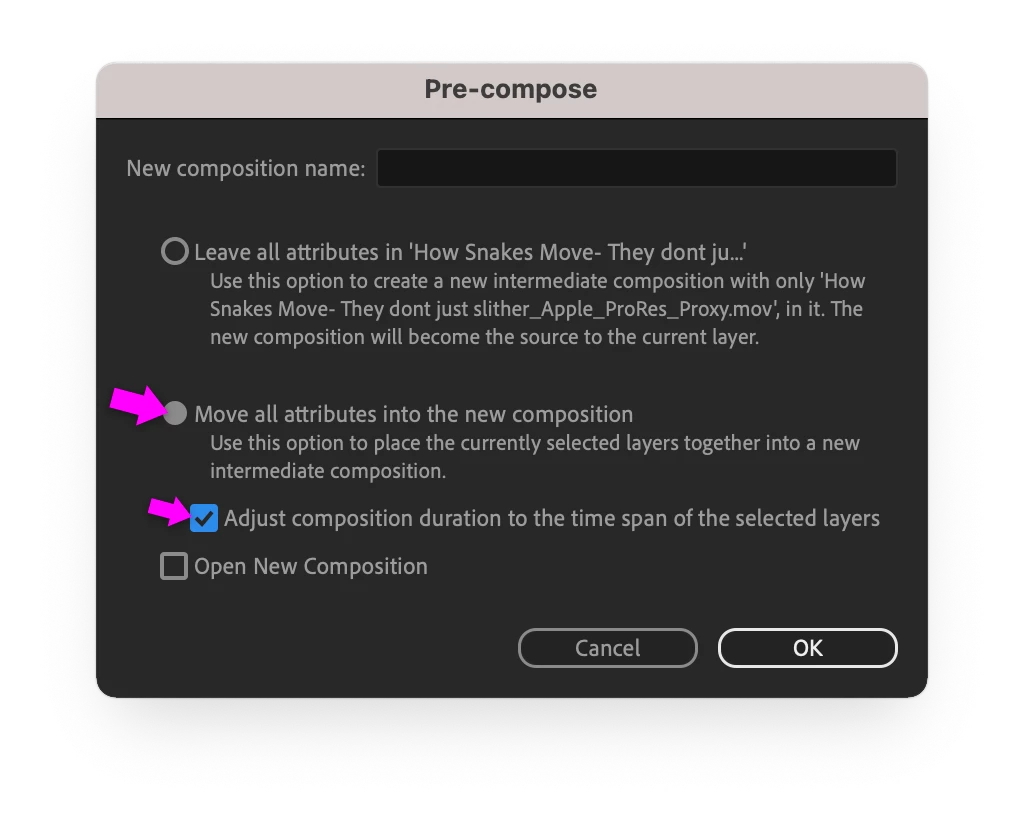
Remove S_ReverseClip to restore the correct forward playback from In point to Out point.  Then choose Layer > Pre-compose....  In the Pre-compose dialog box, choose "Move all attributes into the new composition" and enable "Adjust compositon duration to the time span of select layers".  Then apply S_ReverseClip to the Pre-comp.
 

3 replies

Community Expert
November 6, 2022

Tanscode the clip to a format that's good for use as source footage in After Effects like Apple ProRes or Avid DNx.


In the Timeline panel, right-click the Layer in the Composition and choose Reveal > Reveal Layer Source in Project to go the the source footage in the Project tab.  In the Project panel, right-click the source footage and choose "Reveal in Finder".  Add the clip in the Finder to the Queue tab of Adobe Media Encoder, choose "QuickTime" as the Format and "Apple ProRes 422 LT" as the Preset, then click Start Queue.  When the transcode is finished, return to After Effects and in the Project tab right-click the source footage and choose "Replace Footage > File..." and locate the ProRes LT QuickTime movie.

Mylenium
Brainiac
November 5, 2022

Try to pre-compose your trimmed segment and reverse the then shorter layer in the parent comp. This could be a decode issue with your long clips.


Mylenium 

Known Participant
November 6, 2022

Getting the same results, also when i reverse it using the s_reverseclip from sapphire plug-in it goes to a different time in the clip.

Warren Heaton10841144Correct answer
Community Expert
November 6, 2022

@Jaiden’s2489601331i6 


Sapphire's S_ReverseClip reverses the entire source, not the In to Out of the trimmed Layer Time Span.  As such, if you are using the first to second second of a ten second clip and apply S_ReverseClip, you'll see the ninth to the eight second play (insead of the second second to the first second).

Remove S_ReverseClip to restore the correct forward playback from In point to Out point.  Then choose Layer > Pre-compose....  In the Pre-compose dialog box, choose "Move all attributes into the new composition" and enable "Adjust compositon duration to the time span of select layers".  Then apply S_ReverseClip to the Pre-comp.


Mylenium
Brainiac
November 5, 2022

Cropped screenshots/ photos don't tel lus much and you have not provided any specific info about your project and your Mac. That said, the most likely issue is simply hardware acceleration problems, so check the relevant settings, update the graphics driver if possible and/ or turn of Fast Draft and the other GPU acceleration stuff. Converting the footage to a different type that doesn't use hardware acceleration for decoding like an image sequence might also work. Also clean out your disk caches. Anything more will require specific info.


Mylenium

Known Participant
November 5, 2022

here's the video
