


ninose11
Inspiring
January 29, 2019
Question

trouble rotating a null-parented camera around a point of interest on a map

  • January 29, 2019
  • 4 replies
  • 2599 views

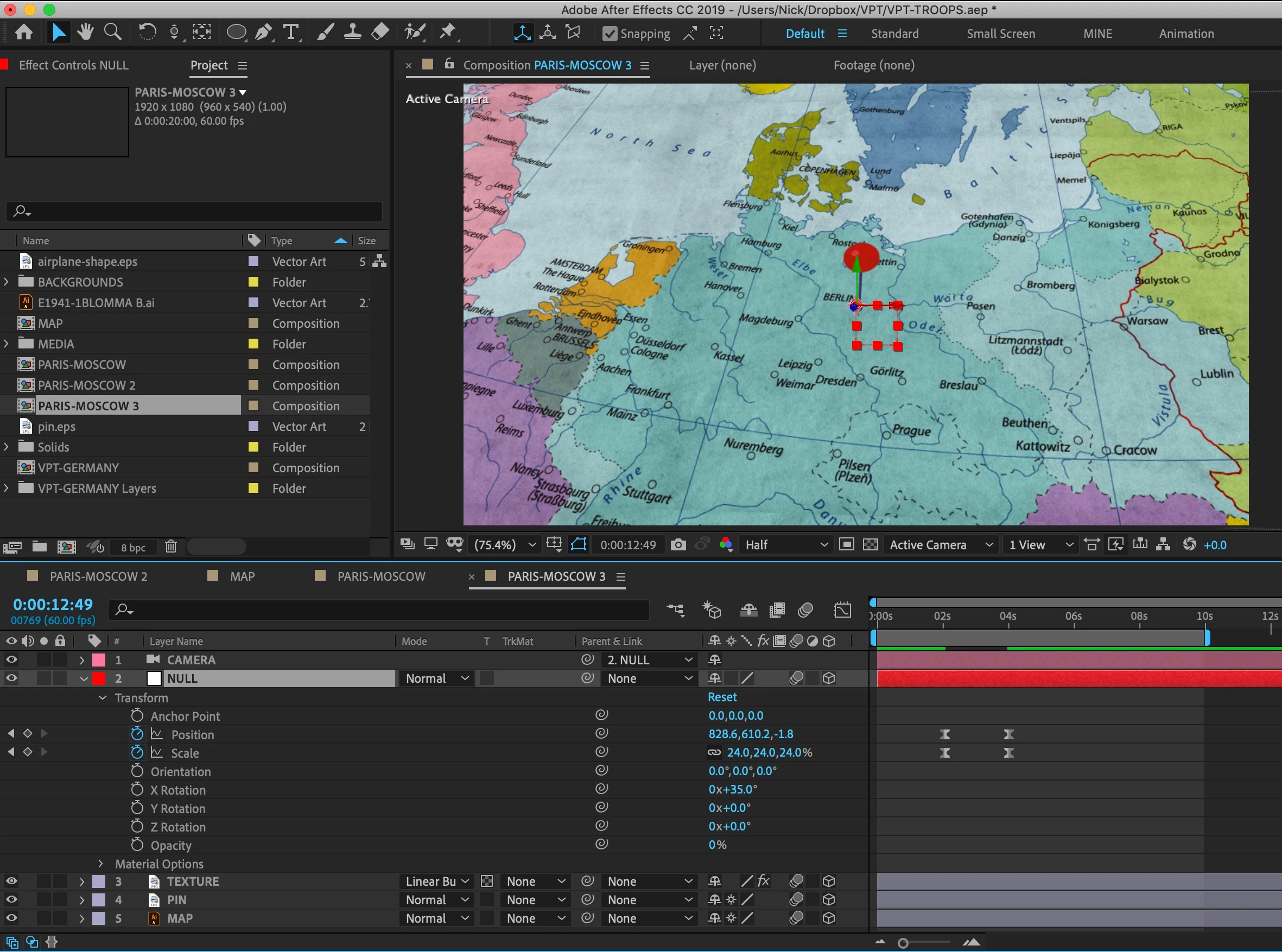
I'm trying to orbit my null-parented camera around this pin on a WWII map. I'd like to be able to rotate or orbit several times around the pin, but when I use the Z rotation, I'm not getting the desired rotation effect I'm looking for which I can only achieve when using "Orientation" mode (0.0, 0.0, 0.0), but it doesn't have the Rotation # "0x" option that "Z Rotation" does. Is there an expression I can use to tell the Null/camera to orbit around the Pin several times in Z Orientation mode?
Thanks in advance for any help.  
    This topic has been closed for replies.

    4 replies

    ninose11
    ninose11Author
    Inspiring
    February 3, 2019

    Hi Rick and thank you again for your continued help with this. Regarding the globe idea, shouldn't the comp be double the width that it is in height? Unless I'm mistaken, I thought that the best way to project a world map on a sphere would be for the map to be equirectangular. 

    Equirectangular projection - Wikipedia

    Community Expert
    February 4, 2019

    3 is a typo... should have been 2

    If you want to apply a square map of the part of Europe in your example then you need to divide the circumference of the earth by the width of the map in miles, let's say 1500 miles to calculate the width of the comp. 1500 is about 16% of 25000 so the map needs to be 16% of the comp. If you are filling the screen with the map the size of a nested comp is going to get really big very quickly unless you have a vector map. When I've done this kind of thing before without a vector based map I have used a 3D app to texture part of a globe with the square map. It's a lot easier than dealing with potentially huge nested comps and huge radius sizes for CC Sphere.

    There are other map projections. The Lambert projection uses π time the height so 3:1 is a good approximation. If you are using Lambert projection you have to distort any placed artwork to make it look right. I don't remember the math for that kind of projection, but it's rather uncommon.

    ninose11
    ninose11Author
    Inspiring
    January 30, 2019

    Hi Mike and Rick,

    Thank you both very much for your help. I'll review everything you advised carefully step by step along with the references you both very kindly provided me with. Rick here is another snapshot of my window showing the camera properties:


    Here is a closeup shot of the pin and the null on the map both positioned on Berlin:

    Hopefully I haven't left any other needed information out. Please let me know if I'm missing anything.

    Thank you both again very much for your much appreciated help.  

    Community Expert
    January 30, 2019

    This is what the comp would look like:

    I have turned off the parenting on the pin layer to get the auto-orient to camera to work. The camera is animated up and in, the Camera Orbit null is animated in y to rotate the camera.

    Workflow:

    1. Add map, make 3D, rotate -90 in x
    2. Create the Pin from a single shape layer with the anchor point at the bottom of the pin
    3. Position pin on map checking multiple views and position values
    4. Add a two-node camera
    5. Menu>Layer>Camera>Create Orbit Null
    6. Hold shift and Parent Camera 1 Orbit Null to Pin layer to move the orbit null to the pin
    7. Remove the parenting
    8. Set Auto Orient (Alt/Option + Ctrl/Cmnd + o) on the Pin layer to auto-orient to camera
    9. Adjust start position of the camera and set a position and orbit null y rotation keyframe
    10. Move down the timeline and set a new orbit null y rotation value and adjust camera position to frame up the final shot
    11. Select the pen tool and use the second view to modify the position path of the camera and give it a pleasing curve

    That's it.

    ninose11
    ninose11Author
    Inspiring
    January 30, 2019

    Hi Rick,

    Thank you very much for those tips. As a result I was able to parent the null to the pin which is perfect. But I'm finding that to get the effect I'm looking for (rotating the camera around the pin) - I discovered that I can do so by simply playing with the Z rotation axis of the map itself. So the entire map is rotating but from the camera's perspective it looks like I'm rotating around the pin. Is that a bad way to do it?  

    The problem when I animate the Y axis of the Camera orbit Null is that the map appears at an undesired angle for me:

    Community Expert
    January 29, 2019

    Unfortunately, your screenshot doesn't tell us anything about the position of the camera, the point of interest, or where the null is in relation to the dot. A better screenshot would have revealed the modified properties of the camera, the null, the point of interest on the map and the location of the map. Select the layers, press the U key twice, take a screenshot and drag it to the forum. I suspect that the point of interest null is not in the same position as the dot on the map or the camera's point of interest is not at the same position as the null. I don't think there is anything wrong that is not caused by improperly setting up the camera and the position of the point of interest (should be orbit) null.

    If this was my project I would set up a 2 node camera, create an orbit null using the menu, Make sure the map and the location dot have been rotated 90º in X so they are laying flat, make sure the location dot's anchor point is in the center of the dot, position the location dot (point of interest) on the map so that it is just one pixel above the surface of the map layer, then I would down the shift key and parent the orbit null to the location dot. This would move the orbit null to the same location as the dot and the center of the orbit would be precisely at the anchor point of the dot. The last step would be to animate the rotation of the orbit null and or the position of the camera to move in or out or adjust the height above the map.  Auto Orientation for the layers must be turned off. If you want the pin to look like it is sticking in the map then remove the parent to the rotation null and auto-orient the pin to the camera or, if you are animating the height of the camera above the map try auto orient y only - Dan Ebberts's Expressioneering Design Guidewww.motionscript.com/design-guide

    Mike_Abbott
    Legend
    January 29, 2019

    Are you by any chance trying to set the rotation by dragging on your null with the rotation tool?
    If so, if you look in the toolbar you'll see, to the right of the tools, a "Set" menu - probably set to orientation.  Hence you are changing the orientation not the rotation. You could change that menu to rotation - but I'd advise against it.

    To animate the Z rotation - set your rotation keyframes on the Z rotation property directly in the timeline.

    Homework :  look in the help for the difference between orientation and rotation, and impress your family and friends by telling them all about Euler and quarternion based rotation : )

    ...on the other hand you could just remember: "orientation for 'posing' your object, rotation for animating it." : )