

Participant
December 10, 2013
Answered

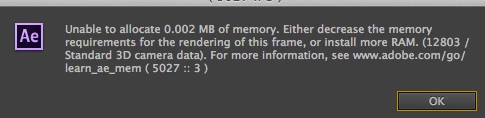
Unable to allocate 0.002MB of memory

  • December 10, 2013
  • 42 replies
  • 52644 views

I have an iMac 3.4GH 16GB of ram. I don't understand why I should suddenly be getting this message. I am using Mavericks 10.9. I use after effects CC the latest version.

    This topic has been closed for replies.
    Correct answer Todd_Kopriva

    The After Effects CC (12.2) update fixes this.

    Let us know how it works for you after you've installed the update.

    42 replies

    Participant
    October 5, 2015

    It seems to still be occurring in its latest update.  Working with some pretty heavy renders but also have 32g of ram and it shows that there's plenty left there and still get the message and eventual crash.

    Participant
    October 20, 2015

    I uninstalled AE 2015 and reinstalled 2014 and everything is working perfectly fine now... took me hours to figure this out.  I'll just work with the 2014 version until all of the bugs are fixed.

    Participant
    September 3, 2015

    I've just started getting this error and it happens CONSTANTLY. OS X.9.5 using AE CC 2015. I also get another error "unable to allocate enough memory to render the current frame" occasionally when rendering certain compositions.

    Inspiring
    September 3, 2015

    I'm starting a project that relies on Trapcode Form and this bug is stoping me cold. Please please address this.

    Szalam
    Community Expert
    Community Expert
    September 4, 2015

    brendanT wrote:

    I'm starting a project that relies on Trapcode Form and this bug is stoping me cold. Please please address this.

    Brendan, can you use CC 2014 for your project? That way, until the bug gets fixed, at least you won't be stopped.

    If you left the Creative Cloud software at its default to remove your old versions when you updated to CC 2015, you can reinstall AE CC 2014 very easily: How to Find and Install Previous Version of Adobe Apps in CC 2015

    Participant
    September 4, 2015

    About to try reinstalling CC14 - truly hope you're right in that this error only affects CC15. Getting this same problem when using Reg Giant Effects plugins - ToonIt in particular.

    Participant
    September 1, 2015

    jizz please fix it as soon as possible @A@

    Participant
    August 11, 2015

    This is NOT solved. I've got the current version of AE CC 2015. I've had a serious issue with rendering and bugs on nearly every project and version of After Effects since it went to CC. I'm having this exact problem, 5027::3 alternating with 27::30 and  the "needs two frames for playback" issue as well.  I'm four days into a week long very complicated text based project and finally finished designing the text and vectors and am now sitting on four lost days because I can't apply the effects the project needs. This needs a fix asap.

    Computer:

    Macbook Pro Retina late 2013

    2.6 ghz i7

    16gb ram

    SSD

    Current version of Yosemite.

    GPU:

    GPU Driver Version: 10.4.2 310.41.35f01

      Chipset Model: NVIDIA GeForce GT 750M

      Type: GPU

      Bus: PCIe

      PCIe Lane Width: x8

      VRAM (Total): 2048 MB

      Vendor: NVIDIA (0x10de)

      Device ID: 0x0fe9

      Revision ID: 0x00a2

      ROM Revision: 3776

      gMux Version: 4.0.8 [3.2.8]

    barbara_silva
    Participant
    August 18, 2015

    Having the same problem. Formated the machine, reinstalled and it persists =/ where is the fix?

    Szalam
    Community Expert
    Community Expert
    August 18, 2015

    The bug mentioned by the original poster in AE version 12 was fixed.

    The RAM leak bug in version 13.0 was also fixed.

    You guys are sharing evidence of a different bug with similar symptoms. Read my suggestions in this thread: Re: "unable to allocate memory after effects CC 2015" Mac Pro bug fix?

    Participant
    July 10, 2015

    For all those facing the imminent loss of their work I have a last minute method to retain it. I too am having this same memory error and this update DID NOT fix it. I have an office with an early 2014 mac pro, a late 2014 mac pro (both contain fire cards), early 2014 imac with nvidia cuda mobile gpu, and edit suite in the studio that is a late 2014 mac pro with kona card and external 10 bit monitor. I can hose up every one of them and their memory. I can tell you that the edit suite hangs in the longest but has 64 gb of ram. Followed by the imacs with cuda cards supporting them. The new m,ac pros with fire cards were the first to go. We are now plagued by memory issues on anything involving green screening. cc, 2014, 2015, Makes no difference and the update had no effect. The only machine to hold out is my late 2013 macbook pro and our 2011 mac pro. There needs to be some serious work put into fixing this thats all i got to say. And for the fix, pressing enter to confirm the notification closes it for half a sec. If you have your pointer ready you can click the x to close the composition window before another appears. This will allow you to save your work. Sometimes you have to close all your timelines too in the same way. Hope this helps.

    shando
    Participant
    July 7, 2015

    I am also getting this error message + crash every time.

    Brand new Mac Pro 64 GB RAM, 8 core, Dual AMD FirePro D300. AE CC 2015.

    Very minimal project. A single solid layer with Trapcode Particular + one camera. No presets even selected, just plain white particles. After a bit of scrubbing After Effects crashes. Nothing to do with audio scrubbing I'm afraid, there is no audio in my project.

    Thanks in advance for any help.

    shando
    Participant
    July 8, 2015

    Just to give a more detailed report, this is my exact scenario, I also reported directly to Adobe here: https://www.adobe.com/cfusion/mmform/index.cfm?name=wishform

    I received a message saying thanks for feedback and that not all inquiries will be responded to due to volume... : \ Ugh.

    ******BUG******

    Concise problem statement:

    I recently downloaded the demo for REDGIANT Trapcode Suite.  After working with a single layer with the Trapcode Particular effect applied and one camera inserted into the scene, (nothing else in the project), experiencing error messages:

    Error message 1 : Cached Preview takes 2 or more frames to playback. Once I get this message, I am no longer able to RAM preview. Also, AE won't quit after this point without a force quit.  Usually but not always shortly after I receive this error message:

    Error Message 2: Unable to allocate 0.0002 MB of memory. Either decrease the memory requirements for the rendering of this frame, or install more RAM (12803 /list.) For more information, see www.adobe.com/go.learnae_mem ( 27 :: 30 )

    This error message pops up an infinite amount of times after pressing "OK", leaving me with no choice but to force quit after effects. Sometimes the error appears after working for 5 minutes, sometimes shorter.

    Seems to occur when scrubbing with a keyframed camera. 

    Brand new Mac Pro w/ AE CC 2015

    OSX Yosemite 10.10.3

    3 GHz 8-Core Intel Xeon E5

    64GB 1866 MHz DDR3 ECC

    Dual AMD Firepro D700 - 6144 MB

    Participant
    July 6, 2015

    Started getting the same message today after upgrading to After Effects CC 2015. Trying to follow one of the MIR / GeoLayers tutorials. Also must Force Quit the app. Any updates from Adobe on this?

    Participant
    May 4, 2015

    Todd said:

    "The After Effects CC (12.2) update fixes this.

    Let us know how it works for you after you've installed the update."

    And I ask:

    You fixed a bug. Now, would you say the bug is back? I can't work more than 5 minutes on my projects.

    I have a Mac Pro early 2014 with 32Gb Ram....

    What's wrong with this?

    Thanks

    Participant
    June 25, 2015

    I am having the same problem with CC 2015.  Any updates?

    Participating Frequently
    June 26, 2015

    Me too. CC 2015 and the same problem.
    I hate Adobe.

    MavAuthor
    Participant
    December 10, 2013

    An update that sounds great news. Thank you. I have deleted files that started this happening and I seem to be over the problem for now. I am wondering if it was caused by mixing file formats. I was using a part of an MP4 clip when the rest of the project was in Apple Proress. I am now converting the file to Apple Proress to see if this is the case. I am sure though that the update will fix the problem. Thank you.

    Todd_Kopriva
    Inspiring
    December 10, 2013

    > I am wondering if it was caused by mixing file formats.

    No, it has nothing to do with anything that you did. It is just a stupid bug that is unrelated to anything that matters.

    Todd_Kopriva
    Todd_KoprivaCorrect answer
    Inspiring
    December 14, 2013

    The After Effects CC (12.2) update fixes this.

    Let us know how it works for you after you've installed the update.