



Rameez_Khan
Legend
March 23, 2020
Answered

Unable to import MP4 (H.264) files after updating to After Effects 17.0.5

  • March 23, 2020
  • 20 replies
  • 51885 views

After updating to After Effects 17.0.5, some users have reported that After Effects is unable to import H.264 and H.265 files.

It looks like there is some confusion around this issue and I'd like to provide more clarification:

  • H.264 and H.265 import support haven't been removed. This is a bug and we're working on it.
  • For now, I'd recommend that you reinstall After Effects 17.0.4 (steps provided below).
  • If you don't want to reinstall After Effects 17.0.4, you can transcode the files using Adobe Media Encoder into a different format.


In order to help our teams fix this quickly, we need your help. Please provide the following information so that I can take it to the engineering teams.

  • What version of Premiere Pro are you currently using, the one which does import footage?
  • What version of After Effects were you using before you updated to 17.0.5?
  • Where do you store your footage? On a networked drive like a NAS or locally?
  • Would you be able to share your System Information file and some sample media files with us? If so, please follow these steps to obtain the System Information file:


macOS:
Follow the steps given in this article: https://support.apple.com/en-in/HT203001


Windows:
1. Hold the Windows key and press R to open the Run window
2. Type msinfo32 and click OK
3. From the System Information window, go to File > Save
4. Save the file as .NFO


After collecting the System Information file, upload it to a cloud sharing service like Google Drive, Dropbox or Adobe Creative Cloud Files and share the URL in the comments below.


Here is how you can reinstall After Effects 17.0.4.
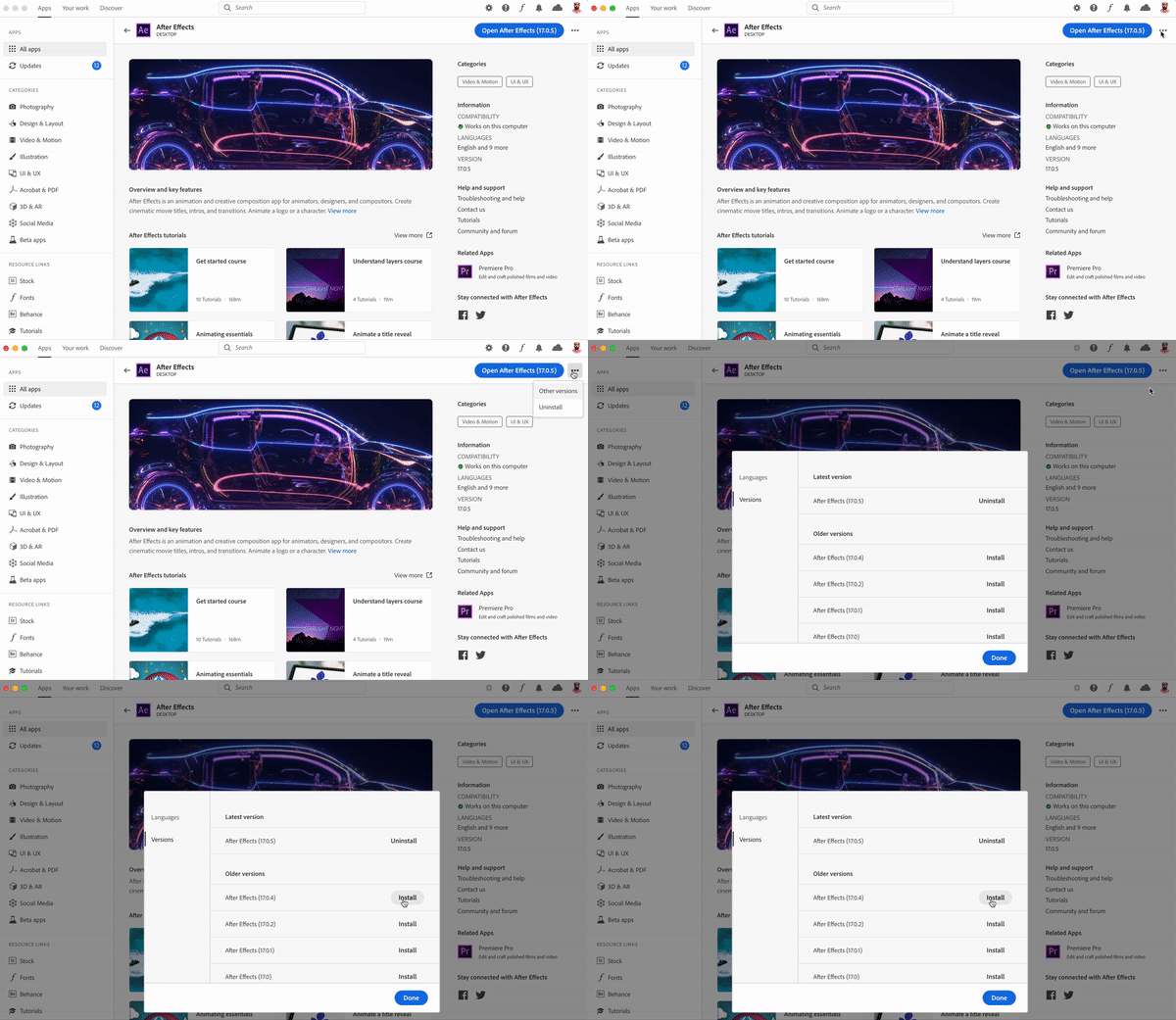


Original community discussion: https://community.adobe.com/t5/after-effects/can-t-import-videos-after-updating-to-17-0-5-build-16/td-p/10990351?page=2


Thank you for your patience and cooperation.

Rameez Khan

Community Manager and Social Support Strategist, After Effects

This topic has been closed for replies.
Correct answer antonio777

I just got the notification and updated, the problem is fixed... thank you.

20 replies

Participant
April 12, 2020

What would an alternative format to h.264/65 be to maintain quality - file size not really a problem?

Just for re-importing into AE

gizem_guzeldere
Participant
April 7, 2020

Hello, I was having the same problem. then I converted the mp4 file to avi file and it worked. I hope this problem will be fixed.

Inspiring
April 7, 2020

Did you try by just renaming the extension instead of converting?... it would sure make the workflow a lot faster than converting but it may not work for everybody and every file.

Rameez_Khan
Legend
April 9, 2020

Hi Rockstard555,


Can you confirm the type of Adobe subscription that you have? Do you use the same Adobe ID with Creative Cloud apps that is associated with your community profile?


Let me know.

Rameez

Participant
April 6, 2020

I downgraded to 1.17.4 and even 1.17.2 and still get this error.

My .NFO file (Google Drive) 

Rameez_Khan
Legend
April 7, 2020

Thanks for sharing the System Information file. I've attached it to the bug.

Can you double-check the AE version number and let me know which one you are on right now? https://adobe.ly/2Tri88U


Best,

Rameez

Participant
April 8, 2020

I downgraded to 1.17.0 and it works fine, but I was on 1.17.5

Inspiring
April 6, 2020

For those transcoding the files, I have found there's no need to...  just rename the extension to .AVI and After Effects is able to import the file with no problems. Maybe this can be of help in trying to figure out the problem.

Roland Kahlenberg
Legend
April 7, 2020

I'm highly sceptical this recommendation will work for all use-cases. I believe the reason this works for you is that your original source had a lain vanila H264 and not created as a QuickTime H264.

Please share with us the original source of your H264. Thanks.

Very Advanced After Effects Training | Adaptive & Responsive Toolkits | Intelligent Design Assets (IDAs) | MoGraph Design System DEV
Inspiring
April 7, 2020

I"m not sharing anything, why should I?.. If it doesn't work for anybody then at least they can try.

Participant
April 4, 2020

Hi everyone,


I faced this problem yesterday and I converted the video to more than one format and it did not all work but when I converted it to AVI it worked normally.


I wish you good luck 🙂 .

Rameez_Khan
Legend
April 7, 2020

Thanks for letting us know.


-Rameez

stevene86653469
Participant
April 1, 2020

I don't have "other versions" either. I can't believe I'm pirating software that I own (a previous version) just to be able to use the f@cking software. I can't input any of my footage at all! Unbelievable that this gets past "testers".

Rameez_Khan
Legend
April 2, 2020

Hi stevene86653469,


Can you send me your Adobe ID via a private message? I"ll check why other versions are not showing up for you. Like I mentioned in my earlier post, I'm happy to work with people 1:1 and see why they aren't able to reinstall After Effects 17.0.4.


I don't understand how pirating software will work for you! 

If you can, please share your system information file with me. That would be super helpful.


Thanks,

Rameez

wtmlnz
Participating Frequently
April 3, 2020

I cannot see the "Other Versions" button either. 

Please help!

Roland Kahlenberg
Legend
March 30, 2020

Thanks for the input Rameez. This is rather horrid Quality Engineering and it doesn't help that you posit -

"All variants of H.264 and H.265 are not affected"


If this is true, then why don't you state which variant(s) are not affected. This will allow users to make necesary convertions to relevant files while avoiding same?

This is extremely horrid Quality Engineering work and just as bad support. We expect more from the AE Team and you.

While the fix is being made, please, at least let users know which variant(s) work and which do not. The information should be quite obvious, critical to more than a few users.

Thank you.

Very Advanced After Effects Training | Adaptive & Responsive Toolkits | Intelligent Design Assets (IDAs) | MoGraph Design System DEV
Rameez_Khan
Legend
March 30, 2020

Hi Roland,


I hope you're doing good in these difficult times.

The Formats team is investigating the bug. Unfortunately, we haven't been able to replicate it with the files that are being tested in-house. We are now trying to work with users directly and figure out what's going on. We have a bunch of extremely wonderful pre-release users and none of them are able to reproduce this either. It's clear that all the users are not affected by this bug. It also looks like the issue could be due to third-party codecs installed on the users' computers rather than the type of H.264 files.

I'll check with the team internally and update the post with more information. Sorry that you feel let down by the quality engineering team and me. We want nothing but the best experience for our users.


Thanks,

Rameez


Roland Kahlenberg
Legend
March 30, 2020

Hi Rameez, I've not been let down by you or QE. I understand bugs happen. I was disappointed that you mentioned "All variants of H.264 and H.265 are not affected" - I took this to mean there is at least one variant that is assured to work and that this detail wasn't shared. I take it now that there is no known variant that works under all known cases? Sorry for being pedantic but I just want to be clear since the answer will help users with the issue.

Keep up the great work and please update us when there is more info. 

Very Advanced After Effects Training | Adaptive & Responsive Toolkits | Intelligent Design Assets (IDAs) | MoGraph Design System DEV
Participant
March 27, 2020
I can't install previous versions inside the cloud, can you tell me how can I download and install After Effects version 17.0.4?  
Rameez_Khan
Legend
March 27, 2020

Hi lunarjl,


What kind of Creative Cloud membership do you have - Individual, Teams, or Enterprise?


Let me know.

Rameez


Known Participant
March 26, 2020

Here is the NFO file https://drive.google.com/file/d/1zE1JOOjUSHssDGVO8FglGq_rIfWOPjMg/view 

I'm using the latest version  of everything (Premiere Pro, After Effects) PP imports the footage AE doesn't 

The version that I was using before this is 17.0.4 (AE) Which was working well

Rameez_Khan
Legend
March 26, 2020

Thank you for sharing, husseinAA.

Looks like I can't access the link though.


Thanks,

Rameez

Inspiring
March 23, 2020

I don't have the "Other versions" option in the menu dropdown... the only option I have is "uninstall".

Rameez_Khan
Legend
March 24, 2020

Hi Rockstard555,


That's weird! Do you have a single-user subscription? What's the version of the Creative Cloud desktop app that's installed on your computer?


-Rameez

Participant
March 26, 2020

I have the same issue as @rockstrad555 and im running the latest update, i even uninstalled creative cloud and installed it again any solutions?