

MahaB82A
Legend
October 17, 2022
Answered

Unit of the speed

  • October 17, 2022
  • 2 replies
  • 211 views

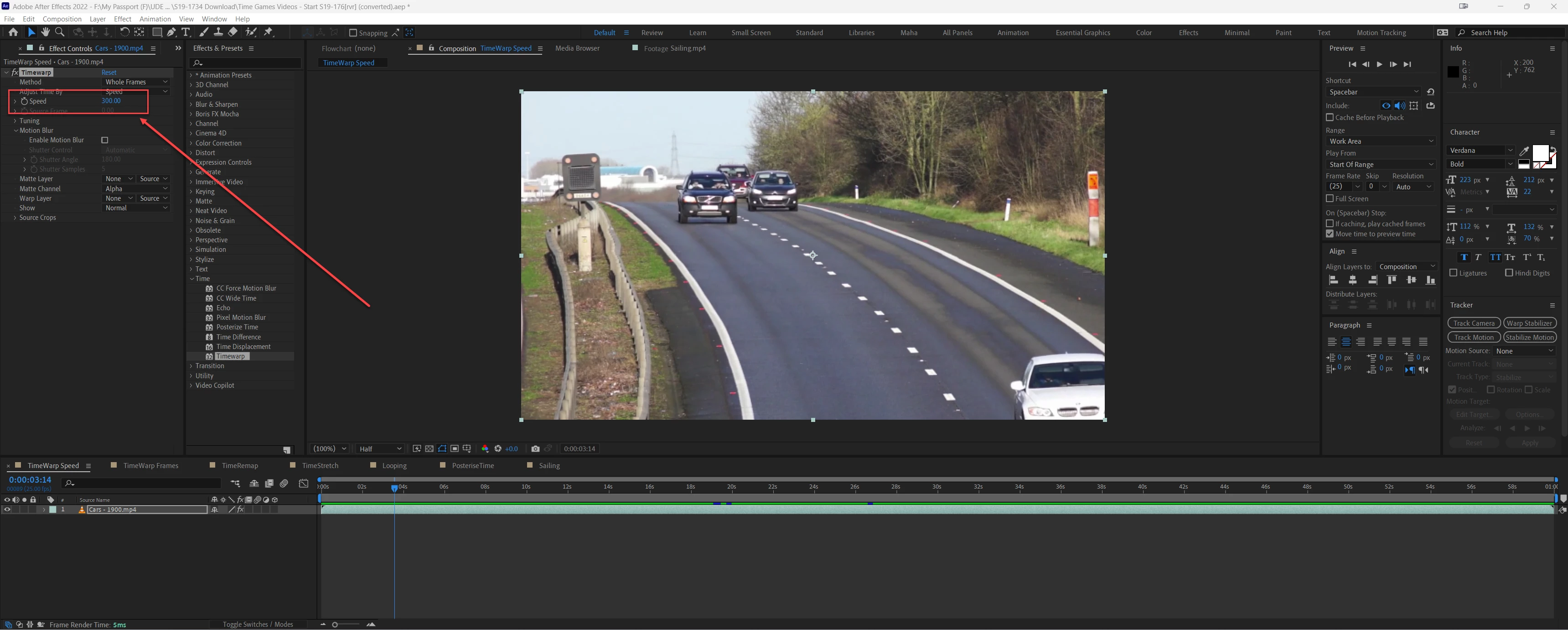
It is just saying speed. What is the unit of the speed?

This video is 25 fps & duration is 1min. When the speed increased to 300, now frame rate is 75 fps. I do not know how to calculate this without the unit of the speed.

 

This topic has been closed for replies.
Correct answer David Arbor

The "speed" parameter seems to be percent. Take a look at the Timewarp documentation: https://helpx.adobe.com/after-effects/using/time-effects.html

The "note" right below the GIF indicates that you can add motion blur to a video without changing its speed by setting the "speed" parameter to 100.

2 replies

Community Expert
October 18, 2022

Time Displacement is intended to be used with a gradient displacement layer to change the speed of only a portion of the footage or nested animated composition. If you are trying to change the playback speed of a layer, a better tool is Time Remapping or the In/Out/Duration/Stretch column in the Timeline. Activate that by selecting the third icon from the bottom left corner of the Timeline. It looks like this: {}


Playback speed is also determined in the Interpret methods for the footage. Select the footage in the Project Panel, right-click or use the File/Interpret Footage menu to access the Interpret Footage panel. 


The composition's frame rate has nothing to do with the playback speed of any footage in the composition. Matching the composition's frame rate to an even multiple of the footage's frame rate can eliminage blended frames.


Change the frame rate in the Interpret Footage panel, and you change the playback speed. If the default frame rate for footage means that one second of real-time is equal to one second of screen time. If the footage is shot at 120 fps and you conform the frame rate to 24 fps, one second of real-time becomes five seconds of screen time. 


Time Remapping and the In/Out/Duration/Stretch column respect different frame blending modes. So does a change in the frame rate using the Footage Interpretation panel. It is always a good idea to try different frame blending options, especially if you are slowing down the action.


David ArborCorrect answer
Inspiring
October 17, 2022

The "speed" parameter seems to be percent. Take a look at the Timewarp documentation: https://helpx.adobe.com/after-effects/using/time-effects.html

The "note" right below the GIF indicates that you can add motion blur to a video without changing its speed by setting the "speed" parameter to 100.

MahaB82A
MahaB82AAuthor
Legend
October 17, 2022

Thanks for the help.