Participating Frequently
February 20, 2024
Answered

Uppercase to Lowercase text animation using expressions

  • February 20, 2024
  • 2 replies
  • 1833 views

I have some text in a comp that I would like to morph from uppercase to lowercase per character/word over time using a slider control. I have managed to achieve the result in part, however all of the words are changing together rather than per character/word and I was wondering if there's a way to do this. Attached is a screen recording of the project


I have added the following expressions to the layer Source Text:
txtCase = effect("FontCase")("Slider").value;

txtColour = effect("Colour")("Color").value;

text.sourceText.style .setAllCaps(txtCase)

.setFillColor(txtColour)


Thanks very much for any tips


Harvey

This topic has been closed for replies.
Correct answer Airweb_AE


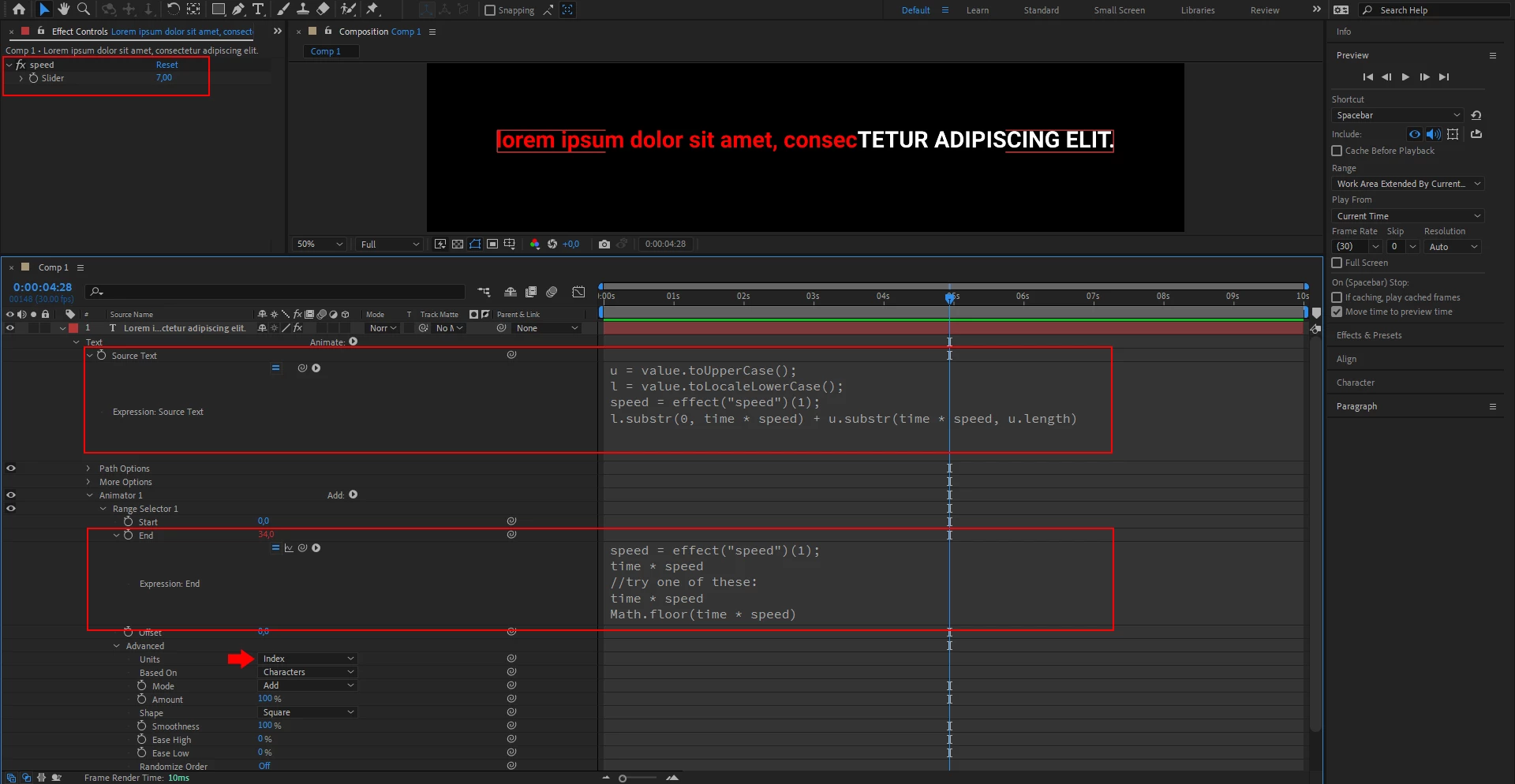
You can use source text expression and fill color text animator and 1 slider control to control the speed

Source text expression:


u = value.toUpperCase();
l = value.toLowerCase();
speed = effect("speed")(1);
l.substr(0, time * speed) + u.substr(time * speed, u.length)


Fill color text animator -> End:


speed = effect("speed")(1);
time * speed
//try one of these:
time * speed
Math.floor(time * speed)


Advanced -> Units -> set to Index


2 replies

Airweb_AECorrect answer
Brainiac
February 20, 2024


You can use source text expression and fill color text animator and 1 slider control to control the speed

Source text expression:


u = value.toUpperCase();
l = value.toLowerCase();
speed = effect("speed")(1);
l.substr(0, time * speed) + u.substr(time * speed, u.length)


Fill color text animator -> End:


speed = effect("speed")(1);
time * speed
//try one of these:
time * speed
Math.floor(time * speed)


Advanced -> Units -> set to Index


Dan Ebberts
Adobe Expert
February 20, 2024

That's a nice solution. I would advise, in general, though, against using a local variable named "speed" because most properties (including End) already have a speed attribute. This conflict can lead to hard-to-debug, unexpected results.

Participating Frequently
February 21, 2024

Hi Dan,


Thanks very much for your advice. That's good to know. I will try naming the variable something else.


Harvey

Mylenium
Brainiac
February 20, 2024

Use two layers and text animators. You are making this way too complicated and it won't work, anyway. Text style expressions always affect the whole text. It's a limitation of the process.


Mylenium

Participating Frequently
February 20, 2024

Hi Mylenium,


Thanks for your reply. I'm new to working with expressions so not familiar with their capabalities or limitations.

I did wonder if I was overcomplicating the solution, however I know there are no animation properties for in the text character panel and thought it would save time if there was one expression rather than adding lots of extra text layers to my comp.


Thanks again,


Harvey