


Inspiring
April 11, 2022
Answered

Using 'convert vertex' on motion path w/ separated dimensions

  • April 11, 2022
  • 2 replies
  • 572 views

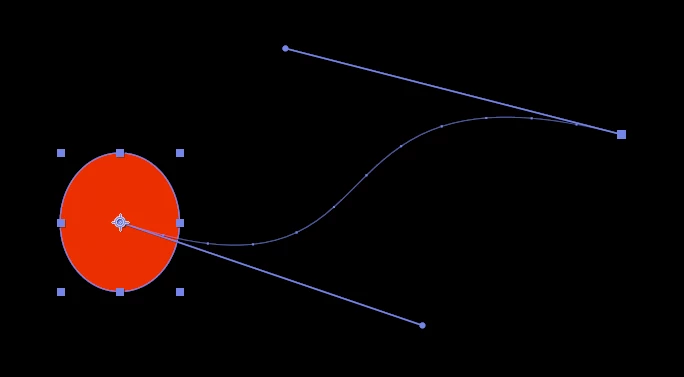
I'm able to use the 'convert vertex' tool on a motion path as per the below screengrab, but when I separate the dimensions the tool stops working... the handles disappear.


Is there a way around this? Is the only alternative to draw a path on a separate layer and paste it into the 'position' property?
 

This topic has been closed for replies.
Correct answer Rick Gerard

You cannot have a bezier handle without X and Y coordinates. Separating dimensions removes them. 


It is very rare to need to separate dimensions on a motion path. I can only think of a couple of times I have been required to do that in a project since the option became available. Please explain your design goals, and maybe we can help.

2 replies

Mylenium
Legend
April 11, 2022

Yeah, as Rick said already, you can't defeat the math. A Bèzier curve is always the result of its input components and those are by the very nature of the thing always at least two-dimensional. Whatever you have in mind wil lrequire a different appraoch. Since you seem to only want to control the motion timing along the path, that might be pre-composing and using time-remapping.


Mylenium

Rick GerardCommunity ExpertCorrect answer
Community Expert
April 11, 2022

You cannot have a bezier handle without X and Y coordinates. Separating dimensions removes them. 


It is very rare to need to separate dimensions on a motion path. I can only think of a couple of times I have been required to do that in a project since the option became available. Please explain your design goals, and maybe we can help.