


New Participant
October 13, 2020
Question

After Effects 'Checkout Item Frame Range' Crash

  • October 13, 2020
  • 1 reply
  • 1086 views

Hi there,

I'm having a bit of trouble with my After Effects. Every now and then it just crashes and I get an error message that's some version of the one below: 
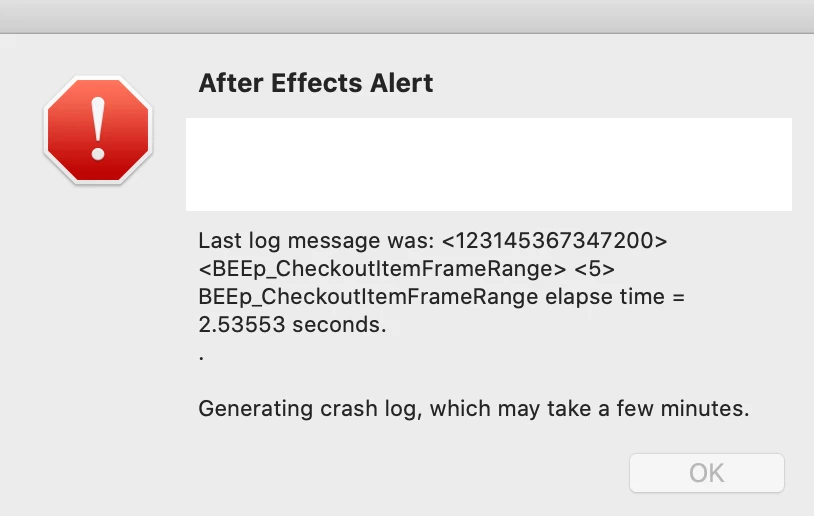


It seems to happen after I've been working for about 30mins to and hour. 

I've tried uninstalling AE, clearing all the caches and updating my laptop, but it keeps happening.  Hadn't been an issue with similar comps up until a couple of weeks ago. 

I'm running AE 17.1.4 and OSX  10.15.7

My comp is just basic animation using text, shapes and illustrator files. 


Thanks in advance for any help! 

This topic has been closed for replies.

1 reply

nishu_kush
Community Manager
Community Manager
October 13, 2020

Hi Andreas5CCB,


Sorry for your issue. We'd need more details so that we can troubleshoot the issue properly.

  1. What are your system specifications (CPU, GPU, RAM)?
  2. Do you see any crash reports? If so, please share.
  3. Is there a specific action/command that triggers the crash?

We're here to help, just need more info.


Thanks,

Nishu

New Participant
October 14, 2020

Hey Nishu,

I'm having the same problem. Latest version of AE and OSX

Specs:

  • CPU: 2.6 GHz 6-Core Intel Core i7
  • GPU: Intel UHD Graphics 630 1536 MB
  • RAM: 16 GB 2400 MHz DDR4

Crash reports: None found

Specific action: Not that I can tell