


robertuso93773757
New Participant
December 1, 2016
Answered

All footage disappears after extending composition duration

  • December 1, 2016
  • 3 replies
  • 7503 views

Hi,

I hope this problem has a relatively simple answer.

I am creating an animated infographic and I had orginally set the composition to be 30s long.

Near completion of the animation I realised that it needed to be longer so I went to the composition settings and extended the duration to 90s.

However, after the extension the video still plays as normal until the 30s when everything just disappears and the composition reverts to its background colour.

How do I get everything to remain in place from 30s to the complete 90s?
This topic has been closed for replies.
Correct answer Roei Tzoref

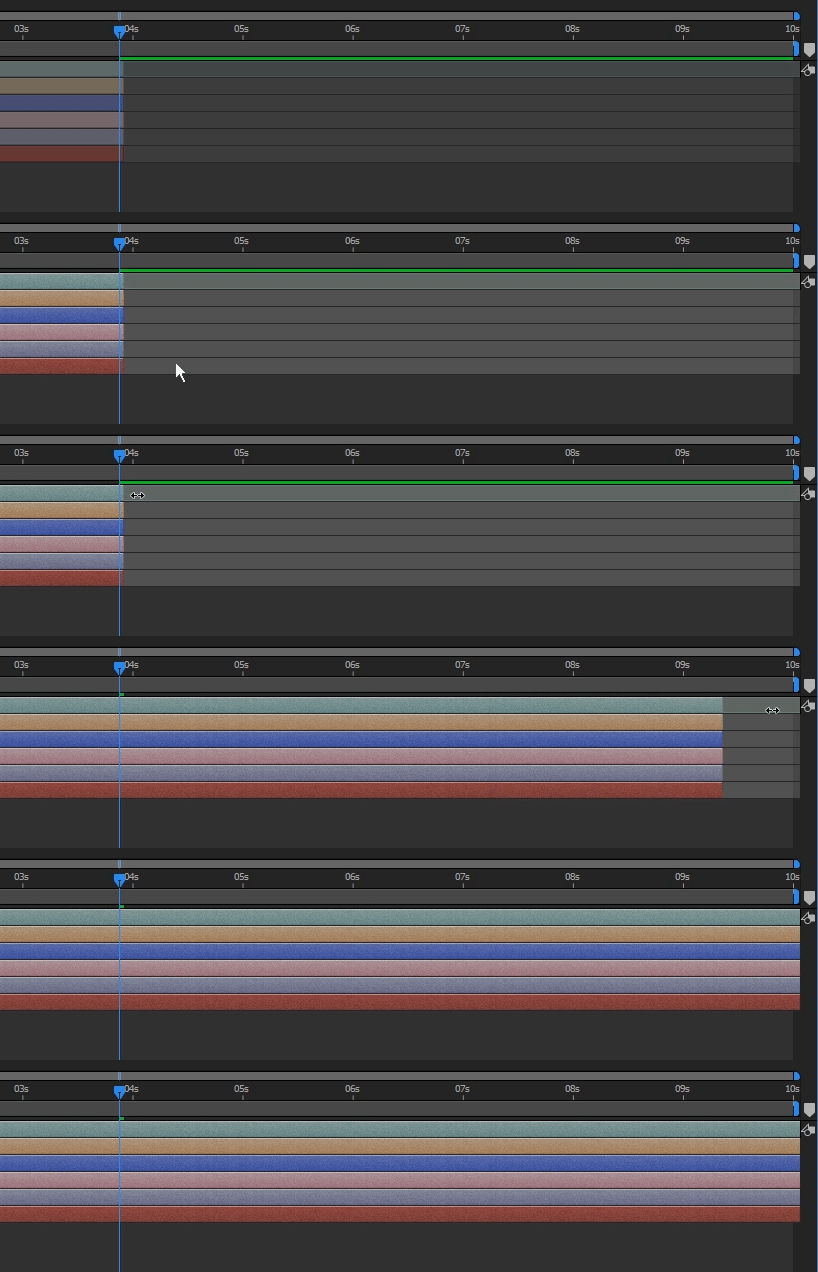
do this:

select All layers - Ctrl/Cmd + A

now manually drag the layers by the edge to the end of your duration

3 replies

Participating Frequently
August 7, 2023

I have had a simlar issue. I've extended every composition from 0:01:00:00 to 0:04:00:00 and have gone through and confirmed that every 1. individual image, 2. the base composition for the photo, 3. Each camera, position, wiggle and solid 4. the composition 'frames' I created for the images, have all been extended via their comp settings, and extended via the actual duration slider. 


Even so, the images disappear after the 0:01:00:00 mark, despite being visible along the whole length of the 0:01:00:00 timeline. Any assistance would be fab!

New Participant
August 7, 2023
I never found a solution. I had to start over from scratch.
Known Participant
February 17, 2017

Hooray. All good. Finally worked it all out. When you're just starting out in after effects, things can get a little bit messy. Hugh learning curve, but that's what it all about, learning and having fun.

Szalam
Community Expert
February 21, 2017

Glad you got it sorted!

Roei Tzoref
Brainiac
December 1, 2016

when you extend the duration, you have to actually extend the layers too... make sure the layers are all the way stretched to the end of the duration.

robertuso93773757
New Participant
December 1, 2016

How do I do this for shapes and Text as well? There is no Open Layer option for me to find.

Roei Tzoref
Roei TzorefCorrect answer
Brainiac
December 1, 2016

do this:

select All layers - Ctrl/Cmd + A

now manually drag the layers by the edge to the end of your duration