


Eccentric_videography98A4
New Participant
November 28, 2018
Answered

How to center triangle anchor point on layer level?

  • November 28, 2018
  • 2 replies
  • 3832 views

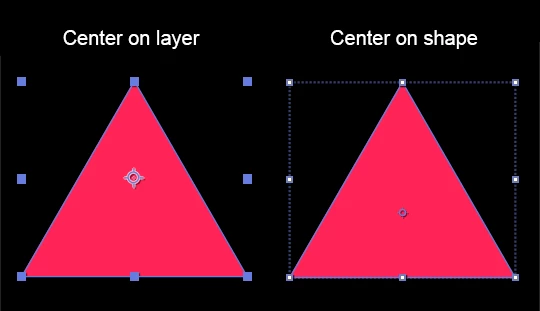
I can't seem to find any solution to this. I know the shortcut to get your anchor point centered in the middle (on the left). But in case of a triangle that is not the actual center of the shape. The one on the right is. But that is centered in the shape itself.

How can I have the same spot on layer level without doing it manually because that's difficult to get 100% perfect?

So I can rotate my layer and my triangle will do a perfect rotation around its own middle... Hope anyone can help me, thank you!
This topic has been closed for replies.
Correct answer OussK

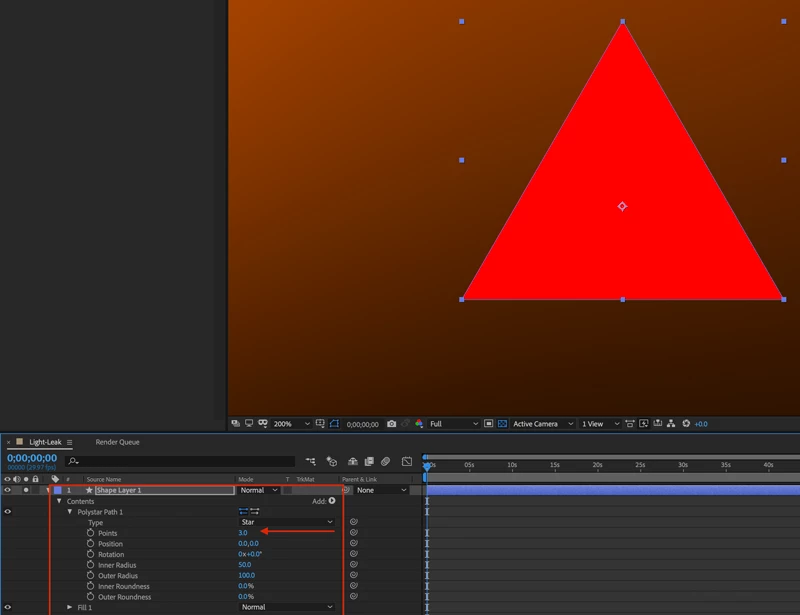
Create new shape layer (empty) , inside this shape layer create a new polystar, now change the points to 3 and you will get a triangle with perfect anchor point.

2 replies

OussK
Adobe Expert
November 28, 2018

it must be same for triangle and for layer, i tested, just be sure to follow same step i explain before. create your triangle inside a empty shape layer.

Eccentric_videography98A4
New Participant
November 28, 2018

My apologies! Seems to be the fix! Weird but very hulpful, thank you so much! :-)

OussK
OussKCorrect answer
Adobe Expert
November 28, 2018

Create new shape layer (empty) , inside this shape layer create a new polystar, now change the points to 3 and you will get a triangle with perfect anchor point.

Eccentric_videography98A4
New Participant
November 28, 2018

That's what I have on the right image. But I need the position of that anchor point on layer level (left image)...