


New Participant
January 6, 2019
Answered

How to enable GPU acceleration

  • January 6, 2019
  • 3 replies
  • 23775 views

Hello,

I'm using CC 2019 but when I try to use some VR effect, I have this red banner saying that I need to activate GPU acceleration.

My computer has two GTX980 with SLI, Cuda v10 is install and I don't see any option to turn things on.

There is the paste from GPU information.

Ebauche rapide : Disponible

Mémoire de textures : 3257,00 Mo

Lancer de rayon : GPU

OpenGL

Fournisseur : NVIDIA Corporation

Périphérique : GeForce GTX 980/PCIe/SSE2

Version : 2.1.2 NVIDIA 417.35

Mémoire totale : 7,85 Go

Modèle d’ombrage : 4.0 ou plus récent

CUDA

Version du pilote : 10.0

Périphériques : 2 (GeForce GTX 980, GeForce GTX 980)

Mémoire utilisable actuelle : 6,52 Go (au lancement de l’application)

Mémoire utilisable max. : 8,00 Go

Thank you very much.
This topic has been closed for replies.
Correct answer imeilfx

To turn on GPU acceleration you have to:

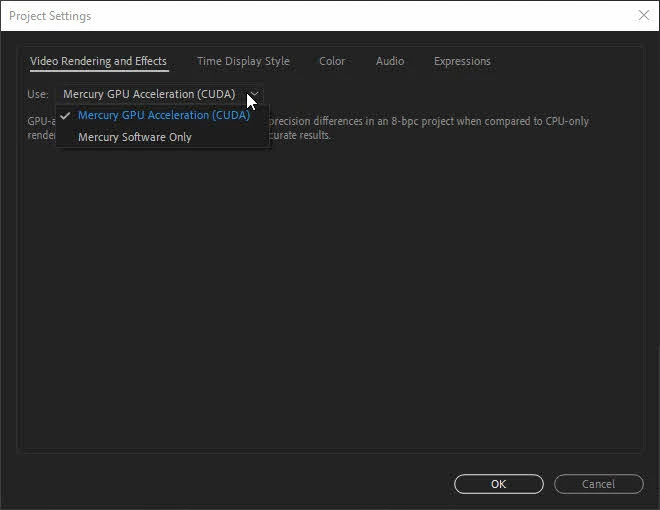
Go to "File>Project Settings" and enable Use: Mercury GPU Acceleration


As for usin GPU in SLI as was said before - AE is not to good with SLI and will not use it and to be honnest - do not need it. AE is mostly CPU intensive so most of semi decent GPU in single mode will work moslty on 20-50% of power avaliable.

3 replies

artyh12252942
New Participant
August 18, 2020

mine was on software only but i changed it to cuda which solved the problem

Operating System: Windows 10 Pro 64-bit
System Manufacturer: LENOVO
System Model: 10SQ002LUK
Processor: Intel(R) Core(TM) i7-8700 CPU @ 3.20GHz (12 CPUs), ~3.2GHz
Memory: 16384MB RAM

imeilfx
imeilfxCorrect answer
Inspiring
January 9, 2019

To turn on GPU acceleration you have to:

Go to "File>Project Settings" and enable Use: Mercury GPU Acceleration


As for usin GPU in SLI as was said before - AE is not to good with SLI and will not use it and to be honnest - do not need it. AE is mostly CPU intensive so most of semi decent GPU in single mode will work moslty on 20-50% of power avaliable.

ToolfarmJP
Community Expert
January 7, 2019

Hello,

I would doubt After Effects supports SLI. I would recommend you disable SLI and launch After Effects.