


Known Participant
March 12, 2021
Question

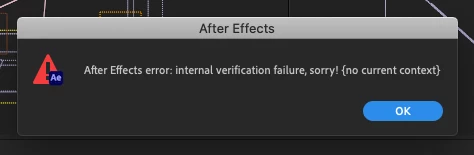
Internal verification failure?!
  • March 12, 2021
  • 3 replies
  • 483 views

Sorry, but WTF does it mean? This started happening after the update to AE 18. Could it be a third-party plugin issue or what? My project seems to work, but I haven't checked every comp in it yet, as it's quite large...

Thanks in advance for any help,


Mikołaj

This topic has been closed for replies.

3 replies

Community Manager
April 14, 2021

Hi all,

We appreciate you troubleshooting the issue, sharing suggestions and implementing them too. This is the intent behind creating the community. Having said that, we're sorry for the issue. We'll look into this.

Adobe has recently released a new version of After Effects. Would you mind giving it a try?

Let us know.


Regards,

Shivangi

Known Participant
March 17, 2021

Yup, same error here. Must be a bug with 18.


So far I've tried:

- Turning off GPU completely

- Restarted GPU

- Clearing cache

- Cleaning database

- System restart


For me, the error occurs after I restart AE following a crash caused by attempting to copy layers between comps. I go one comp, copy some layers, switch to comp 2 and the app stops responding and doesn't recover. I force quit and when re-opening the project get the verifaction failure error.


After Effect 18 (Build 39)

Mylenium
Brainiac
March 13, 2021

It means your hardware acceleration isn't working properly. Impossible to say more since you haven't bothered to provide any system information or other details. Start by turning off hardware acceleration in the prefs.


Mylenium

Known Participant
March 17, 2021

Hi Mylenium,

Sorry for not posting any system info - I have written several posts on this forum at more or less the same time and, though I've included my system info in the other ones, I indeed have forgotten to do this in this one 🙂

There it is: MacBook Pro mid-2015, Intel Iris Pro with 16GB RAM, Mac OS X 10.15.7

It also seems you are right regarding the hardware acceleration, since my other problem with AE 18 is Real-time Draft 3D not working properly  It's more than likely that this is a hardware issue - but how do I fix this, if this is possible at all?

Thanks a lot for your answer,

Mikołaj