natashas12686874
Participant
February 4, 2018
Answered

LoopOut Composition not working

  • February 4, 2018
  • 1 reply
  • 24760 views

First off, apologies as I am still getting the hang of After Effects.

So my project/main comp is 2 mins 54 seconds long (because of the song I have in it). I have a 6 second composition in it that loops perfectly - as in it loops perfectly within a 6 second period. I'm trying to get this to loop throughout the whole project. I used a guide that has helped me in the past with looping a composition, followed it by enabling time remapping, going to the last keyframe, going 1 frame backwards, setting a new keyframe, going back to the last keyframe, setting the time to 0 and deleting it, adding the expression loopOut(type = "cycle", numKeyframes = 0) to the 2 keyframes, then dragging the comp all the way to the end of my project. However this doesn't seem to work and I'm unsure why as this has worked for me in the past, only difference being (as far as I know, I keep looking but don't see anything else different) was that my last project was 60 FPS and this one is 29.97 FPS.

I'm not having a black frame issue, it's just not looping correctly. The end frame isn't the same frame that is at the end of the 6 second comp. Am I wrong to think 6 seconds comp looped into a 2 min 54 sec main comp should work perfectly? Going to feel stupid if my math was wrong since I've been trying to figure this out for hours. I have the project set to 29.97 fps so I'm wondering if that's my issue as well. Overall, I'm confused and would really appreciate some insight so I don't repeat whatever mistake it is that I'm making in the future.

Unsure what else to add aside from I'm running the latest version of After Effects.

Thank you.

Correct answer Roei Tzoref

Right so I did exactly as you said and it works perfectly right until the very end. I noticed something odd and I'm unsure how to explain it so I'll use images.

Result of 6 sec comp after doing what you said:

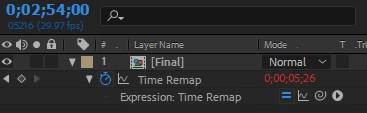
Then I noticed that at the very end of my main comp it's at this time/frame:

Shouldn't it be at 0;00;00;00? I'm assuming this is why it's not looping correctly? I thought that a 6 second comp would go into 174 seconds or am I looking at this the complete wrong way? Sorry to be a pain, just very confused. Thanks for both of your help.


then you want a loop over a loop and not a loop after a loop, and you should delete the last keyframe (as Rick suggested) and you will be fine.

this is loop over a loop (loopOut with 2 keyframes):

1st loop: 00:00-06:00 - precomp ranging from 00:00-06:00

2nd loop: 06:01-12:00 - precomp ranging from 00:01-06:00

3rd loop: 12:01-18:00 - precomp ranging from 00:01-06:00

as you can see, you are always skipping the first frame of your precomp.

this is loop after a loop (loopOut with 3 keyframes):

1st loop: 00:00-06:00 - precomp ranging from 00:00-06:00

2nd loop: 06:01-12:01 - precomp ranging from 00:00-06:00

3rd loop: 12:02-18:02 - precomp ranging from 00:00-06:00

this is as if you did this, all your frames in the precomp get played, but there is a shift in time because you are playing a sequence and right after playing another - there is a frame offset in the playback.

1 reply

Roei Tzoref
Legend
February 4, 2018

to make a perfect exact loop do this:

1. create the TR keyframes

2. go to one frame before the last frame and create a keyframe

3. copy the first keyframe over the original last keyframe.

4. add this expression loopOut()

done.

Community Expert
February 5, 2018

Do what Roei said. You are over complicating things. I don't know where you got the idea you needed to reset the last keyframe to zero but it sounds like it was from somebody that did not understand AE. The frame rate of the comp has nothing to do with anything. Time remapping is based on time and loopOut() and the first frame of your loop as a keyframe and the last frame of your loop are all you need. The confusion happens because Time Remapping sets the last keyframe after the last frame has played back so you end up seeing it.

Using the keyboard:

  1. Alt/Option + Ctrl/Cmnd + t to enable time remapping and extend the layer's out point to the length of the current comp.
  2. k to move to the last time remapping keyframe
  3. Ctrl/Cmnd + left arrow to move back one frame
  4. Click the Add Remove Keyframe diamond to insert a new keyframe at the start of the last frame
  5. press k to move to the last keyframe
  6. Click the Add Remove Keyframe diamond to remove the last keyframe
  7. Alt/Option + click the Time Remapping stopwatch to add an expression
  8. type loopOut() and click anywhere to enable the expression

If your looping comp is exactly the right length when you apply time remapping to the comp your loop will be perfect.

Roei Tzoref
Roei TzorefCorrect answer
Legend
February 5, 2018

Right so I did exactly as you said and it works perfectly right until the very end. I noticed something odd and I'm unsure how to explain it so I'll use images.

Result of 6 sec comp after doing what you said:

Then I noticed that at the very end of my main comp it's at this time/frame:

Shouldn't it be at 0;00;00;00? I'm assuming this is why it's not looping correctly? I thought that a 6 second comp would go into 174 seconds or am I looking at this the complete wrong way? Sorry to be a pain, just very confused. Thanks for both of your help.


then you want a loop over a loop and not a loop after a loop, and you should delete the last keyframe (as Rick suggested) and you will be fine.

this is loop over a loop (loopOut with 2 keyframes):

1st loop: 00:00-06:00 - precomp ranging from 00:00-06:00

2nd loop: 06:01-12:00 - precomp ranging from 00:01-06:00

3rd loop: 12:01-18:00 - precomp ranging from 00:01-06:00

as you can see, you are always skipping the first frame of your precomp.

this is loop after a loop (loopOut with 3 keyframes):

1st loop: 00:00-06:00 - precomp ranging from 00:00-06:00

2nd loop: 06:01-12:01 - precomp ranging from 00:00-06:00

3rd loop: 12:02-18:02 - precomp ranging from 00:00-06:00

this is as if you did this, all your frames in the precomp get played, but there is a shift in time because you are playing a sequence and right after playing another - there is a frame offset in the playback.