Exit
  • Global community
    • Language:
      • Deutsch
      • English
      • Español
      • Français
      • Português
  • 日本語コミュニティ
  • 한국 커뮤니티
0

My 3d layer acts weird when it rotates or scale is changed. (Need help)

Community Beginner ,
Aug 02, 2019 Aug 02, 2019

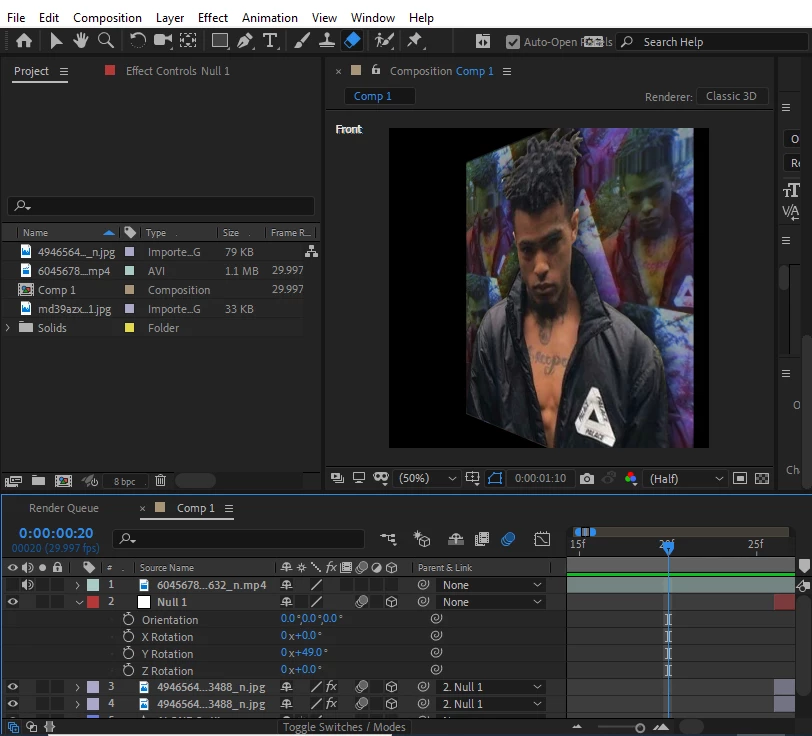
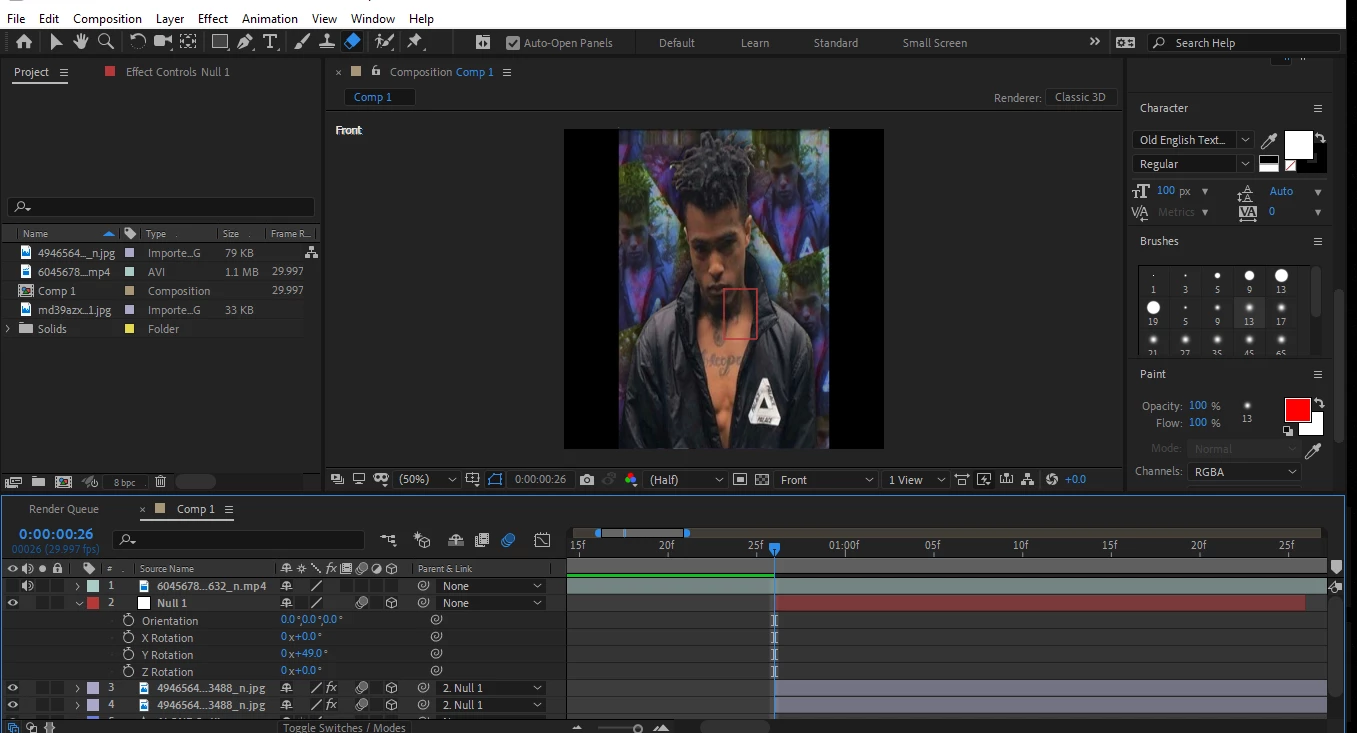
(ADOBE AFTER EFFECTS CC 2019) When ever I turn on 3d layer its normal but when i change any of the X or Y positions or rotation it looks like it would be stretching then closing in. When I press space to preview it, it shows how it is supposed to look like.           
after effects.PNG1st one glitched.

after effects 2.PNG2nd one the right way its supposed to be.

( PLEASE HELP )   
4.0K
Translate
Report
Community guidelines
Be kind and respectful, give credit to the original source of content, and search for duplicates before posting. Learn more
community guidelines

correct answers 1 Correct answer

Mentor , Aug 03, 2019 Aug 03, 2019

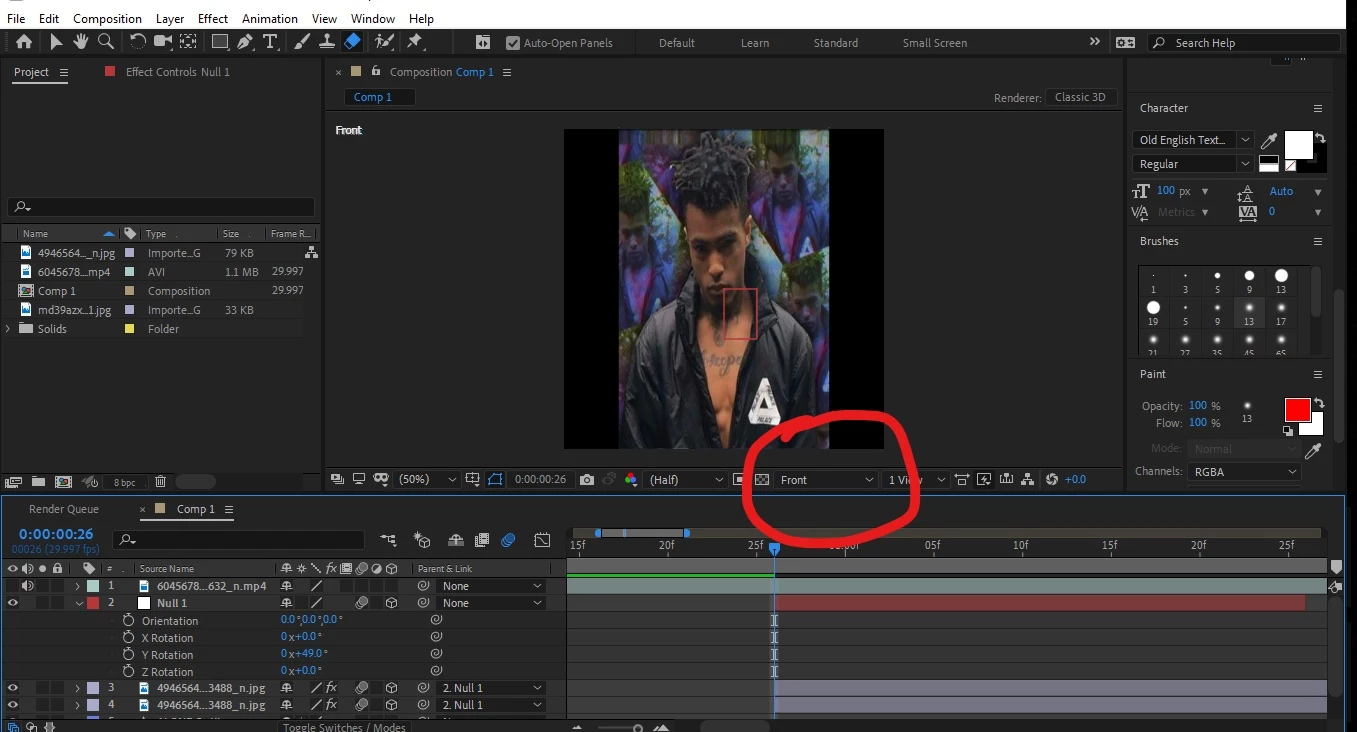
You miss the camera view setting.

In your comp-panel, the view is set to front:

Inkedafter+effects_LI.jpg

This is a view for creation process. When you preview render or final render, it renders the camera-view, which is whatever you set up, or some default when there is no camera-layer in comp.

To see what the final outcome will look like, just change front-view to - I think - active camera. Play around with the views to gt a feeling for it.

*Martin

Translate
Mentor ,
Aug 03, 2019 Aug 03, 2019

You miss the camera view setting.

In your comp-panel, the view is set to front:

Inkedafter+effects_LI.jpg

This is a view for creation process. When you preview render or final render, it renders the camera-view, which is whatever you set up, or some default when there is no camera-layer in comp.

To see what the final outcome will look like, just change front-view to - I think - active camera. Play around with the views to gt a feeling for it.

*Martin

Translate
Report
Community guidelines
Be kind and respectful, give credit to the original source of content, and search for duplicates before posting. Learn more
community guidelines
Community Beginner ,
Aug 03, 2019 Aug 03, 2019

Thank you so much!

Translate
Report
Community guidelines
Be kind and respectful, give credit to the original source of content, and search for duplicates before posting. Learn more
community guidelines
Guide ,
Aug 03, 2019 Aug 03, 2019

Check your camera is set to one or 2 node

This makes a huge difference.

So basically when you create a new camera you will see the option 2 choose a single or 2 node camera

This camera option affects all 3D layers in a dramatic way.

Try 2 node. Should solve your issues

Mo

Translate
Report
Community guidelines
Be kind and respectful, give credit to the original source of content, and search for duplicates before posting. Learn more
community guidelines
Community Expert ,
Aug 03, 2019 Aug 03, 2019

Mo Moolla , There is no difference in the perspective between a 2 node camera and a 1 node camera. The only difference is in how you point the camera. The reason that the OP's view looks weird is that it is an isometric view - there is no perspective.

Any view other than Active Camera is an isometric view. NO perspective. Perspective is controlled by camera position, framing by focal length. It's that way in the real world, it's that way in AE's virtual camera. If your view does not say Active Camera it will not render. If your view says Camera 1 or any other camera in the comp, only the top camera in the timeline will be chosen as the active camera. If you want the other cameras to render you have to move them to the top of the timeline. If. you want to cut between cameras you have to set in and out points for the camera layers.

All of this is explained in the User Guide.

What is an isometric view?

Translate
Report
Community guidelines
Be kind and respectful, give credit to the original source of content, and search for duplicates before posting. Learn more
community guidelines
New Here ,
Oct 26, 2024 Oct 26, 2024
LATEST

Just Change the camara rendere from 4D cinema to 3D

Translate
Report
Community guidelines
Be kind and respectful, give credit to the original source of content, and search for duplicates before posting. Learn more
community guidelines