


Participating Frequently
December 22, 2016
Answered

Problem - 100% Disk Activity When Caching

  • December 22, 2016
  • 2 replies
  • 14109 views

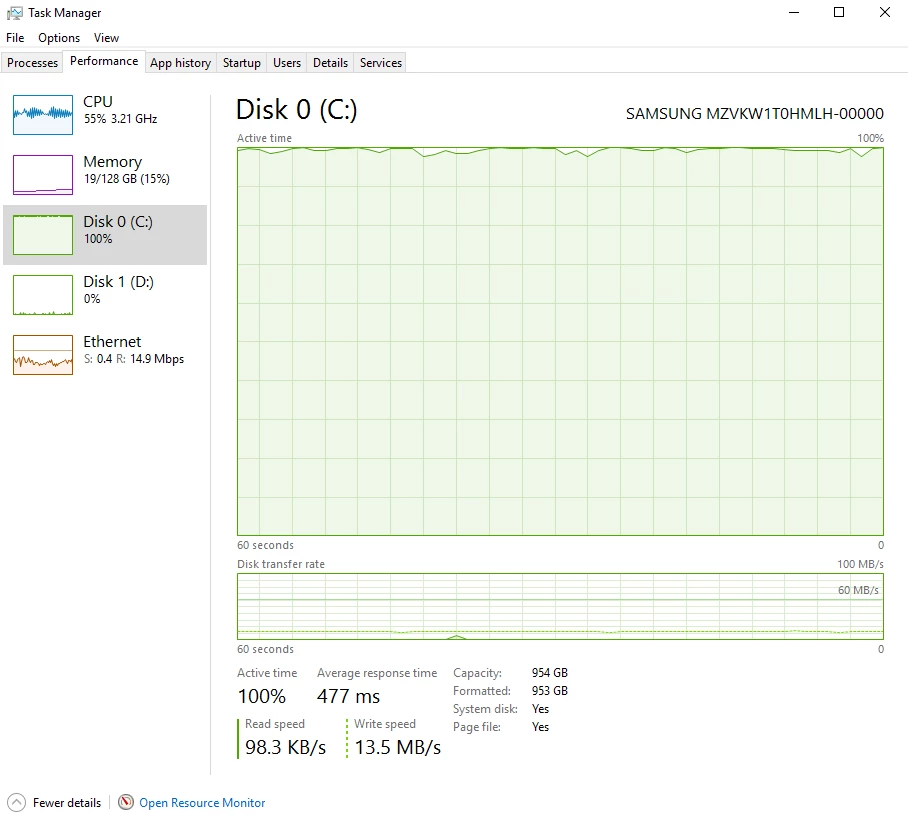
Hi, I am having a problem where the activity of the SSD raises to 100% when I am caching, while its write and read speeds remain very low.

All the other peripherals (cpu, memory, etc) are barely used.

I tried to move the cache to different drives and it happened on all drives. On other pcs the disk activity is usually in sync with the read and write speeds.

Also, sometimes the disk goes to 100% even by just opening AE and not rendering, etc and once I stop rendering/caching it remains at 100% for a long time.
Specs:

Windows 10

128gb Ram

6950x i7

sm 961 samsung SSD

Tested on multiple AE versions, with same result.

Anyone has a solution? Thanks!

This topic has been closed for replies.
Correct answer Mylenium

Ah, ok. I have generated some csv files as you suggested. You can find them in this dropbox folder: Dropbox - SSD Problem


Sorry, but this is inconclusive. As far as AE is concerned I see no trace of excessive I/O activity, so this is something that's triggered indirectly. The files in your logs should not even make a blip ond your SSD. Most likely this is some driver or CoDec issue where your system waits forever until something is initialized and keeps the respective files and registry keys open indefinitely. I'd start by checking your device manager and the associated logs in the event viewer. I'd imagine there are some warning sign icons somewhere.

Mylenium

2 replies

New Participant
May 7, 2018

same issue...used CCcleaner to clean the registry, installed latest driver from the SDD manufacturer...that fixed it...
960 evo pro.

1950x/1080ti/

New Participant
January 3, 2021

Done all that, and still the driver where is the AE cache is peaking at 100%, tried everything that is above, removing the plug-ins, using differents version of AE but nothing fixed it, i'm trully desperate 

LUMA_creative
New Participant
January 24, 2022

Same problem with my disk cache. I have it located on a Samsung 980 pro SDD drive, separate from the system drive and the file drive. I think with this hard drive I shouldn't have any problems, but even with updated drivers there is no way after effect will work properly. Eternal render times. I am also desperate. Did you find the solution for this problem? 


Mylenium
Braniac
December 22, 2016

Not sure what you are asking. This sounds more like a driver and configuration problem that is beyond AE. Either way, such crude statistics are of no use. you have to employ advanced monitoring tools to track down such file I/O issues. To me it looks like you need to start by checking your user folders. The behavior could well be related to temp files and preferences, not just the cache.

Mylenium

Participating Frequently
December 22, 2016

Hi Mylenium, Thank you for your reply!

Do you have any suggestions on how to monitor this better? I am quite illiterate when it comes to the such problems :/

Mylenium
Braniac
December 22, 2016

Download Sysinternals'/ Microsoft's Process Monitor utility, set its filtering to the AfterFX.exe and monitor the file I/O One of the calls is going to spike and that will tell you what's wrong. Feel free to post pertinent screenshots on the forum. I'm sure we can figure it out somehow.

Mylenium