


New Participant
December 20, 2019
Answered

Random Numbers animating to letters After Effects Animation Workaround

  • December 20, 2019
  • 3 replies
  • 8766 views

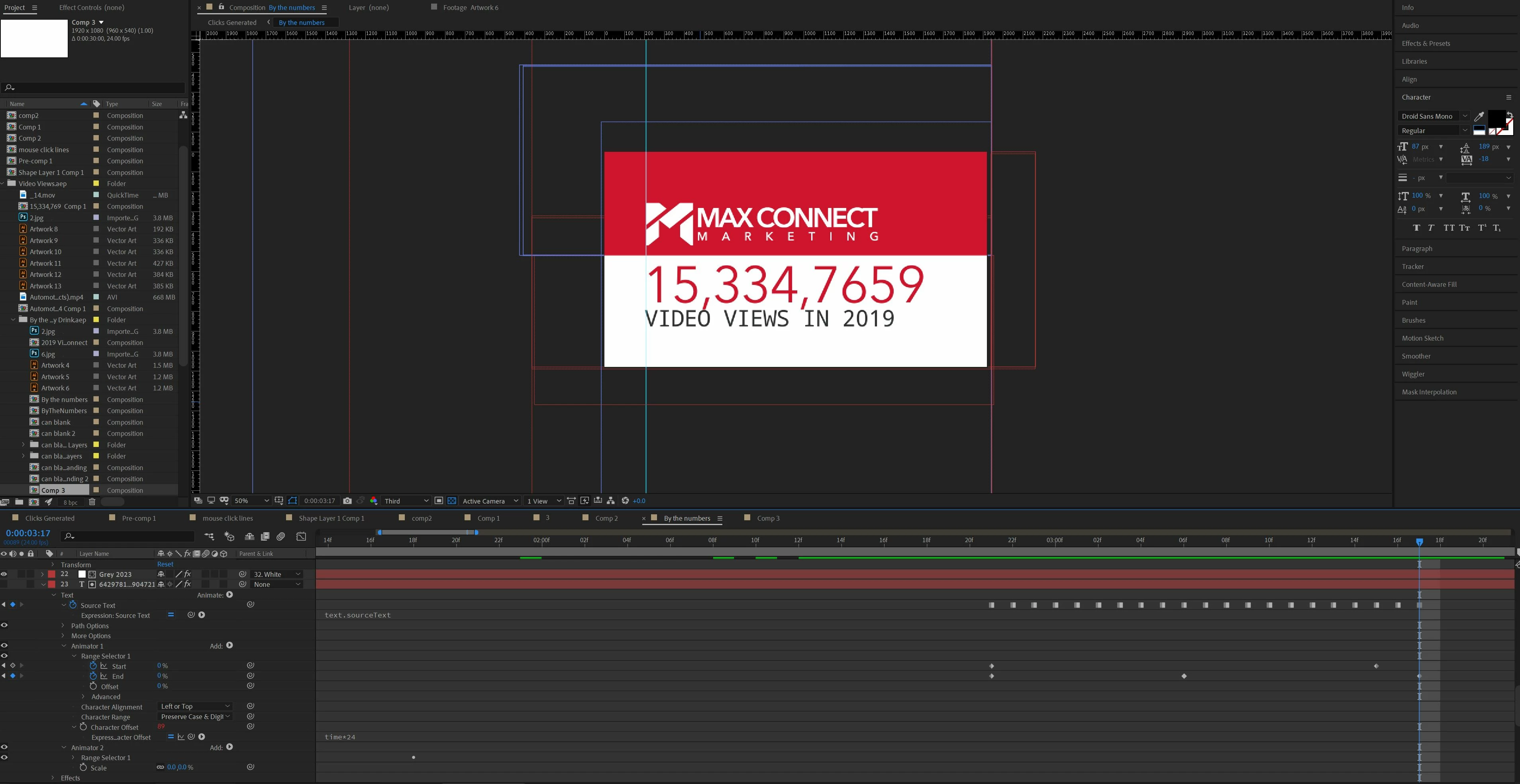
I am making an animation for work and found a way to get the below words "Video Views in 2019" to animate from random numbers to the actual source text I want. I wanted to know if there is a simpler workaround to doing this a lot faster. What I did was made the same number of characters as the source text, added an animator-range selector, then made the expression for the offset time*24, then I added a second animator-scale to add the numbers one at a time right to left. then I changed the source text one letter at a time, while changing the range of characters being randomized fram by frame. Until the phrase I wanted came in. The project is related to numbers so I wanted it to be only numbers until the actual text . Is there a workaround to make this a lot easier? I got the idea for this way from this youtube video: https://www.youtube.com/watch?v=1WZy_O_kJ_Y

This topic has been closed for replies.
Correct answer Mike_Abbott

You're in luck : )

Here's an alternative approach - but it has a few limitations:

1. Requires a mono-spaced font.
2. Single line of text - doesn't work with line breaks or blocks of text.
3. Designed to work with opacity. (Range selector > Advanced > Smoothness can be any value.)
4. It's a two layer solution.

If that meets your needs - it may be a little faster in use.


On the positive side:
Any style or text changes made to the text layer will automatically update the number layer : )


Here's what to do:

1. Set your text and animate this with a text animator as normal.
2. Duplicate the layer.
3. On the lower layer:

          Set: Animator 1 > Range selector > Advanced > Mode : subtract

          Paste this expression into the Text > Source text property


posterizeTime(5); // for fps of random number change
txtLen = thisComp.layer(index-1).text.sourceText.length;
txtAll = "";
for (var i = 0; i < txtLen; i++ ) {
txt = Math.floor(random(0,9))
txtAll += txt
} 
thisComp.layer(index-1).text.sourceText.style.setText(txtAll)


Adjust the posterizeTime property to taste.


Optional: you may want to parent the lower layer to the main layer so that any changes to to the parent layer's position, scale and rotation are matched by the number layer.

3 replies

Mike_Abbott
Mike_AbbottCorrect answer
Legend
December 23, 2019

You're in luck : )

Here's an alternative approach - but it has a few limitations:

1. Requires a mono-spaced font.
2. Single line of text - doesn't work with line breaks or blocks of text.
3. Designed to work with opacity. (Range selector > Advanced > Smoothness can be any value.)
4. It's a two layer solution.

If that meets your needs - it may be a little faster in use.


On the positive side:
Any style or text changes made to the text layer will automatically update the number layer : )


Here's what to do:

1. Set your text and animate this with a text animator as normal.
2. Duplicate the layer.
3. On the lower layer:

          Set: Animator 1 > Range selector > Advanced > Mode : subtract

          Paste this expression into the Text > Source text property


posterizeTime(5); // for fps of random number change
txtLen = thisComp.layer(index-1).text.sourceText.length;
txtAll = "";
for (var i = 0; i < txtLen; i++ ) {
txt = Math.floor(random(0,9))
txtAll += txt
} 
thisComp.layer(index-1).text.sourceText.style.setText(txtAll)


Adjust the posterizeTime property to taste.


Optional: you may want to parent the lower layer to the main layer so that any changes to to the parent layer's position, scale and rotation are matched by the number layer.

Mike_Abbott
Legend
December 21, 2019

The problem with decoder fade in is that the OP wants to transition from numbers only.
I remember writing a little expression to do this some time ago - a different approach to Mikey's solution. My solution had two limiations: It needs a monospaced font, and it's a two layer solution. If those restrictions are OK for you let me know - post a reply here. I can't promise I'll be able to find it, but I'll have a look.

Justin Taylor-Hyper Brew
Community Expert
Community Expert
December 20, 2019

The simplest way is using the "Decoder Fade In" text animation preset. This has its limitations of course, so if you need something more then you'll need to use expressions.