

Answered
Strange behavior of the Effect Controls panel
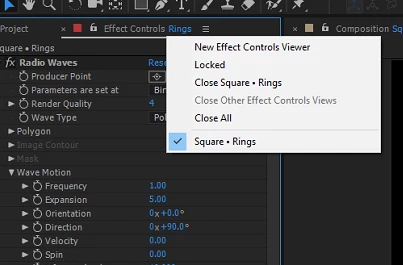
This is what it should be like. But if you choose to close the effect control for the current layers and then select the layer again.
It will turn into this.

Aren't they supposed to be the same?

This is what it should be like. But if you choose to close the effect control for the current layers and then select the layer again.
It will turn into this.
Aren't they supposed to be the same?
It looks like you have found a bug. If you view that menu once, then select any other layer you won't see the layer name selected at the bottom. If you narrow the ECP you should bet a >> icon on the left. Click on that icon and you have the ability to see the selected layer even if the ECP is locked. If you have locked an ECP and have opened up another one for different layers the >> icon will give you the option to choose between the two.
As I think of it I think this is less of a bug than an incomplete redesign of the UI. I've never used the list at the bottom to get to another ECP.
Already have an account? Login
Enter your E-mail address. We'll send you an e-mail with instructions to reset your password.
 AdChoices