FlexAce
Inspiring
November 13, 2018
Answered

Use Repeater With Shade/Color Variations?

  • November 13, 2018
  • 1 reply
  • 5157 views

I would like to animate a brick wall being built
I can do it with a couple of repeaters, but all of the bricks are the same color.

Any hints on how to randomly slightly vary the colors?
Or hints on how I might do it another way?

    This topic has been closed for replies.
    Correct answer Rick Gerard

    More than one rectangle, more than one repeater, and a little math. You can do it all with one shape layer. It would look like this for a brick that was 200 X 90 pixels. Just add a repeater use math to calculate the offsets, animate the copies, animate the number of copies, then group the rectangles, duplicate the group (Ctrl/Cmnd + D) and offset the keyframes and values to create your wall.

    Your first group would look like this:
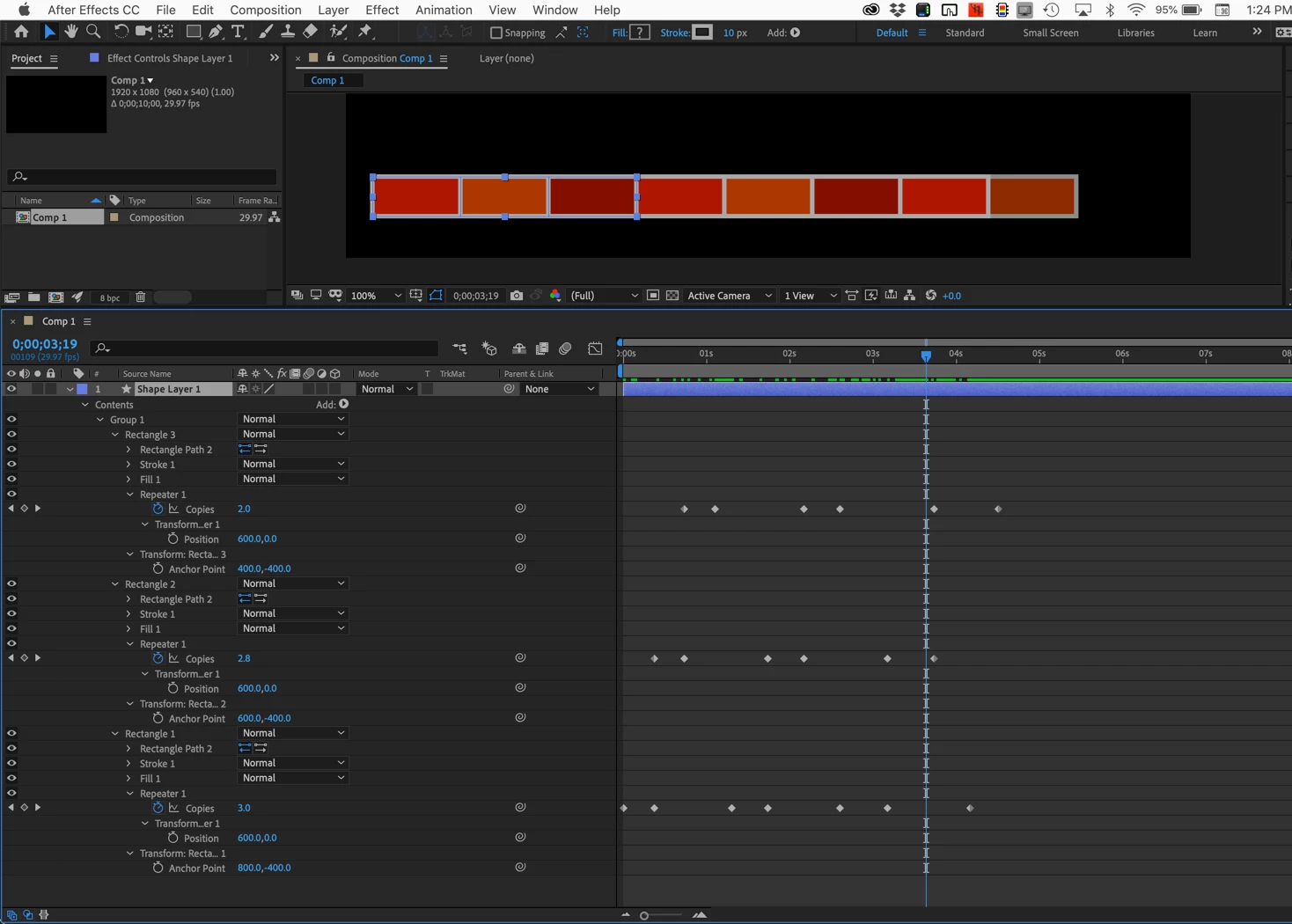
    You can fiddle with offsets and numbers of copies for each rectangle in each group to generate a seemingly random wall.

    The other option would be to just use a single rectangle shape layer and then use a script that aligned layers and randomize the color values with a simple random number function and a linear method. Then just set the in and out point to a few frames, sequence the layers, and reset all out points to the end of the comp. That would build your wall with little or no keyframing.

    I hope this helps.

    I just thought of another method. You could take an existing image of a brick wall and apply Card Dance, line up the rows and columns to match the image, then use Card dance to animate the opacity of each layer card based on a gradient.

    There are a lot of ways to skin this cat.

    1 reply

    Rick GerardCorrect answer
    Community Expert
    November 13, 2018

    More than one rectangle, more than one repeater, and a little math. You can do it all with one shape layer. It would look like this for a brick that was 200 X 90 pixels. Just add a repeater use math to calculate the offsets, animate the copies, animate the number of copies, then group the rectangles, duplicate the group (Ctrl/Cmnd + D) and offset the keyframes and values to create your wall.

    Your first group would look like this:

    You can fiddle with offsets and numbers of copies for each rectangle in each group to generate a seemingly random wall.

    The other option would be to just use a single rectangle shape layer and then use a script that aligned layers and randomize the color values with a simple random number function and a linear method. Then just set the in and out point to a few frames, sequence the layers, and reset all out points to the end of the comp. That would build your wall with little or no keyframing.

    I hope this helps.

    I just thought of another method. You could take an existing image of a brick wall and apply Card Dance, line up the rows and columns to match the image, then use Card dance to animate the opacity of each layer card based on a gradient.

    There are a lot of ways to skin this cat.

    FlexAce
    FlexAceAuthor
    Inspiring
    November 13, 2018

    Bravo, Thanks!
