


Inspiring
May 2, 2017
Question

Why are there multiple Adobe folders in Roaming folder?
  • May 2, 2017
  • 3 replies
  • 2222 views

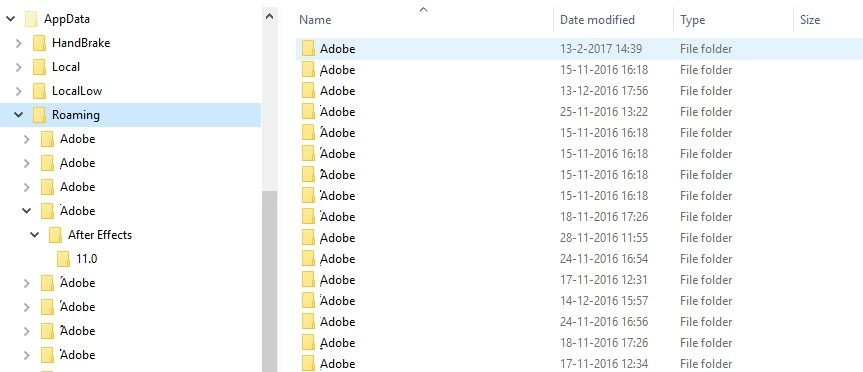
Since installing After Effects CS6 on my computer it keeps making these weird extra Adobe folders in the C:\Users\UserName\AppData\Roaming folder.

Obviously they cannot all be named Adobe, so they have alternating first characters.

Right now they are called:

Adobe

֢Adobe

֙Adobe

֜Adobe

֝Adobe

֞Adobe

֟Adobe

֠Adobe

֡Adobe

֣Adobe

֤Adobe

֥Adobe

֫Adobe

ׄAdobe

ׇAdobe

As you can see the top folder is the only one that is actually called Adobe. This folder contains all my usual Adobe stuff. All the other folders contain just a folder called After Effects, and in this folder there is again just 1 folder called 11.0, and after opening that one I see an AfterFX11.ini file. It looks like a normal ini file to me. I deleted all these extra folders more than once, but they keep reappearing over time.

QUESTION: why does AE make these folders and how can I get rid of them?

Thanks for helping out!

Hans Buying

ComicHouse Amsterdam

This topic has been closed for replies.

3 replies

ScottieB1
Known Participant
September 15, 2017

Same here - Windows 10 with Creators Update - I have 22! Adobe folders in my AppData-->Roaming folder. They are all very small, but what the heck???

Kevin-Monahan
Community Manager
Community Manager
May 31, 2017

Hey there ComicHouse,

Still seeing this issue? Let us know.

Thanks,
Kevin

Kevin Monahan - Sr. Community & Engagement Strategist – Pro Video and Audio
Inspiring
June 6, 2017

Yes, I just deleted 18 superflues Adobe folders. Still have them in my bin though.

Szalam
Community Expert
Community Expert
May 2, 2017

I haven't seen that many of them pop up before. Very odd. What third-party plugins or scripts do you have installed?

If it's not affecting you, I wouldn't worry about those folders, by the way.

Inspiring
May 3, 2017

Thanks. This happened right from the get go so without any plug-ins.

Szalam
Community Expert
Community Expert
May 3, 2017

Odd. I'd suggest just ignoring them if you can.