

compupix
Known Participant
March 2, 2022
Answered

Add WebP Format

  • March 2, 2022
  • 2 replies
  • 8111 views

How do I add the WebP file format to Adobe Bridge 2022's File Type Associations list?
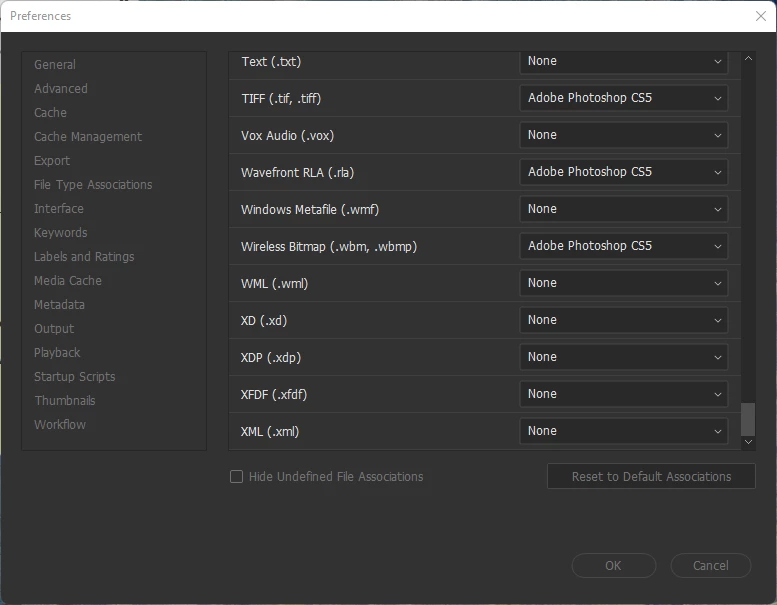
 

Thanks!

Correct answer Lumigraphics

There is not a supported way to do so, however you can edit the "Adobe Bridge Opener Preferences.xml" file that should work.

2 replies

Participant
November 23, 2024

hola, he encontrado una manera de poder abrir archivos webp en adobe bridge camera raw, en la opcion de preferencias

al final esta el formato webp, viene configurado a que se abra en photoshop, pero uno puede elegir el programa exe buscas bridge y listo.


LumigraphicsCorrect answer
Legend
March 2, 2022

There is not a supported way to do so, however you can edit the "Adobe Bridge Opener Preferences.xml" file that should work.

compupix
compupixAuthor
Known Participant
March 3, 2022

Thanks! Adding the following line (in alphabetical order):

<item description="$$$/Bridge/OpenersXML/Description/WebP=WebP" extensions="webp" app_name="Photoshop">

to file

"C:\Program Files\Adobe\Adobe Bridge 2022\Resources\Adobe Bridge Opener Preferences.xml"

worked just fine.

(Admin privileges are required to replace the file.)

Anton Strukov
Participant
May 11, 2022

And how to make this on Mac? Can't find Adobe Bridge Opener Preferences.xml.