
Répondu
Adobe Bridge and iCloud
Hi, I need helt to locate the path to my iDrive so I can add my photographs to Bridge.

Hi, I need helt to locate the path to my iDrive so I can add my photographs to Bridge.
Hi Dizzybild,
Can you provide a bit more information. Since you mention iCloud, I gather you are on a Mac. OK so far.
But I'm unaware of any way that iCloud can store files that are not already ON your computer. However, to see (and/or verify) where files are ON your computer, try turning on the Path Bar.
To do so, go to Windows and select Path Bar
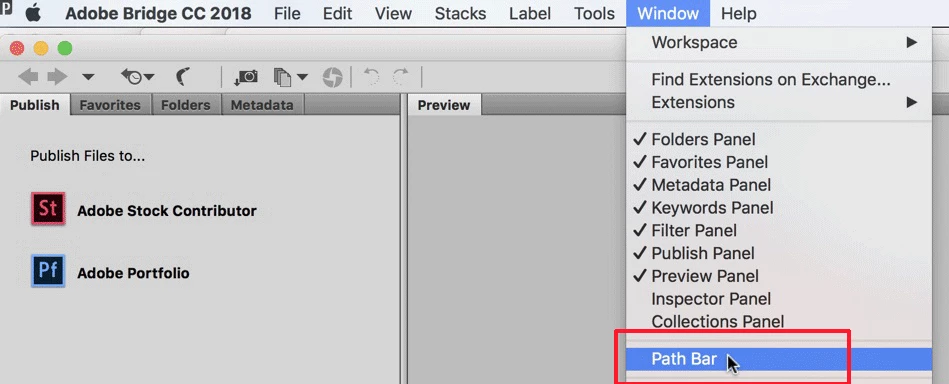
After doing this you'll see the Path (also known as a Bird's trail below Bridge's icon tools as shown below. You'll notice in the image above, this path does not show up but below it does.
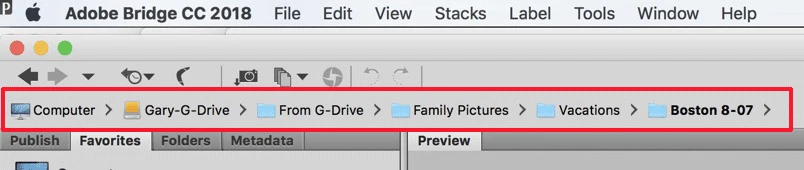
That way you can see right there where your files are being stored and/or where any given file exists on your computer. You can then add to that location, move it to a different location, or delete it if you chose.
Let us know if this helps you,
Enter your E-mail address. We'll send you an e-mail with instructions to reset your password.
 AdChoices