


New Participant
December 5, 2019
Answered

Adobe Bridge not opening files? AIRobin error message?

  • December 5, 2019
  • 5 replies
  • 3976 views

I use Adobe Bridge daily at work searching our servers for files, and all of a sudden I'm getting this error message when Bridge finds a file and I double click to open it... (see attached screenshot)


"The document "***" could not be opened. AIRobin cannot open files in the "Adobe Illustrator document" format."


This isn't only happening when trying to open AI files - it's happening when trying to open ANY file.
This topic has been closed for replies.
Correct answer Ashutosh_Mishra

Hi there,


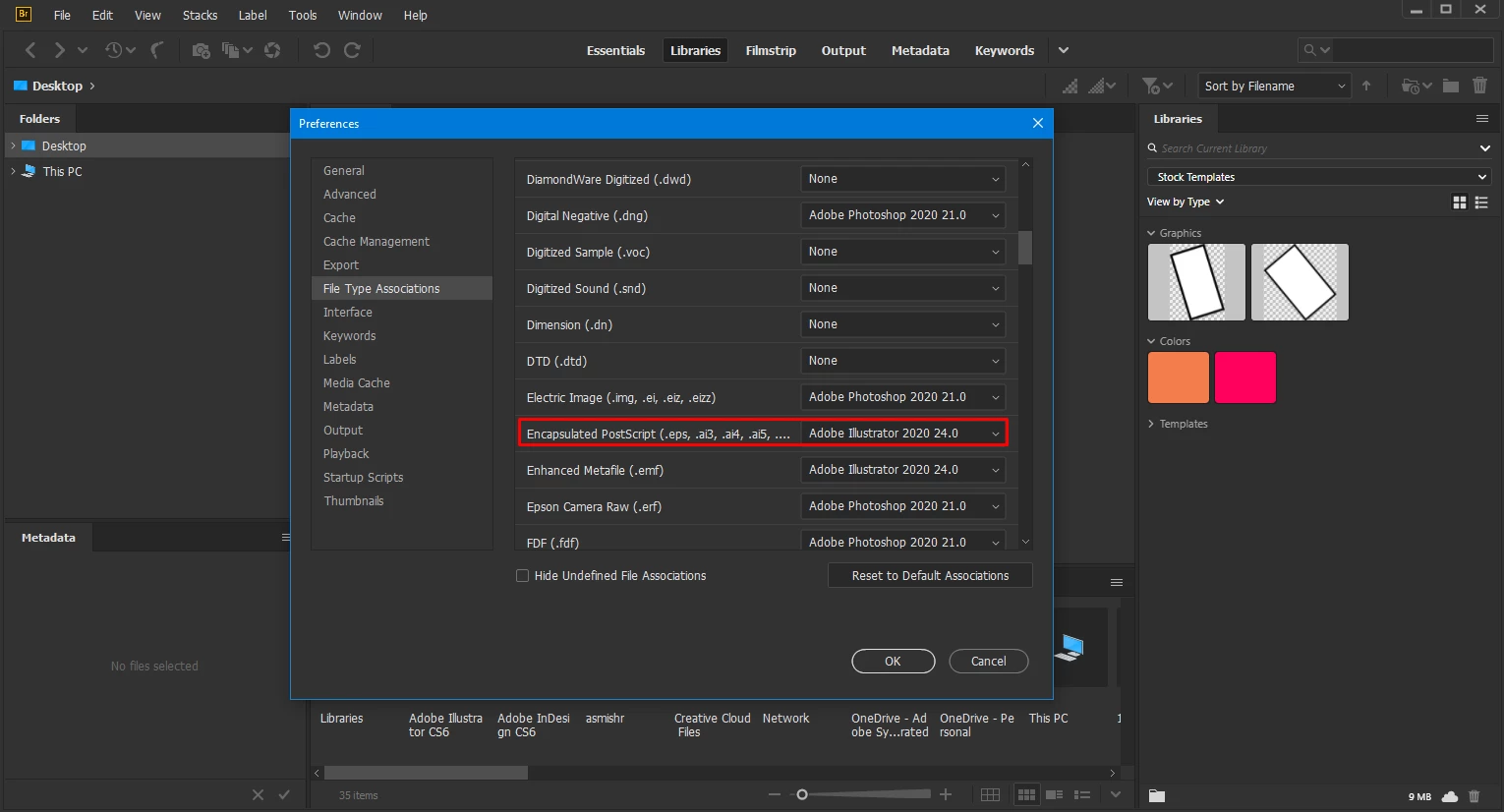
Thanks for reaching out. I'd recommend checking the preferences in Adobe Bridge. Under Edit > Preferences > File Type Associations, make sure EPS and other native vector graphics formats are set to open in Adobe Illustrator. If they are set to AIRobin, change them to Adobe Illustrator. I have also attached a screenshot as well for your reference:


Hope it helps.


Regards,

Ashutosh

5 replies

Known Participant
December 24, 2019

Can anyone tell me how to fix this annoying problem in Bridge?


The document "*****.eps could not be opened. AIRobin cannot open files in the "Encapsulated Postscript" format.


Please help as this is annoying.


Thanks!

Chuck Uebele
Community Expert
Community Expert
December 24, 2019

Can you open the file directly through Illustrator? Airobin is suppose to be a background process for saving certain types of files, which don't include eps.


I should probably move this to the Illustrator forum. Let me know if you want me to do that.

Chuck Uebele
Community Expert
Community Expert
December 24, 2019

Here is a screenshot of the error message: 


Yea, seems like a bug with Bridge, if you can open it elsewhere. I'll leave the post here, so maybe the Bridge team can see it, but you might want to also post in the IA forum.

New Participant
December 23, 2019

The response from philvb-mint helped with opening illustrator files. However, it still does not work if I try right-clicking on a PDF file and say open with Illustrator. The Filetype association is set to open PDF with acrobat, as it should be. Adobe, what. is. going. on?

New Participant
August 7, 2020

It's approaching a year later and I have not gotten any response to this. I am still working around this issue.

Is anyone at Adobe monitoring this community?

New Participant
December 5, 2019

I was having the same problem yesterday. Solved it by opening the preferences in bridge and going to "File Type Associations" and changing all the extensions set to open with AiRobin (?!) to open in Illustrator. No idea why it defaulted to that application, I don't even have it on my system, could have been an update or something.


Works fine after manually changing it back to Illustrator.

New Participant
December 10, 2019

This was the Answer! Thank you!

jbm007
Community Expert
Community Expert
December 5, 2019

What OS?

Can you download the file to your system drive and open it?

You may have permision errors related to your server access.

December 5, 2019

Moving to the Bridge forum from Get Started