


ricardo_anderson
Participating Frequently
September 22, 2020
Answered

Ayuda urgente

  • September 22, 2020
  • 2 replies
  • 606 views

Tengo problemas de Bridge dede hace como 6 meses despues de una actualización, todos los dias tengo que estar firmando para entrar a Creative Cloud, todos los dias se actualiza, puedo abrir Photoshop y trabajar sin problemas con esa aplicación, si abro Bridge se congela y photoshop tarda en cada comando que le doy, no se puede trabajar con los dos programas abiertos, por separado trabajan bien, ya he buscado soluciones y no encuentro una carpeta que dicen esta en Bridge (OOBE) que dicen quitando su contenido se soluciona este problema.

Agradesco cualquier ayuda que puedan prestarme ya estoy muy cansado de trabajar sin la sincrinia de los dos programas
This topic has been closed for replies.
Correct answer gary_sc

Hi Recardo, 


Sorry, I wasn't ignoring you, I was doing things away from my computer. I just saw both responses.


I'm going to give you two different things to try, if one doesn't work, try the other.


#1) Uninstall and reinstall both Bridge and Photoshop

reason: During the initial instillation something could have been screwed up. Not so bad that it afffected the performance of the applications, but enough to make them no work together compatibly. Doing this may fix the problem. Oh, if it asks if you want to get rid of the Preferences, say yes. Oh #2, if you have any personally installed plugins, or settings (i.e., Workspaces) will be kept. The uninstall process only removes things that Adobe installed. 


#2) Rebuild the Preferences for Photoshop & Bridge

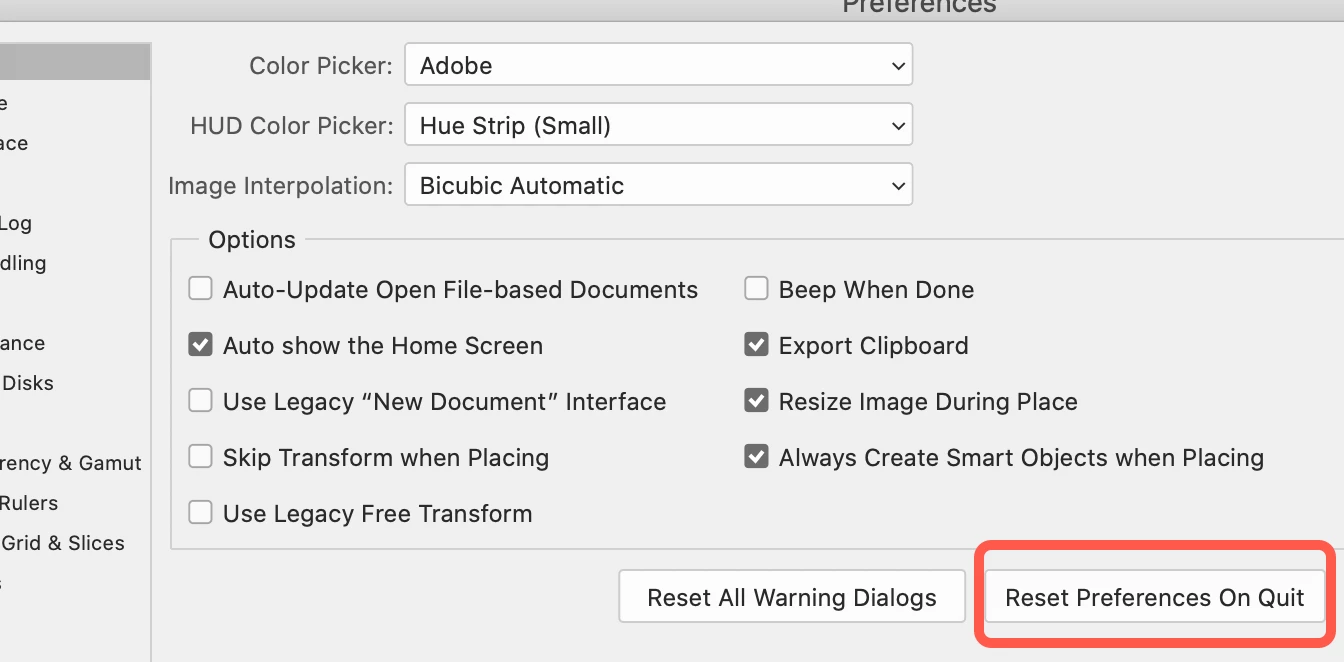
Photoshop is easy to do: Open the Preferences for Ps and in the General tab click on this button, then quit and restart.

Bridge is a tad more tricky, do the following:

First Quit Bridge. Then, in the Finder, double-click on Bridge while you have your fingers on the Shift-Option-Command keys (yeah, all three). You should get a window pop up asking if you want to “Reset Preferences," click yes to that.

Reason: sometimes Preferences get corrupted and you need to replace them with a fresh set.


Let me know how it works out.

2 replies

ricardo_anderson
Participating Frequently
September 25, 2020


 I have a Photoshop 2020 subscription 

Una imagen dice mas que mil palabras
gary_sc
gary_scCorrect answer
Community Expert
September 25, 2020

Hi Recardo, 


Sorry, I wasn't ignoring you, I was doing things away from my computer. I just saw both responses.


I'm going to give you two different things to try, if one doesn't work, try the other.


#1) Uninstall and reinstall both Bridge and Photoshop

reason: During the initial instillation something could have been screwed up. Not so bad that it afffected the performance of the applications, but enough to make them no work together compatibly. Doing this may fix the problem. Oh, if it asks if you want to get rid of the Preferences, say yes. Oh #2, if you have any personally installed plugins, or settings (i.e., Workspaces) will be kept. The uninstall process only removes things that Adobe installed. 


#2) Rebuild the Preferences for Photoshop & Bridge

Photoshop is easy to do: Open the Preferences for Ps and in the General tab click on this button, then quit and restart.

Bridge is a tad more tricky, do the following:

First Quit Bridge. Then, in the Finder, double-click on Bridge while you have your fingers on the Shift-Option-Command keys (yeah, all three). You should get a window pop up asking if you want to “Reset Preferences," click yes to that.

Reason: sometimes Preferences get corrupted and you need to replace them with a fresh set.


Let me know how it works out.

ricardo_anderson
Participating Frequently
September 25, 2020

Thank you for your help. I'll try the second thing first.

I've already installed the two programs twice

Una imagen dice mas que mil palabras
gary_sc
Community Expert
September 23, 2020

Hi Ricardo,


What is your operating system (and what release)?


Which version of Bridge and Photoshop are you using (and what release)?


You are far more patient than I would be under these circumstances. Six months? Sheesh!!

ricardo_anderson
Participating Frequently
September 25, 2020

I have a Photoshop 2020 subscription

Una imagen dice mas que mil palabras