@step31519705xkxe
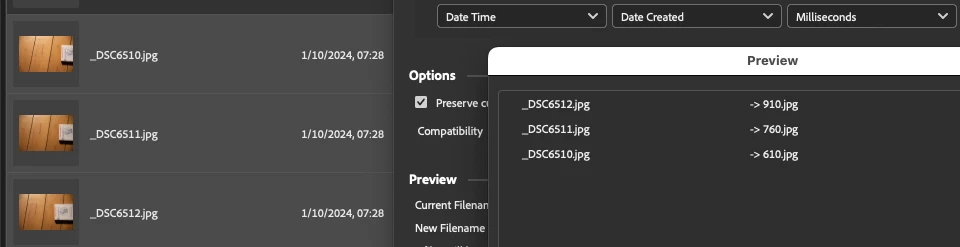
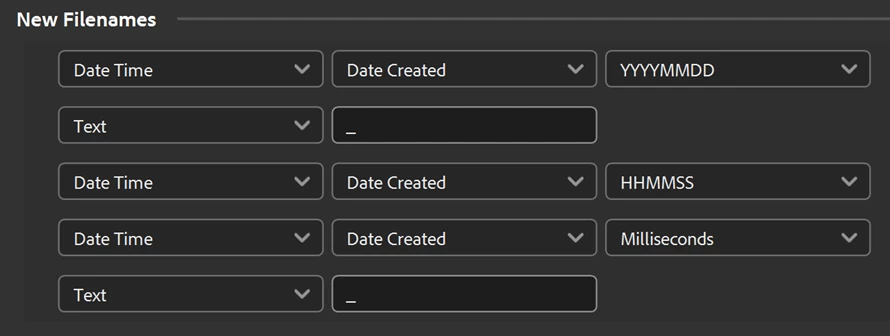
Unlike earlier versions, Bridge 2024 (14.0.0.102) appears to be able to correctly rename using the milliseconds value!
P.S. For the sake of completeness, I'll post an ExifTool command tomorrow and look into a script for renaming for earlier versions of Bridge, it's bedtime now!
For what it's worth, here is the Bridge script to batch rename using milliseconds:
/*
Batch Rename to YYYYMMDD_HHMMSSMS_D750.jsx
v1.0 - 3rd October 2024, Stephen Marsh
https://community.adobe.com/t5/bridge-discussions/batch-renaming-issue-with-milliseconds/td-p/14886235

Rename from:

_DSC1.jpg
_DSC1.NEF

to:

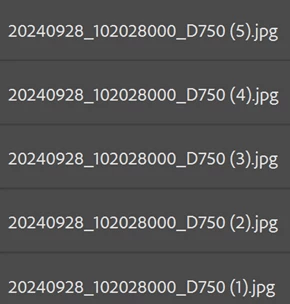
YYYYMMDD_HHMMSSMS_D750.jpg
YYYYMMDD_HHMMSSMS_D750.NEF

With the MS or Millisecond value being the only unique part of the filename.

Note: Bridge 2024 fails to refresh, so refresh/F5 manually to see the renamed files!

*/

#target bridge

if (BridgeTalk.appName == "bridge") {
   batchRename = new MenuElement("command", "Batch Rename to YYYYMMDD_HHMMSSMS_D750", "at the end of tools");
}

batchRename.onSelect = function () {
   var sels = app.document.selections;
   for (var z = 0; z < sels.length; z++) {
      var thumb = sels[z];
      var selectedFile = thumb.spec;
      var md = new Thumbnail(selectedFile).synchronousMetadata;
      md.namespace = "http://ns.adobe.com/xap/1.0/";
      var cd = md.CreateDate;
      // 2024-10-01T07:28:39.91
      var dateTime = cd.replace(/(^\d{4})(?:-)(\d{2})(?:-)(\d{2})(?:T)(\d{2})(?::)(\d{2})(?::)(\d{2})(?:\.)(\d{2})/, '$1$2$3_$4$5$6$7');
      var ext = selectedFile.name.replace(/(^.+)(\.[^\.]+$)/, '$2');
      //alert(dateTime + "_D750" + ext);
      File(selectedFile).rename(dateTime + "_D750" + ext);
   }
   alert("Custom Rename Completed!" + "\r" + "Manually select View > Refresh or press F5 in Bridge 2024!");
   app.refresh();
}
https://prepression.blogspot.com/2017/11/downloading-and-installing-adobe-scripts.html




 AdChoices