Inspiring
September 28, 2024
Answered

Batch Renaming Issue with Milliseconds

  • September 28, 2024
  • 5 replies
  • 6723 views

Hello Community,

filenames out of the camera are set as _DSC1.* _DSC2.*, _DSC3.* …

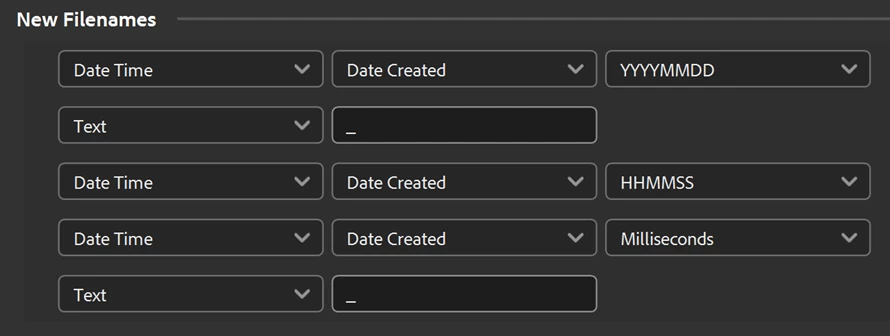
My Batch Renaming procedure includes MMSS to ensure right chronological sequence:

(Another text line not shown, as last step to add model).

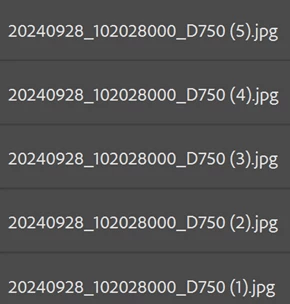
What I get is:

So Milliseconds are reflected as 000 in the renaming procedure although they are included in the metadata: File info:


How do I get this to work correctly? Result should be: 20240928_102028980_D750

These issues have been reported earlier Adobe Bridge Batch rename - issues to include mill... - Adobe Community - 12519842 but doesn’t seem to be fixed yet?

Thanks for your ideas!!

Martin

(Bridge 14.1, Windows 11)

Correct answer Stephen Marsh

@step31519705xkxe 


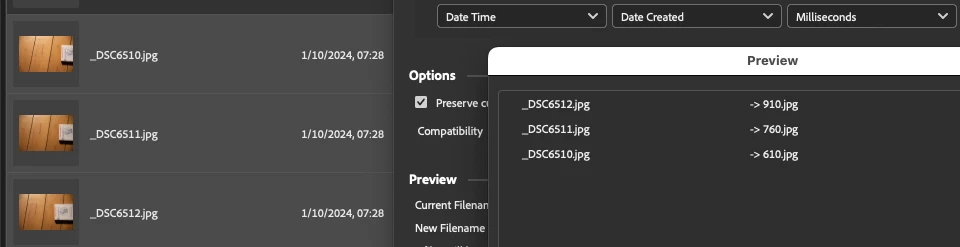
Unlike earlier versions, Bridge 2024 (14.0.0.102) appears to be able to correctly rename using the milliseconds value!


P.S. For the sake of completeness, I'll post an ExifTool command tomorrow and look into a script for renaming for earlier versions of Bridge, it's bedtime now!


For what it's worth, here is the Bridge script to batch rename using milliseconds:


/*
Batch Rename to YYYYMMDD_HHMMSSMS_D750.jsx
v1.0 - 3rd October 2024, Stephen Marsh
https://community.adobe.com/t5/bridge-discussions/batch-renaming-issue-with-milliseconds/td-p/14886235

Rename from:

_DSC1.jpg
_DSC1.NEF

to:

YYYYMMDD_HHMMSSMS_D750.jpg
YYYYMMDD_HHMMSSMS_D750.NEF

With the MS or Millisecond value being the only unique part of the filename.

Note: Bridge 2024 fails to refresh, so refresh/F5 manually to see the renamed files!

*/

#target bridge

if (BridgeTalk.appName == "bridge") {
   batchRename = new MenuElement("command", "Batch Rename to YYYYMMDD_HHMMSSMS_D750", "at the end of tools");
}

batchRename.onSelect = function () {
   var sels = app.document.selections;
   for (var z = 0; z < sels.length; z++) {
      var thumb = sels[z];
      var selectedFile = thumb.spec;
      var md = new Thumbnail(selectedFile).synchronousMetadata;
      md.namespace = "http://ns.adobe.com/xap/1.0/";
      var cd = md.CreateDate;
      // 2024-10-01T07:28:39.91
      var dateTime = cd.replace(/(^\d{4})(?:-)(\d{2})(?:-)(\d{2})(?:T)(\d{2})(?::)(\d{2})(?::)(\d{2})(?:\.)(\d{2})/, '$1$2$3_$4$5$6$7');
      var ext = selectedFile.name.replace(/(^.+)(\.[^\.]+$)/, '$2');
      //alert(dateTime + "_D750" + ext);
      File(selectedFile).rename(dateTime + "_D750" + ext);
   }
   alert("Custom Rename Completed!" + "\r" + "Manually select View > Refresh or press F5 in Bridge 2024!");
   app.refresh();
}


https://prepression.blogspot.com/2017/11/downloading-and-installing-adobe-scripts.html

5 replies

New Participant
October 13, 2025

October 2025 and it's still not fixed. Version 15.1.2.737, Windows 11, the issue seems random. Renamed a great number of files in the last 2 years without problem (I guess, now i'll have to check again), both NEFs and JPGs. Yesterday renamed a batch of NEFs, converted to DNG, then exported to JPGs in full size and 1600px size. Then, when renaming the 1600px files today, the milliseconds info was lost (000 instead). Tried again, same result. Then tried a different batch of JPGs, no problems. Back to the original, same issue. So I tried exporting again from the DNG to 1600px JPGs, then renaming. That works. But it's a pain in the ass getting to check if the rename is correct every time. Get your things together Adobe, please.

Stephen Marsh
Community Expert
October 5, 2024

Add your votes to fix this bug at the (separate) Bridge User Voice forum:


https://adobebridge.uservoice.com/forums/905377-report-bugs/suggestions/48926096-batch-rename-in-milliseconds-bug-in-v2024-14-0-0


There are 3 tickets that you can vote for with similar issues on the incorrect millisecond 000 value.


Inspiring
October 5, 2024

Ok, done.

Thanks for the links, Stephen.

Stephen Marsh
Community Expert
October 3, 2024

@Lumigraphics wrote a fantastic Bridge script to run ExifTool commands, essentially allowing Bridge to be used as an GUI for selecting files and running commands outside of Terminal.app or CMD.exe:


https://community.adobe.com/t5/bridge-discussions/running-exiftool-from-bridge-with-app-system/td-p/13597324/page/2


P.S. I have updated the previous code examples to remove the underscore before the milliseconds value since these screenshots were taken.

Inspiring
October 3, 2024

Hi Guys

what a great piece of work! And having an Exiftool-GUI inside Bridge is an amazing improvement in handling the tool!

Now I'm off to work, will try to implement all this in my workflow later. Thanks guys!!!

Brainiac
October 3, 2024

The latest versions of my scripts are available for download on Dropbox.

https://www.dropbox.com/sh/mg817g9a9ymbasi/AADTmXUVxmFfM58bcyYE7yiwa?dl=0

Brainiac
September 30, 2024

This has been brought up before as an issue with video and image sequences. Who knows if a fix is possible or if it will be implemented.

Stephen Marsh
Community Expert
September 29, 2024

Offhand my suggestion would be to use another program such as the CLI ExifTool if the milliseconds are critical.


https://www.dyxum.com/dforum/metadata-for-milliseconds_topic138111.html


https://exiftool.org/forum/index.php?topic=15297.0


I don't have any images at hand that include millisecond metadata for testing.


Rather than using milliseconds, you could use a numerical sequence to avoid the rename clash (1) etc.

Inspiring
September 30, 2024

Yes, I tried this numerical sequence option, but doesn't work either. Bridge puts the files in upside down order:

1 - 2024-09-28 10:20:28.98

2 - 2024-09-28 10:20:28.65

3 - 2024-09-28 10:20:28.49

(extracted from file info, origin).

This is why I'd like to add the millisec. Seems to be the only chance to get the correct order via sorting by file name, when HHMMSS are the same.

Thank you guys for your help. 

Stephen Marsh
Community Expert
October 2, 2024

Buggy? No way.


quote

Buggy? No way.


By @Lumigraphics


I know, truly unbelievable! 


I used to wonder if Bridge would be any different if it was a paid product.