


Known Participant
July 16, 2013
Answered

Blank Output Module (Bridge CC)

  • July 16, 2013
  • 13 replies
  • 41103 views

As suggested here

http://helpx.adobe.com/bridge/kb/install-output-module-bridge-cc.html

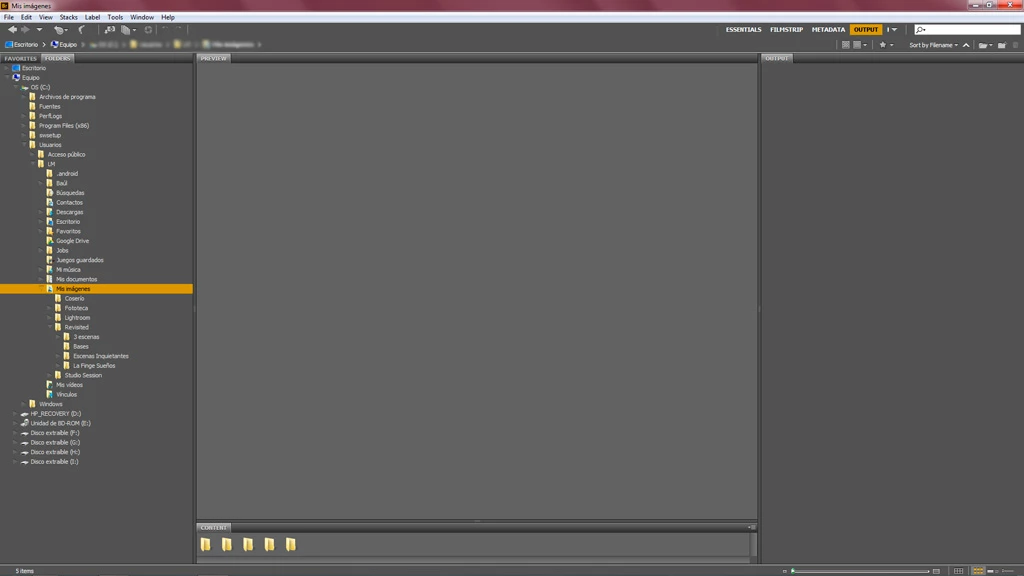
I downloaded and installed Bridge CC Output Module. The module looks blank when I launch Bridge. I already tried the two workarounds for "Possible Issues", covered at the bottom of the download page, but none of them worked for me.

Anybody else with this problem?

I'm using Windows 7, 64 bit. Here's a screenshot:
This topic has been closed for replies.
Correct answer Brett N

Hi,

Thank you for the pointer! The modifiication worked for me on 10.7.5. I'm forwarding on the script modification for the developers to review and comment on any potential downside.

regards,

steve


We've had the script modification tested and now implemented. The files to download from the document have been updated with the new code and will no longer require any changes.

13 replies

New Participant
May 13, 2014

Hi,

I'm using a Mac and I can't get the output option to work with the new link.

Omke Oudeman
Participating Frequently
May 13, 2014

I'm using a Mac and I can't get the output option to work with the new link.

Yes you can, read the instructions carefully where it is all perfectly clear explained. Just be aware of using the correct library, there is system library and a user library.

Known Participant
July 30, 2013

I have the same problem as everybody else. I'm on Windos 7 and CC. None of the workarounds work. No way am I going to sit around downloading and reinstalling CS6. I've moved on. Time for Adobe to catch up.

Omke Oudeman
Participating Frequently
July 30, 2013

I've moved on. Time for Adobe to catch up.

Don't hold your breath waiting for them…

SG...
Adobe Employee
Adobe Employee
July 16, 2013

Hi,

We have a couple of other reports, and we're trying to track down solutions.

Something not noted in the the current solutions on the KB doc is to try resetting the preferences and standard workspace via the one or three-key (Ctrl or Ctrl +Alt+Shift for WIn) press at launch. Can you try that and see if it helps. Another thing to try is a system reboot.

regards,

steve

Known Participant
July 16, 2013

SG... wrote:

Hi,

We have a couple of other reports, and we're trying to track down solutions.

Something not noted in the the current solutions on the KB doc is to try resetting the preferences and standard workspace via the three-key (Ctrl +Alt+Shift for WIn) at launch. Can you try that and see if it helps. Another thing to try is a system reboot.

regards,

steve

Hi Steve,

Just to confirm: I tried resetting Bridge CC preferences and rebooted my system, It didn't work: the output module is still blank.

I'm using WIndows 7, 64 bit. Bridge CC, 64 bit version.

I hope you can let us know when a solution is available. In the meantime, should I erase the Output module folder / workspace that I just added to Bridge?

Thanks,

Luis

SG...
Adobe Employee
Adobe Employee
July 16, 2013

Hi Luis,

I'll update here when if I here of more solutions. I don't think there's any need to delete those files at the moment.

regards,

steve