



MCO Fine Art
Known Participant
December 10, 2022
Answered

Blurry pixelated thumbnails after installing Bridge 2023 in Dec. 2022

  • December 10, 2022
  • 2 replies
  • 1641 views

Hello! After installing Bridge 2023, when opening a folder of images, all thumbnails are pixelated until clicked on individually. In 2022, which I still have, thumbnails are rendered clearly and immediately. Did I change a setting? Is this a bug in 2023?  (Windows PC, HP Z5 Workstation, Nvidia quadro T1000, 32GB ram, SSD) Please advise. Would LOVE the thumbnails to render quickly and without having to click on them.
This topic has been closed for replies.
Correct answer gary_sc

Hi, @MCO Fine Art 


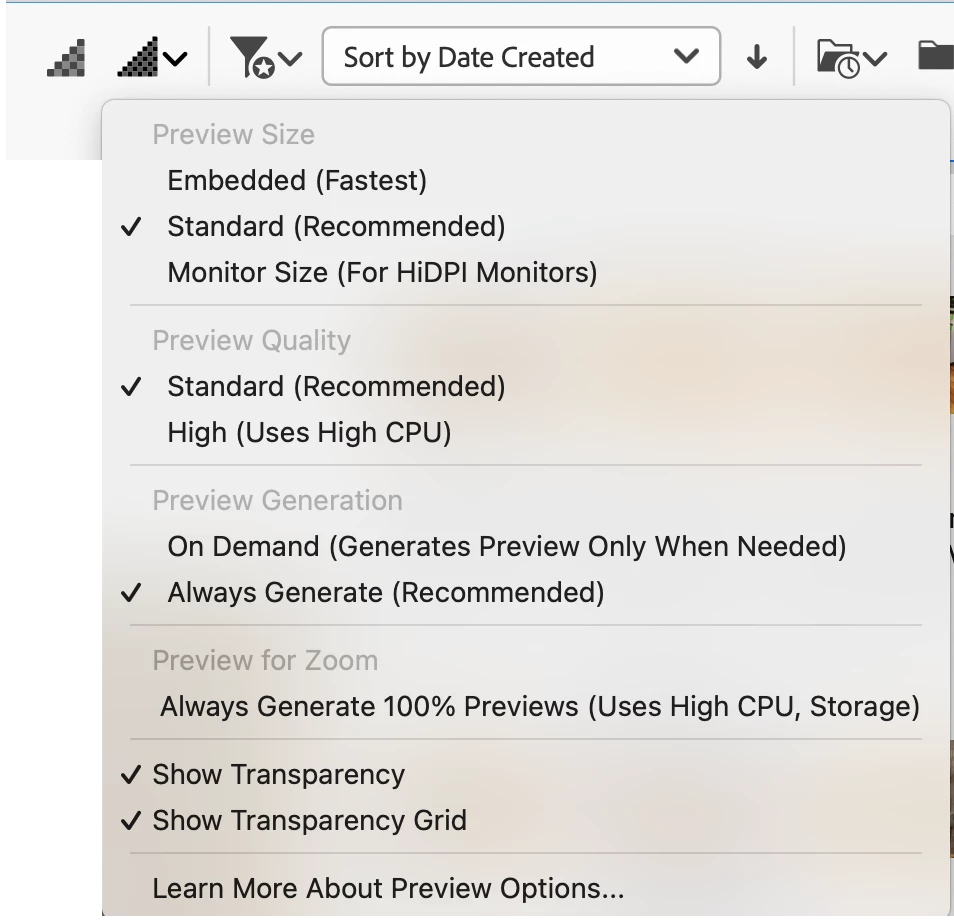
Are your settings the same as these checked settings here? It's very possible that the settings may have shifted when you updated. (I've left-clicked on the 2nd triangle to get that dropdown.)


2 replies

Participant
December 13, 2022

I have this same issue and its not resolved by the answer listed here. I scroll up and down through the folder of images and the thumbnails will go back to pixelated and need to be clicked on to make them render clearly. 

MCO Fine Art
Known Participant
December 24, 2022

@Brandon24700010mzkf Did you find a fix? This problem is back haunting me in Bridge again. The above solution appeared to work after selecting "standard" but it is back, and it's driving me nuts to have to click on each thumbnail so that it clears up. Very annoying! What happened to Bridge? 

Mark @ MCO Fine Art
Participant
December 25, 2022
Yes I did, I downgraded back to the last version of bridge and it's working
fine. 😉
gary_sc
Community Expert
gary_scCommunity ExpertCorrect answer
Community Expert
December 10, 2022

Hi, @MCO Fine Art 


Are your settings the same as these checked settings here? It's very possible that the settings may have shifted when you updated. (I've left-clicked on the 2nd triangle to get that dropdown.)


MCO Fine Art
Known Participant
December 10, 2022

That's it! Thanks Gary!  Honestly, I don't recall if I selected "Embedded (Fastest)" or if that got selected when updating to the new version. Selecting "Standard" cleared it up immediatly. Much appreciated. 

Mark @ MCO Fine Art