
FoveaCreative
Inspiring
March 3, 2020
Answered

Bridge 2020 - EPS and PNG thumbnails display incorrectly

  • March 3, 2020
  • 1 reply
  • 1802 views

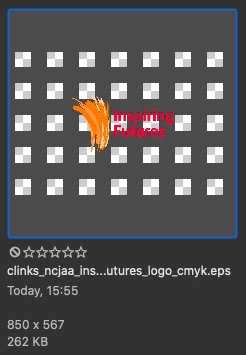
Since the latest update, all my EPS and PNG file thumbnails display strangely, with a dark, chunky, checkerboard background. See attached image, which is a CMYK EPS file, saved backwards to CS1. Illustrator files look fine. All files display correctly in the preview window.


Anyone else seeing this issue?


Adobe Bridge 2020 (latest build - 10.0.3.138)

Mac OS X Catalina (10.15.3 (19D76))
 

This topic has been closed for replies.
Correct answer FoveaCreative

Oh, I misunderstood your screenshot. I thought the gray was your intended image.


Can you share one of the images with me via PM?


Thanks Gary,


There was a CC app update, so I ran that. Then I logged out of CC, closed everything down, restarted my Mac and then logged in again. Not sure which of these things was causing a problem, but it's all working fine now!


Thanks for helping out.


Ian

1 reply

gary_sc
Community Expert
Community Expert
March 3, 2020

Hi Designicc,


Good news, there's nothing wrong with anything here. Just as in Photoshop, invisible (non-pixel) regions are being displayed with a checkerboard pattern to show that there are no pixels there. 


EPS, PNG, and TIF files can all have non-pixel regions and this lets you know that you are seeing a file that has non-pixel regions. 


(The first time I saw the checkerboard pattern in Photoshop, I thought that there was something seriously wrong in PS as well. Fortunately all is good.)

FoveaCreative
Inspiring
March 3, 2020

Thanks Gary, 


I'm familar with the checkerboard, but it's changed into something that makes it very hard to see the artwork (see the example I posted). It's not the checkerboard that I had before the recent update, it's like looking at the original checkerboard through a prison grill!

gary_sc
Community Expert
Community Expert
March 3, 2020

Oh, I misunderstood your screenshot. I thought the gray was your intended image.


Can you share one of the images with me via PM?