


New Participant
November 8, 2022
Answered

Bridge 2023 : Custom XMP error on UI metadata panel

  • November 8, 2022
  • 2 replies
  • 1083 views

Hye community,


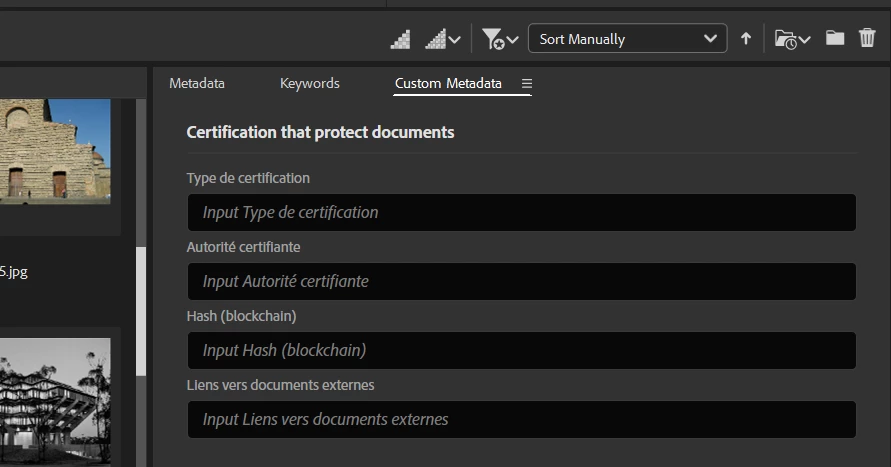
I wrote custom XMP metadata to add on images and medias. It works like a charm on Bridge 2022 but a bug appears on UI n 2023 version(update the day of the demo to my partners... fate...). The views are ok on 'Information panel' (Files > Informations) but doens't works on 'Metadata panel', as shown on the image linked : Image of the bug on Bridge 2023  

A read the documentation another time, line by line and I've tryed many ways to rewrite XML files that describes custom XMP schema and view but nothing works. This time, I think there's a bug.

All the files could be found on the github repository in Nemateria extension folder

Thank you community for yours help.
Correct answer gregreser

I did a quick version of your Certifications fields as a demo:


Here is the JSON view file:

[
  {
    "id": "dividerCertification",
    "displayName": "Certification that protect documents",
    "type": "Divider",
    "dependencies": []
  },
  {
    "id": "certif_type",
    "displayName": "Type de certification",
    "namespace": "http://my.nemateriaSchema.namespace/",
    "prefix": "nemateriaSchema",
    "propertyName": "certif_type",
    "type": "Text",
    "readOnly": false,
    "dependencies": []
  },
  {
    "id": "certif_autority",
    "displayName": "Autorité certifiante",
    "namespace": "http://my.nemateriaSchema.namespace/",
    "prefix": "nemateriaSchema",
    "propertyName": "certif_autority",
    "type": "Text",
    "readOnly": false,
    "dependencies": []
  },
  {
    "id": "certif_hash",
    "displayName": "Hash (blockchain)",
    "namespace": "http://my.nemateriaSchema.namespace/",
    "prefix": "nemateriaSchema",
    "propertyName": "certif_hash",
    "type": "Text",
    "readOnly": false,
    "dependencies": []
  },
  {
    "id": "certif_politic",
    "displayName": "Liens vers documents externes",
    "namespace": "http://my.nemateriaSchema.namespace/",
    "prefix": "nemateriaSchema",
    "propertyName": "certif_politic",
    "type": "Text",
    "readOnly": false,
    "dependencies": []
  }
]


2 replies

New Participant
November 28, 2022

Im having all sorts of trouble with Bridge 2023 altering the 'capture date' in the metadata. Anyone else having that issue.?

Neil Price


gregreser
Brainiac
November 28, 2022

@Neil27341265suml A few questions to help track down the problem:

What type of file(s)?

Where do you see it, metadata workspace, metadata panel (File properties, Camera Data (Exif), IPTC Core)? Can you send a screenshot?

Did the problem just start with Bridge 2023?

Are the files from new device(s) or have you changed any device settings, like time zone?


The first thing to check is the time zone offset on the capture device.


New Participant
November 30, 2022
Thanks for your support.

The issue was complex and I haven’t worked out exactly what caused it yet.

But as there were multiple possible contributing factors it's hard to know.

As a background I have just retired after 35 years photographing for a major local authority her in NZ and have used Adobe and Adobe Bridge and the RAW file processor for a decade and processed more than one million images.

Occasionally Bridge faults, but not often.

This time I was mixing Canon CR2s from a 1Dx with Canon CR3s from a 1Dx-3 with some converted to DNGs.

Bridge thumbnail view (which I have set to show the capture date and time, the file size and file dimensions) switched out the capture date and time for the download (or file modified) date and time for all the files so it was the same.

This meant I couldn’t sort by date (the job had 3,000 photos)

However, I was using an older Mac book laptop and when I got home on my modern iMac and downloaded a new job, the problem seems sorted.

Cheers

Ngā mihi nui
Kind Regards
Neil Price Photo
PO Box 13731
Johnsonville 6440
021 1525 422
neilpricephoto@icloud.com
www.neilprice.photo
gregreser
Brainiac
November 8, 2022

@géralda21874515 this is a bug in 2023 and it has reported it to Adobe.


The good news is that there is abetter alternative: Custom Metadata Panel  It has a lot of useful features and is very easy to use. It htink your schema would be very easy to apply, I am willing to help you set it up.

New Participant
November 8, 2022

Thank you Greg, it seems useful and I will give it a chance ;). I need to have custom namespaces in the XMP metadata for servers treatments. Its very frustrating, my XML works just before the update...