


Participating Frequently
September 20, 2023
Answered

Bridge 2024 losing file extensions and no preview after batch rename

  • September 20, 2023
  • 2 replies
  • 4502 views

Hello everyone,


I need some assistance, please!


After renaming a batch of files, I noticed that the file extensions were missing and I am no longer able to preview them. 


I am using Bridge version 14.0.0.012 on a Mac. I have attached some screenshots for reference. This is my first time using Bridge and I am worried that I have lost all the files that were renamed.


Your help is greatly appreciated. Thank you and have a great day!
 

This topic has been closed for replies.
Correct answer gregreser

Don't worry, you haven't lost your files. Somehow the file extensions were removed in your batch rename. 


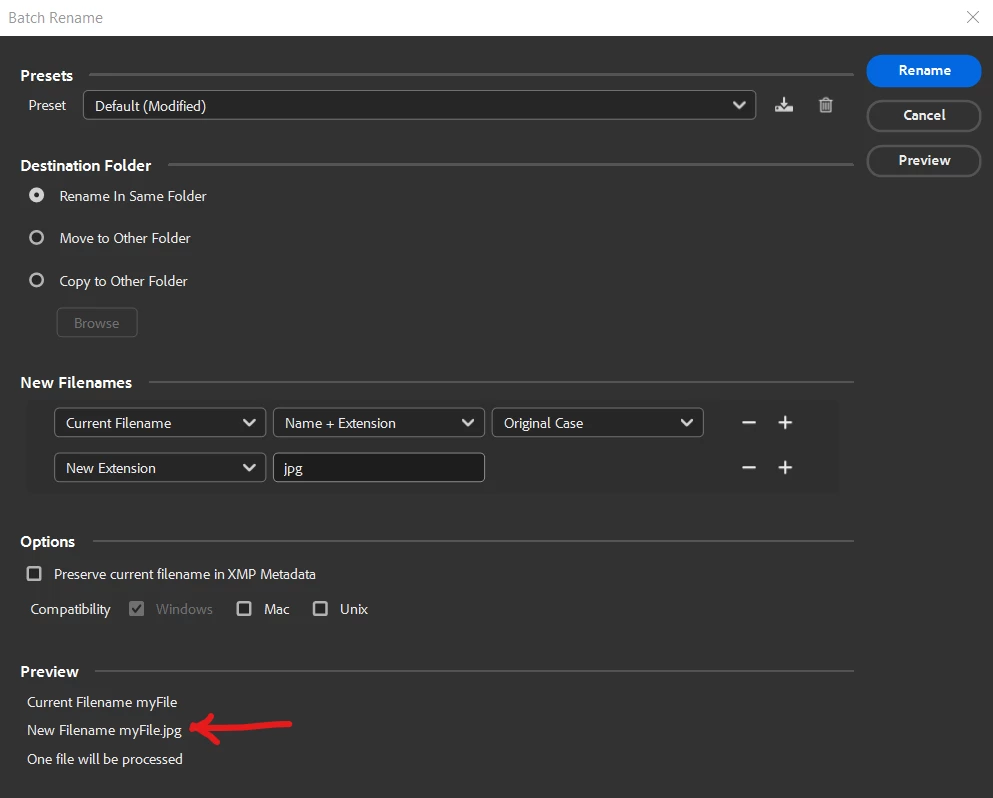
You can restore the file extensions by running batch rename again using Current Filename and New Extension.

For Current Filename, try setting it to Name. Check the preview at the bottom to make sure it's correct. If the preview does not show the name use Name + Extension 


The challenge is that you have to do a batch for each file type. 


2 replies

Stephen Marsh
Community Expert
Community Expert
September 23, 2023

The following solution works for missing file extensions where there's a mix of different file types:


https://prepression.blogspot.com/2017/09/exiftool-automatically-adding-missing.html

Participating Frequently
September 20, 2023

To provide additional information, I am able to view the preview of photos through Bridge; however, I cannot view the preview when I access the original folder where the files are stored. As for videos, I am unable to view the preview or open the files in both Bridge and the original folder.

gregreser
gregreserCorrect answer
Legend
September 20, 2023

Don't worry, you haven't lost your files. Somehow the file extensions were removed in your batch rename. 


You can restore the file extensions by running batch rename again using Current Filename and New Extension.

For Current Filename, try setting it to Name. Check the preview at the bottom to make sure it's correct. If the preview does not show the name use Name + Extension 


The challenge is that you have to do a batch for each file type. 


gregreser
Legend
September 28, 2023

Hey @gregreser, sorry for the late reply. I missed the notification.

I was expecting to see the created date, but the screenshot I previously shared had the wrong data.

The attached screenshot exemplifies it better: the file was renamed as 1904.01.01, Bridge File Properties shows it was created on 2023.09.02, and Raw Data shows the correct date, which is 2021.09.07.

I'm unsure how to rename using the Raw Data information - I would appreciate it if you have any suggestions or workaround. I need to rename 5,000+ files. Thanks in advance!


Hi @Jeferson S. it is possible to rename the files using the xmpDM:logComment value, but that field is not necessarily a date field. I would first do some analysis to see if that data is correct and to see if the creation date might be stored elsewhere, such as the device EXIF data. This data is different than the XMP metadata.


I would look at ExifTool. It's a command line tool but is is very versatile, powerful and fast. 

ExifTool

MacOS installation 


First, you could simply read all the metadata from a few sample files to see what date metadata they contain.

To read metadata from a file:

  1. Launch the Terminal application from your /Applications/Utilities folder.
  2. Type "exiftool" followed by a SPACE in the Terminal window.
  3. Drag and drop files and folders on the Terminal window.
    (This saves you typing the full path names of the files/folders.)
  4. Press RETURN to view the metadata from the files you dropped.


You could also export a list of all the files and their dates to be sure it is consistent.

I would recommend changing the 1904 date in XMP with the real date. This should be easy with ExifTool

Finally, you could rename the files with ExifTool or the Bridge batch rename using the corrected XMP Date Created.