


Participating Frequently
November 26, 2016
Answered

Bridge CC 2017 (PC) unable to open camera raw with button or right click menu

  • November 26, 2016
  • 1 reply
  • 6318 views

When I select an image (RAW, JPG TIF, etc) in Bridge and then click on the 'Open in Camera Raw' icon or right click and select 'Open in Camera Raw' I get the error dialog box saying: 
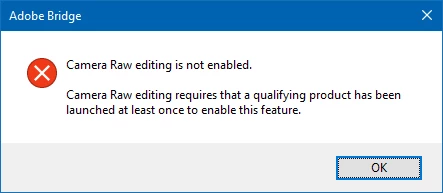
Yet when I double click on a RAW file Photoshop CC 2017 is started and the image does open up in Camera Raw. 

I also get the above dialog box when I go "Edit->Camera Raw Preferences..."

Is there a fix for this??

    This topic has been closed for replies.
    Correct answer pfield69

    I found my solution. something strange had happened in installing. completely deleted folder and reinstalled. i think some of 2015.5 had upset the install.

    1 reply

    Sahil.Chawla
    Community Manager
    Community Manager
    November 29, 2016

    Hi Artoo_Smith,

    Please refer to this thread Camera Raw editing is not enabled

    Regards,

    Sahil

    Participating Frequently
    December 4, 2016

    None of those worked.  Is there an order of installation?  I had installed PS CC 2017 first and then later on decided to install Bridge.

    pfield69Correct answer
    Inspiring
    December 4, 2016

    I found my solution. something strange had happened in installing. completely deleted folder and reinstalled. i think some of 2015.5 had upset the install.